This is the full developer documentation for YAMLRocks
# YAMLRocks
> Rock-solid YAML for Python, written in Rust.
**YAMLRocks** is the rock-solid YAML library for Python: a Rust-backed extension that parses and emits YAML fast, follows the YAML 1.2 specification (with a YAML 1.1 compatibility mode), and, unlike PyYAML, round-trips documents while preserving comments, anchors, and formatting. Correct, secure by default, and fast, with Rust at the core (the R in Rock).
The API is small and predictable: `loads` and `dumps` for in-memory data, `load` and `dump` for files, `to_json` to export JSON, integer `OPT_*` flags combined with `|`, and `dumps` returning `bytes`. Reach for a flag only when you need to, and the defaults stay fast and correct.
Created and written by **[Franck Nijhof](https://www.linkedin.com/in/frenck)**, also known as [Frenck](https://frenck.dev).
Read [the story behind YAMLRocks](/about/).
Pre-1.0 project
YAMLRocks is currently alpha software. The core promises are explicit and tested: safe loading by default, YAML 1.2 semantics, reproducible real-world verification, and byte-for-byte round-trip for unmodified documents. Some advanced APIs may still change before 1.0 while the project gathers production feedback. See [stability and roadmap](/stability-roadmap/) for the 1.0 contract.
Fast
Parsing runs about 6 to 10 times faster than PyYAML’s C loader, and dumping about 17 to 19 times faster. Native `!include` resolution over hundreds of files is roughly 17 times faster than a PyYAML constructor.
Correct
A custom YAML 1.2 scanner and parser that passes the complete official YAML test suite, backed by snapshot and fuzz corpora, and actively tested against thousands of real-world configuration files from dozens of public repositories across many ecosystems. See [real-world verification](/verification/real-world-corpus/).
Secure
No code execution from tags, safe by default, and hardened against alias bombs and deeply nested input. Includes stay confined to their base directory, so a document cannot reach arbitrary files on disk.
Round-trip
Preserve comments, anchors, scalar styles, flow-versus-block layout, and an explicit `---` marker. Edit a value and re-emit with the rest of the document preserved, including unmodified included files.
Async-friendly
Await `async_load` to parse off the event loop (the native parse releases the GIL, so other tasks keep progressing) and `async_dump` to write files without blocking it. The extension is built for free-threaded (no-GIL) CPython, too.
Batteries included
YAML 1.1 mode, source-location annotations, native `!include` resolution with write-back, JSON export, JSON Schema validation (including in-file `$schema` references), and a PyYAML-compatible shim.
## At a glance
[Section titled “At a glance”](#at-a-glance)
Parse YAML into native Python objects, and serialize them back to `bytes`:
```python
import yamlrocks
source = """
key: value
list:
- 1
- 2
"""
data = yamlrocks.loads(source)
# {'key': 'value', 'list': [1, 2]}
yamlrocks.dumps(data)
# b'key: value\nlist:\n - 1\n - 2\n'
```
Edit a value while keeping comments, anchors, and layout untouched:
```python
import yamlrocks
doc = yamlrocks.loads(b"# app config\nname: app # service\nport: 8080\n", option=yamlrocks.OPT_ROUND_TRIP)
doc["port"] = 9090
doc.to_yaml()
# b'# app config\nname: app # service\nport: 9090\n'
```
Export the same data to JSON with `to_json` (JSON is valid YAML 1.2, so `loads` already reads it back):
```python
import yamlrocks
source = """
name: app
ports: [80, 443]
"""
yamlrocks.to_json(yamlrocks.loads(source))
# b'{"name":"app","ports":[80,443]}'
```
In an asyncio application, `await` the load so it runs off the event loop thread. The native parse releases the GIL, so other tasks keep progressing:
```python
import asyncio
import yamlrocks
source = """
key: value
list:
- 1
- 2
"""
async def main():
return await yamlrocks.async_loads(source)
asyncio.run(main())
# {'key': 'value', 'list': [1, 2]}
```
## Faster on everything
[Section titled “Faster on everything”](#faster-on-everything)
YAMLRocks beats PyYAML’s C loader and leaves pure-Python round-trip libraries far behind. Release-build benchmarks, showing how many times faster YAMLRocks is:
| Operation | vs PyYAML (C) | vs ruamel.yaml |
| ------------------------- | --------------- | ----------------- |
| Parse (`loads`) | \~6-10x faster | \~105-141x faster |
| Serialize (`dumps`) | \~17-19x faster | \~160-208x faster |
| Split config (`!include`) | \~17x faster | n/a |
See the full [comparisons](/comparisons/) and [performance guide](/guides/performance/). Planning a migration? Start with the [migration compatibility](/getting-started/compatibility/) matrix.
## Real-world verification
[Section titled “Real-world verification”](#real-world-verification)
Trust matters when a parser edits configuration people maintain by hand. YAMLRocks is continuously tested against a reproducible corpus of public YAML repositories across Home Assistant, ESPHome, Ansible, Kubernetes, Docker Compose, GitHub Actions, CloudFormation, GitOps, Helm, OpenAPI, dbt, CircleCI, Serverless, and Tekton. Every standalone YAML file must parse and re-emit byte-for-byte in round-trip mode, and selected Home Assistant configurations are loaded through their full `!include` graph.
These projects do not endorse or depend on YAMLRocks; their public repositories are used as a compatibility corpus so regressions are caught against YAML that people actually write and maintain. See the [real-world verification](/verification/real-world-corpus/) page for the current corpus and scope.
## The whole story, in one example
[Section titled “The whole story, in one example”](#the-whole-story-in-one-example)
Round-trip a split configuration, edit a value that lives in an included file, and write only the file that changed back to disk:
```python
import yamlrocks
# Load a Home Assistant config with includes, round-trip mode
doc = yamlrocks.load(
"configuration.yaml",
option=yamlrocks.OPT_ROUND_TRIP | yamlrocks.OPT_INCLUDES,
)
# Edit a value that lives in an included file
doc["automation"][0]["trigger"]["at"] = "07:30:00"
# Save: only the changed file is rewritten, comments and the rest intact
doc.save()
```
Project status
YAMLRocks implements fast load/dump, JSON export, YAML 1.1 mode, annotated mode, native includes, round-trip preservation, writable includes, JSON Schema validation (including in-file `$schema` references), the `!secret` and `!env_var` config tags, a PyYAML compatibility shim, and rich standard-library type support. It passes the complete official YAML test suite and is verified against thousands of real-world configs from many ecosystems, behind a code-coverage gate, and is safe against the common YAML attack classes, with hot paths tuned via the raw CPython API and zero-copy scalar parsing. See [stability and roadmap](/stability-roadmap/) for what is stable today, what may still change, and what blocks 1.0.
# About YAMLRocks
> Why YAMLRocks exists, the state of YAML in Python, and who builds it.
YAMLRocks exists because Python deserves a YAML library that is fast, correct, and able to preserve a document exactly as a human wrote it, all at once.
## YAML runs Home Assistant
[Section titled “YAML runs Home Assistant”](#yaml-runs-home-assistant)
[Home Assistant](https://www.home-assistant.io) is configured in YAML, and it leans on it hard. A real installation is rarely a single file: a `configuration.yaml` pulls in dozens or hundreds of others through `!include` and the `!include_dir_*` family, organized into packages, dashboards, automations, scripts, and scenes. All of it is parsed at startup and re-parsed on every reload, so YAML parsing sits squarely on a hot path that millions of installations hit every day.
Home Assistant cares about more than the values, too. It tracks where each setting came from (which file, which line), so an error can point a user at the exact spot, even when that spot is buried several includes deep. To get that, the project maintains `annotatedyaml`, a wrapper around PyYAML that bolts source locations onto the result. It works, but it is a patch over a parser that was never built for it.
## The state of YAML in Python is rough
[Section titled “The state of YAML in Python is rough”](#the-state-of-yaml-in-python-is-rough)
Anyone who has reached for YAML in Python ends up choosing between two compromises:
* **PyYAML** is the default. With its C loader it is reasonably fast, but it speaks only YAML 1.1, discards comments, cannot round-trip a document, and its codebase has aged with little movement for years.
* **ruamel.yaml** is the capable one. It implements YAML 1.2, keeps comments, and round-trips faithfully, but it is pure Python and pays for all of that in speed, which is exactly the wrong trade-off for a startup-time hot path.
There simply was not a library that was *fast and modern and able to round-trip*. `orjson` showed years ago what a Rust- or C-backed core does for JSON in Python. Nothing had done the same for YAML.
## So this is that library
[Section titled “So this is that library”](#so-this-is-that-library)
YAMLRocks is a YAML library with Rust at its core: fast like `orjson`, feature-rich like ruamel.yaml, and faithful to the YAML 1.2 specification (with a YAML 1.1 compatibility mode for the older spellings). It keeps comments, anchors, and formatting through a round-trip, resolves and writes back `!include` trees natively, tracks source locations, and is hardened against the YAML attack classes by default. The whole engine (scanner, parser, emitter) is designed and written from scratch, and exercised against the official YAML test suite plus thousands of real-world configuration files from many ecosystems.
The name says the goal: rock-solid YAML, with Rust at the core (the R in Rock).
## Who builds it
[Section titled “Who builds it”](#who-builds-it)
YAMLRocks is created and written by **Franck Nijhof**, better known as **Frenck**, a [GitHub Star](https://stars.github.com/profiles/frenck/) and the Home Assistant lead, where he has spent years working with YAML at a scale and on a hot path that most projects never see. That experience, and a long-running frustration with the choices above, is where YAMLRocks comes from.
Find more of his work at [frenck.dev](https://frenck.dev) and on GitHub at [@frenck](https://github.com/frenck).
# How YAMLRocks compares
> YAMLRocks versus every major Python YAML library at a glance, with benchmarks.
The Python YAML ecosystem has long forced a choice: **PyYAML** (fast with the C loader, but YAML 1.1 only, no comments, no round-trip) or **ruamel.yaml** (YAML 1.2 with comments and round-trip, but pure Python and slow). YAMLRocks refuses the trade-off. It is Rust-fast *and* round-trip capable, with native includes, schema validation, and source tracking on top.
## At a glance
[Section titled “At a glance”](#at-a-glance)
| | PyYAML | ruamel.yaml | YAMLRocks |
| ------------------------------------- | :--------------: | :----------: | :--------------------: |
| YAML 1.2 | No | Yes | **Yes** |
| Implementation | C + Python | Pure Python | **Rust** |
| Parse speed | C loader | slow | **6-10x vs PyYAML C** |
| Dump speed | C dumper | slow | **17-19x vs PyYAML C** |
| Comments preserved | No | Yes | **Yes** |
| Byte-for-byte round-trip (unmodified) | No | Close | **Yes** |
| Native `!include` (+ write-back) | No | No | **Yes** |
| JSON Schema validation | No | No | **Yes** |
| Source line/column | No | partial | **Yes** |
| Safe by default (no code exec) | No (`yaml.load`) | Yes (`safe`) | **Yes** |
| Bytes output (no extra encode) | No | No | **Yes** |
| Free-threaded (nogil) safe | No | No | **Yes** |
## Performance headline
[Section titled “Performance headline”](#performance-headline)
Release-build benchmarks (`python bench/bench.py`), showing how many times faster YAMLRocks is:
* **Parsing**: \~6-10x faster than PyYAML’s C loader; \~105-141x faster than ruamel.
* **Serializing**: \~17-19x faster than PyYAML’s C dumper; \~160-208x faster than ruamel.
* **Split configs with `!include`**: \~17x faster than a PyYAML `!include` constructor for hundreds of files.
These are ratios, not absolute times, and they vary with payload shape and hardware. Run `python bench/bench.py` on your own machine to reproduce them. The [performance guide](/guides/performance/) explains where the speed comes from and how to measure your own workload.
## The whole field
[Section titled “The whole field”](#the-whole-field)
The Python YAML ecosystem is larger than PyYAML and ruamel. There are newer Rust-backed parsers and pure-Python contenders too. YAMLRocks leads the field on both load and dump. Indicative wall-clock times from `python bench/compare.py` (release build, whole payload set, fastest first):
| Library | Impl | load | dump |
| ------------- | :----: | --------: | --------: |
| **YAMLRocks** | Rust | \~1.7 ms | \~1.0 ms |
| yaml-rs | Rust | \~2.1 ms | \~1.3 ms |
| fast-yaml | Rust | \~2.9 ms | \~1.7 ms |
| py-yaml12 | Rust | \~4.0 ms | \~1.4 ms |
| ryaml | Rust | \~4.7 ms | \~3.4 ms |
| PyYAML (C) | C | \~17.1 ms | \~16.1 ms |
| yamlium | Python | \~71 ms | \~11 ms |
| PyYAML (pure) | Python | \~177 ms | \~106 ms |
| oyaml | Python | \~177 ms | \~106 ms |
| ruamel.yaml | Python | \~260 ms | \~199 ms |
| strictyaml | Python | \~1.38 s | no dumper |
Speed is only half of it. The Rust rivals differ in what they get right: yaml-rs, py-yaml12, and ryaml leave `<<` merge keys unresolved, and yaml-rs, py-yaml12, and fast-yaml misread a bare `0777` as the integer `777`. YAMLRocks is the fastest, and the only one verified against the entire official YAML test suite.
## How to choose
[Section titled “How to choose”](#how-to-choose)
* Coming from **PyYAML** (or **oyaml**, which is just PyYAML with ordered dicts)? Read [YAMLRocks vs PyYAML](/comparisons/vs-pyyaml/) and [vs oyaml](/comparisons/vs-oyaml/).
* Coming from **ruamel.yaml** for its round-trip fidelity, but tired of pure Python speed? Read [YAMLRocks vs ruamel.yaml](/comparisons/vs-ruamel/).
* Comparing the newer **Rust** parsers? Read [vs yaml-rs](/comparisons/vs-yaml-rs/), [vs fast-yaml](/comparisons/vs-fast-yaml/), [vs ryaml](/comparisons/vs-ryaml/), and [vs py-yaml12](/comparisons/vs-py-yaml12/).
* Looking at pure-Python **round-trip or safety** libraries? Read [vs yamlium](/comparisons/vs-yamlium/) and [vs strictyaml](/comparisons/vs-strictyaml/).
Every page carries a benchmark, a feature matrix, side-by-side code, and an honest account of where the other library fits.
## See also
[Section titled “See also”](#see-also)
* [Migrating from PyYAML](/getting-started/migrating-from-pyyaml/) and [Migrating from ruamel.yaml](/getting-started/migrating-from-ruamel/).
* [Performance](/guides/performance/): the benchmark methodology.
* [Round-trip editing](/guides/round-trip/): the feature that sets YAMLRocks apart from PyYAML and on par with ruamel.
# YAMLRocks vs fast-yaml
> A detailed comparison of YAMLRocks and fast-yaml, with benchmarks and the capabilities that set them apart.
[fast-yaml](https://github.com/bug-ops/fast-yaml) (the `fastyaml-rs` package) is a Rust-backed YAML 1.2 parser built on the saphyr crate, with a PyYAML-style `safe_load`/`safe_dump` API and built-in linting. It is a capable, fast reader, and of the newer Rust parsers it gets the most right. But it is still a one-way parser: it does not edit YAML, resolve includes, or validate against a schema, and YAMLRocks is both more complete and faster.
## Feature comparison
[Section titled “Feature comparison”](#feature-comparison)
| Feature | fast-yaml | YAMLRocks |
| ----------------------------- | :-----------: | :------------------------: |
| Comment-preserving round-trip | No | Yes (byte-for-byte) |
| Native `!include` + writeback | No | Yes |
| JSON Schema validation | No | Yes (line-numbered) |
| Source line/column | No | Yes (annotated mode) |
| Custom tag handling | Unverified | Yes |
| Verified vs the YAML suite | Not stated | Yes, in full |
| Merge keys (`<<`) | Yes | Yes |
| Anchors/aliases resolved | Yes | Yes |
| Multi-document streams | Yes | Yes |
| Implementation | Rust (saphyr) | Rust (own scanner/emitter) |
| Speed (parse / dump) | baseline | \~1.7x / \~1.7x faster |
## A parser, or a toolkit
[Section titled “A parser, or a toolkit”](#a-parser-or-a-toolkit)
fast-yaml reads YAML into Python and lints it. YAMLRocks does that and the rest of what a real configuration workflow needs:
* **Comment-preserving round-trip.** Load with `OPT_ROUND_TRIP`, change a value, and re-emit with comments, anchors, and formatting intact; an unmodified document comes back byte-for-byte. fast-yaml explicitly does not preserve comments, so it can read a file but not edit one.
* **Native `!include`** with file-aware write-back across a split configuration.
* **JSON Schema validation** with line-numbered errors.
* **Annotated mode** with the source line and column on every node.
* **Custom tag handling**, and **safe-by-default** loading.
See [round-trip editing](/guides/round-trip/), [includes](/guides/includes/), [schema validation](/guides/schema-validation/), and [annotated mode](/guides/annotated/).
## Speed
[Section titled “Speed”](#speed)
Both are Rust extensions built on strict YAML 1.2. YAMLRocks is faster on both directions.
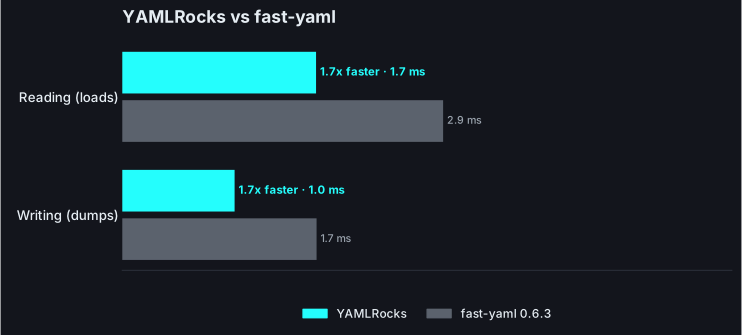
| Operation | fast-yaml | YAMLRocks | YAMLRocks is |
| --------- | --------: | --------: | ------------: |
| Reading | \~2.9 ms | \~1.7 ms | \~1.7x faster |
| Writing | \~1.7 ms | \~1.0 ms | \~1.7x faster |
Reproduce it
Wall-clock times from one machine and payload set. Run `python bench/compare.py` to measure both on your own hardware.
## Correctness, verified rather than assumed
[Section titled “Correctness, verified rather than assumed”](#correctness-verified-rather-than-assumed)
fast-yaml is the most correct of the newer Rust parsers, it resolves merge keys, where yaml-rs, ryaml, and py-yaml12 leave `<<` as a literal key. That makes the remaining difference the interesting one: YAMLRocks checks its parsing against the entire official YAML test suite on every change (load, round-trip, and canonical result), and fast-yaml still misreads a leading-zero integer:
```python
import yamlrocks
# `0777` is a string in YAML 1.2 (the octal form is `0o777`), not the number 777.
yamlrocks.loads(b"mode: 0777")
# {'mode': '0777'}
# fast-yaml returns {'mode': 777}.
```
The point is not one scalar; it is that “verified against the whole suite” is a guarantee fast-yaml does not make, and the edges are where that shows.
## Where fast-yaml is a reasonable pick
[Section titled “Where fast-yaml is a reasonable pick”](#where-fast-yaml-is-a-reasonable-pick)
fast-yaml is a fast, dual-licensed (MIT/Apache-2.0) 1.2 parser with a familiar `safe_load`/`safe_dump` surface and a handy built-in linter. If you want a quick, drop-in-flavored reader for trusted YAML and never write edited files back, it is a reasonable choice, and more faithful than its Rust peers.
## When to choose YAMLRocks
[Section titled “When to choose YAMLRocks”](#when-to-choose-yamlrocks)
Choose YAMLRocks when YAML is something you edit, include, validate, and depend on: comment-preserving round-trip, native includes, schema validation, and source locations, on a parser that is verified correct against the full YAML test suite and is faster too.
## See also
[Section titled “See also”](#see-also)
* [YAMLRocks vs yaml-rs](/comparisons/vs-yaml-rs/), [vs ryaml](/comparisons/vs-ryaml/), and [vs py-yaml12](/comparisons/vs-py-yaml12/): the other Rust-backed parsers.
* [Performance](/guides/performance/): the benchmark methodology.
# YAMLRocks vs oyaml
> Why oyaml is just PyYAML with ordered dicts, and why that no longer buys you anything.
[oyaml](https://pypi.org/project/oyaml/) is not a separate YAML implementation. It is a small shim that imports PyYAML, registers ordered-dict representers and constructors, and re-exports PyYAML’s entire API. You use it as `import oyaml as yaml`. Its one job was preserving mapping key order, which mattered before Python 3.7. Since then, dicts are ordered by the language and modern PyYAML already keeps insertion order, so oyaml adds essentially nothing.
## What oyaml actually is
[Section titled “What oyaml actually is”](#what-oyaml-actually-is)
Everything oyaml does, PyYAML does. Its speed, its YAML 1.1 semantics, its comment handling (none), its safety story, all of it is PyYAML’s, because it *is* PyYAML underneath. So the real comparison is [YAMLRocks vs PyYAML](/comparisons/vs-pyyaml/), and it applies here unchanged.
| Feature | oyaml (= PyYAML) | YAMLRocks |
| -------------------------- | :--------------: | :------------------: |
| Distinct implementation | No (PyYAML) | Yes (Rust extension) |
| Preserves key order | Yes (its point) | Yes |
| YAML 1.2 by default | No | Yes |
| Comment preservation | No | Yes |
| Round-trip (byte-for-byte) | No | Yes |
| Native `!include` | No | Yes |
| JSON Schema validation | No | Yes |
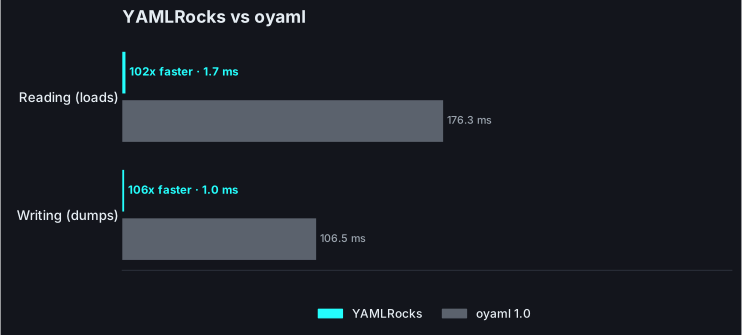
| Speed (parse) | baseline | \~104x faster |
| Speed (dump) | baseline | \~107x faster |
## Order preservation is free now
[Section titled “Order preservation is free now”](#order-preservation-is-free-now)
YAMLRocks preserves mapping key order as a matter of course, the same as any modern dict. There is nothing to add a shim for.
```python
import yamlrocks
yamlrocks.loads(b"z: 1\na: 2\nm: 3\n")
# {'z': 1, 'a': 2, 'm': 3} source order, always
```
## When to choose YAMLRocks
[Section titled “When to choose YAMLRocks”](#when-to-choose-yamlrocks)
There is no scenario where oyaml is preferable to plain PyYAML on a supported Python, and none where it beats YAMLRocks. If you are on oyaml today, you are on PyYAML with a patch that no longer does anything; move straight to YAMLRocks for YAML 1.2, comment-preserving round-trip, native includes, schema validation, and one to two orders of magnitude more speed.
## See also
[Section titled “See also”](#see-also)
* [YAMLRocks vs PyYAML](/comparisons/vs-pyyaml/): the comparison that actually applies to oyaml.
* [Migrating from PyYAML](/getting-started/migrating-from-pyyaml/).
* [Performance](/guides/performance/).
# YAMLRocks vs py-yaml12
> A detailed comparison of YAMLRocks and py-yaml12, with benchmarks and the capabilities that set them apart.
[py-yaml12](https://pypi.org/project/py-yaml12/) is a Rust-backed YAML 1.2 parser (built on the saphyr crate) with genuinely good first-class custom-tag handling. It is a clean data parser, and its tag support is a real strength. But it is a one-way parser: it does not edit YAML, resolve includes, or validate against a schema, and YAMLRocks is both more complete and faster.
## Feature comparison
[Section titled “Feature comparison”](#feature-comparison)
| Feature | py-yaml12 | YAMLRocks |
| ----------------------------- | :---------------: | :------------------------: |
| Comment-preserving round-trip | No | Yes (byte-for-byte) |
| Native `!include` + writeback | No | Yes |
| JSON Schema validation | No | Yes (line-numbered) |
| Source line/column | No | Yes (annotated mode) |
| Custom tag handling | Yes (first-class) | Yes |
| Verified vs the YAML suite | Claims full | Yes, in full |
| Multi-document streams | Yes | Yes |
| Merge keys (`<<`) | No | Yes |
| Implementation | Rust (saphyr) | Rust (own scanner/emitter) |
| Speed (parse / dump) | baseline | \~2.4x / \~1.4x faster |
## A parser, or a toolkit
[Section titled “A parser, or a toolkit”](#a-parser-or-a-toolkit)
py-yaml12’s tag handling is legitimately nice: a `Yaml(value, tag)` wrapper and `handlers=` callables transform tagged nodes at parse time. YAMLRocks matches that (a `tags=` registry and a `tag_handler`) and then adds the whole configuration-editing layer py-yaml12 has no answer for:
* **Comment-preserving round-trip.** Edit a value and re-emit with comments, anchors, and formatting intact; unmodified documents come back byte-for-byte. py-yaml12 reads data but cannot write an edited file back.
* **Native `!include`** with file-aware write-back across split configurations.
* **JSON Schema validation** with line-numbered errors.
* **Annotated mode** with the source line and column on every node.
See [custom tags](/guides/tags/), [round-trip editing](/guides/round-trip/), [includes](/guides/includes/), and [schema validation](/guides/schema-validation/).
## Speed
[Section titled “Speed”](#speed)
Both are Rust extensions built for correctness and speed. YAMLRocks is faster on both directions.
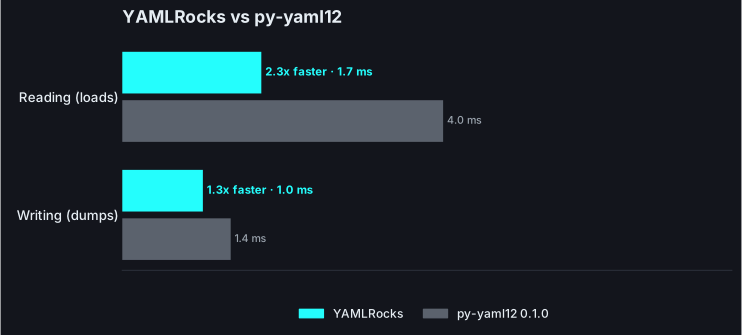
| Operation | py-yaml12 | YAMLRocks | YAMLRocks is |
| --------- | --------: | --------: | ------------: |
| Reading | \~4.0 ms | \~1.7 ms | \~2.4x faster |
| Writing | \~1.4 ms | \~1.0 ms | \~1.4x faster |
Reproduce it
Wall-clock times from one machine and payload set. Run `python bench/compare.py` to measure on your own hardware.
## Correctness, verified rather than assumed
[Section titled “Correctness, verified rather than assumed”](#correctness-verified-rather-than-assumed)
Both aim at YAML 1.2, and py-yaml12 states it targets the test suite. YAMLRocks runs that suite in CI on every change (load, round-trip, and canonical result all checked), and it also resolves merge keys and the 1.2 scalar edges py-yaml12 does not:
```python
import yamlrocks
# Merge keys: YAMLRocks folds the base in; py-yaml12 leaves `<<` as a literal key.
yamlrocks.loads(b"base: &b\n timeout: 30\nsvc:\n <<: *b\n name: api\n")
# {'base': {'timeout': 30}, 'svc': {'timeout': 30, 'name': 'api'}}
# `0777` is a string in YAML 1.2; py-yaml12 returns the number 777.
yamlrocks.loads(b"mode: 0777")
# {'mode': '0777'}
```
## Where py-yaml12 is a reasonable pick
[Section titled “Where py-yaml12 is a reasonable pick”](#where-py-yaml12-is-a-reasonable-pick)
For turning trusted YAML 1.2 data into Python objects with rich custom tags, py-yaml12 is a solid, MIT-licensed choice, and its tag API is genuinely good. If you never edit YAML, resolve includes, or need schema validation, it fits.
## When to choose YAMLRocks
[Section titled “When to choose YAMLRocks”](#when-to-choose-yamlrocks)
Choose YAMLRocks when you want that same clean 1.2 parsing and tag handling plus the editing toolkit around it, comment-preserving round-trip, includes, schema validation, source locations, verified correctness including merge keys, and more speed.
## See also
[Section titled “See also”](#see-also)
* [YAMLRocks vs yaml-rs](/comparisons/vs-yaml-rs/) and [vs ryaml](/comparisons/vs-ryaml/): the other Rust-backed parsers.
* [Custom tags](/guides/tags/) and [performance](/guides/performance/).
# YAMLRocks vs PyYAML
> A detailed comparison of YAMLRocks and PyYAML, with benchmarks and side-by-side code.
[PyYAML](https://pyyaml.org/) is the de-facto standard YAML library for Python. It is mature and widely used, but it is YAML 1.1 only, discards comments, has no round-trip mode, and its safest, fastest path still trails a modern Rust implementation. YAMLRocks is a drop-in-friendly alternative that is faster on every operation, safe by default, and far more capable.
## Feature comparison
[Section titled “Feature comparison”](#feature-comparison)
| Feature | PyYAML | YAMLRocks |
| ----------------------------- | :---------------: | :-------------------------------: |
| YAML 1.2 | No (1.1 only) | Yes (1.2 default, 1.1 mode) |
| Speed (parse) | C loader | \~6-10x faster than the C loader |
| Speed (dump) | C dumper | \~17-19x faster than the C dumper |
| Comment preservation | No | Yes |
| Round-trip (byte-for-byte) | No | Yes |
| Anchors/aliases preserved | No | Yes |
| Merge keys (`<<`) | Yes | Yes |
| Native `!include` | No | Yes (with write-back) |
| Source line/column | No | Yes (annotated mode) |
| JSON Schema validation | No | Yes (line-numbered errors) |
| Arbitrary object construction | Yes (`yaml.load`) | None by design |
| Output type | `str` | `bytes` (no extra encode) |
| datetime/date/time dump | partial | Yes (with offset control) |
| Free-threaded (nogil) safe | No | Yes |
## Safety: no arbitrary object construction
[Section titled “Safety: no arbitrary object construction”](#safety-no-arbitrary-object-construction)
PyYAML’s headline footgun is `yaml.load` with the default loader, which constructs arbitrary Python objects from tags like `!!python/object/apply`. That is remote code execution waiting to happen, which is why PyYAML added `safe_load` and now warns when you call `load` without an explicit loader.
YAMLRocks has no unsafe path to forget. Tags never construct Python objects. An unrecognized tag keeps its underlying scalar, or you opt in to handle it yourself with a `tag_handler` or `OPT_PASSTHROUGH_TAG`:
```python
import yamlrocks
# A tag never executes anything. The value is just the scalar underneath.
yamlrocks.loads(b"value: !something 42") # {'value': '42'}
# Opt in to interpret a tag, on your terms.
yamlrocks.loads(
b"value: !double 5",
tag_handler=lambda tag, value: int(value) * 2 if tag == "!double" else value,
) # {'value': 10}
```
There is no `yamlrocks.load` that behaves like `yaml.load`. The safe behavior is the only behavior. See [security](/reference/security/) and [custom tags](/guides/tags/).
## YAML 1.2 by default: the Norway problem
[Section titled “YAML 1.2 by default: the Norway problem”](#yaml-12-by-default-the-norway-problem)
PyYAML follows YAML 1.1, where `yes`, `no`, `on`, `off`, and the country code `NO` parse as booleans. This famously corrupts configuration files. YAMLRocks defaults to YAML 1.2, where those are plain strings:
```python
import yamlrocks
yamlrocks.loads(b"country: NO") # {'country': 'NO'}
yamlrocks.loads(b"enabled: yes") # {'enabled': 'yes'}
```
If you need the old behavior for a specific document, opt in with `OPT_YAML_1_1`, and use [`yamlrocks.upgrade()`](/guides/yaml-11-vs-12/) to migrate legacy 1.1 files to canonical 1.2:
```python
import yamlrocks
yamlrocks.loads(b"enabled: yes", option=yamlrocks.OPT_YAML_1_1) # {'enabled': True}
yamlrocks.upgrade(b"enabled: yes\nmode: on\n")
# b'%YAML 1.2\n---\nenabled: true\nmode: true\n'
```
The same 1.1 heritage means PyYAML also resolves implicit timestamps and sexagesimals, so a plain `2024-01-15` becomes a `datetime.date` and a bare `13:30:45` becomes the integer `48645` (base-60), a config value silently turned into a large number. YAMLRocks stays clean by default and makes timestamp typing an explicit opt-in that never touches other 1.1 forms:
```python
import datetime
import yamlrocks
yamlrocks.loads(b"at: 13:30:45") # {'at': '13:30:45'}
yamlrocks.loads(
b"on: 2024-01-15", option=yamlrocks.OPT_TIMESTAMPS
) # {'on': datetime.date(2024, 1, 15)}
```
See [YAML 1.1 vs 1.2](/guides/yaml-11-vs-12/) for the full list of differences, and [timestamps](/reference/options/#timestamps) for the opt-in.
## Comments and round-trip editing
[Section titled “Comments and round-trip editing”](#comments-and-round-trip-editing)
PyYAML throws comments away on load and cannot reproduce a file. There is no supported way to load `config.yaml`, change one value, and write it back without losing the comments and reflowing everything.
YAMLRocks’s round-trip mode preserves comments, anchors, and layout, and re-emits only what changed:
```python
import yamlrocks
source = b"# service config\nname: app # the app name\nport: 8080\n"
doc = yamlrocks.loads(source, option=yamlrocks.OPT_ROUND_TRIP)
doc["port"] = 9090
doc.to_yaml()
# b'# service config\nname: app # the app name\nport: 9090\n'
```
The comment survives, and the unchanged lines are reproduced verbatim. See [round-trip editing](/guides/round-trip/) and the [config editor recipe](/recipes/config-editor/).
## Bytes out, no extra encode
[Section titled “Bytes out, no extra encode”](#bytes-out-no-extra-encode)
`yaml.safe_dump` returns a `str`, so writing to a file or socket means a second UTF-8 encode. `yamlrocks.dumps` returns `bytes` directly, ready to write:
```python
import yamlrocks
yamlrocks.dumps({"key": "value", "list": [1, 2]})
# b'key: value\nlist:\n - 1\n - 2\n'
```
## Native includes
[Section titled “Native includes”](#native-includes)
PyYAML has no `!include`. The common workaround is a custom constructor that you wire up yourself and that cannot write changes back. YAMLRocks resolves `!include` and the `!include_dir_*` family natively, and round-trip mode can save an edited value back into the exact file it came from. See [includes](/guides/includes/) and the [Home Assistant recipe](/recipes/home-assistant/).
## Pain points YAMLRocks resolves
[Section titled “Pain points YAMLRocks resolves”](#pain-points-yamlrocks-resolves)
Beyond the headline differences above, YAMLRocks quietly fixes a long list of recurring PyYAML frustrations:
| Common PyYAML frustration | YAMLRocks |
| ------------------------------------------------------------------------------------ | ---------------------------------------------------------------------------------------------------------------- |
| Install fails to build (Cython errors, no wheel for your platform or Python) | Pure Rust via maturin: prebuilt wheels, no C toolchain, and it builds and runs on free-threaded CPython and 3.14 |
| An integer beyond 64 bits raises `OverflowError` on dump, or loads as a string | Arbitrary-precision integers load, dump, and round-trip exactly |
| Large or small floats dump as long digit strings (`1e308` becomes 309 digits) | Scientific notation matching Python’s `repr` (`1.0e+308`, `6.022e+23`) |
| Multi-line strings dump as one ugly `"a\nb\n"` line | A readable literal `\|` block by default, with the right chomping |
| `OrderedDict`, `Decimal`, `Enum`, `UUID`, or `pathlib.Path` raise `RepresenterError` | Serialized natively, no custom representer needed |
| An unknown or custom tag raises `ConstructorError` | Kept as its underlying value, or surfaced as a `YAMLRocksTag`; never an error |
| Characters above U+FFFF (emoji, rare scripts) are mishandled | Full Unicode, including in escapes and as mapping keys |
| `yaml.dump` output differs across platforms or appends a stray blank line | Deterministic output, exactly one trailing newline |
Each of these is exercised by the test suite, and the emitter’s output is checked to be [yamllint](https://yamllint.readthedocs.io/)-clean by default.
## Performance
[Section titled “Performance”](#performance)
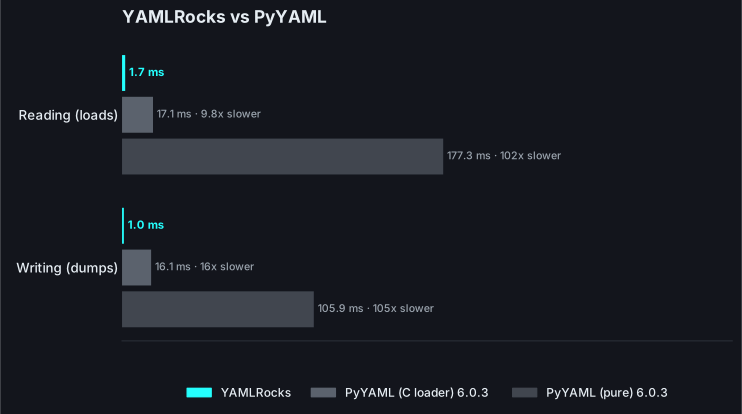
Indicative figures from `python bench/bench.py` (release build), showing how many times **faster YAMLRocks is** than PyYAML. The C loader (`libyaml`) is the harder target; the pure-Python loader is what most environments fall back to.
**Parsing (`loads`)**
| Payload | vs PyYAML (C) | vs PyYAML (pure) |
| --------------------- | ------------: | ---------------: |
| small (10 lines) | \~8x faster | \~64x faster |
| medium (k8s manifest) | \~9x faster | \~80x faster |
| large (500 items) | \~10x faster | \~87x faster |
| deep (30 levels) | \~6x faster | \~69x faster |
**Serializing (`dumps`)**
| Payload | vs PyYAML (C) | vs PyYAML (pure) |
| ------- | ------------: | ---------------: |
| small | \~18x faster | \~94x faster |
| medium | \~18x faster | \~92x faster |
| large | \~17x faster | \~86x faster |
| deep | \~17x faster | \~75x faster |
**Split configuration with `!include`** (Home Assistant style): YAMLRocks’s native resolver versus a PyYAML `!include` constructor.
| Files | YAMLRocks is |
| ----- | -----------: |
| 50 | \~17x faster |
| 200 | \~17x faster |
| 500 | \~17x faster |
These are ratios
The numbers above are speed ratios, not wall-clock times. They depend on payload shape and hardware. Reproduce them with `python bench/bench.py`.
## Migrating
[Section titled “Migrating”](#migrating)
Use the [compatibility shim](/getting-started/migrating-from-pyyaml/) for a near drop-in switch:
```python
import yamlrocks.compat as yaml
yaml.safe_load(b"a: 1") # {'a': 1}
yaml.safe_dump({"a": 1}) # 'a: 1\n' (a str, matching PyYAML)
```
`safe_load`, `safe_load_all`, `safe_dump`, and `safe_dump_all` map straight across, with `sort_keys=True` defaulting as it does in PyYAML. The shim’s `load` and `dump` map onto the safe variants, because YAMLRocks never executes code from tags. For new code, prefer the native `loads`/`dumps` API and its `bytes` output.
## When to stick with PyYAML
[Section titled “When to stick with PyYAML”](#when-to-stick-with-pyyaml)
PyYAML is a reasonable choice when you only need basic 1.1 loading, want zero native dependencies, or rely on its custom `Loader`/`Dumper` extension points and `add_constructor`/`add_representer` hooks. YAMLRocks does not expose those constructor hooks; it provides `tag_handler`, `OPT_PASSTHROUGH_TAG`, and the `default` callback instead. For everything else (speed, round-trip, includes, validation, YAML 1.2, and safety) YAMLRocks is the upgrade.
## See also
[Section titled “See also”](#see-also)
* [Migrating from PyYAML](/getting-started/migrating-from-pyyaml/): the full shim reference.
* [YAMLRocks vs ruamel.yaml](/comparisons/vs-ruamel/): the round-trip comparison.
* [Security](/reference/security/): the safety model in detail.
* [Round-trip editing](/guides/round-trip/) and [includes](/guides/includes/).
# YAMLRocks vs ruamel.yaml
> A detailed comparison of YAMLRocks and ruamel.yaml, with benchmarks and side-by-side code.
[ruamel.yaml](https://yaml.dev/doc/ruamel.yaml/) is the reference for comment-preserving, round-trip YAML in Python. It is excellent and feature-rich, but it is pure Python and therefore slow. YAMLRocks offers the same round-trip fidelity, backed by Rust, at one to two orders of magnitude more throughput, and adds native includes and schema validation. YAMLRocks now scripts comments per node too (inline and leading); ruamel still wins on the most exhaustive comment surgery, covered honestly below.
## Feature comparison
[Section titled “Feature comparison”](#feature-comparison)
| Feature | ruamel.yaml | YAMLRocks |
| ------------------------------ | :---------------------: | :-----------------------------: |
| YAML 1.2 | Yes | Yes |
| Comment preservation | Yes | Yes |
| Round-trip (unmodified) | Close | Byte-for-byte |
| Anchors/aliases preserved | Yes | Yes |
| Merge keys (`<<`) | Yes | Yes |
| Implementation | Pure Python | Rust extension |
| Speed (parse) | baseline | \~105-141x faster |
| Speed (dump) | baseline | \~160-208x faster |
| Native `!include` + write-back | No | Yes |
| Source line/column | partial | Yes (annotated mode) |
| JSON Schema validation | No | Yes |
| Save only changed files | No | Yes |
| Per-node comment editing API | Yes (`.ca`, exhaustive) | Yes (inline, leading, trailing) |
| Output type | `str` (to a stream) | `bytes` |
## Speed: Rust vs pure Python
[Section titled “Speed: Rust vs pure Python”](#speed-rust-vs-pure-python)
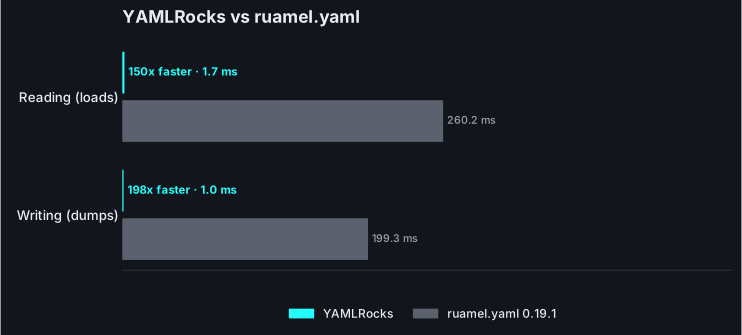
ruamel.yaml is implemented entirely in Python, which makes it flexible but slow. YAMLRocks does the same work in Rust and materializes results across the PyO3 boundary, so the same parse or dump is one to two orders of magnitude faster.
Indicative figures from `python bench/bench.py` (release build), showing how many times **faster YAMLRocks is** than ruamel.yaml in `safe` mode.
**Parsing (`loads`)**
| Payload | YAMLRocks is |
| ----------------- | ------------: |
| small | \~105x faster |
| medium | \~124x faster |
| large (500 items) | \~141x faster |
| deep | \~105x faster |
**Serializing (`dumps`)**
| Payload | YAMLRocks is |
| ------- | ------------: |
| small | \~208x faster |
| medium | \~201x faster |
| large | \~199x faster |
| deep | \~163x faster |
ruamel’s round-trip mode is heavier still. YAMLRocks’s round-trip path stays far faster while preserving comments, anchors, and formatting, with byte-for-byte output for unmodified documents.
These are ratios
The numbers above are speed ratios, not wall-clock times. They depend on payload shape and hardware. Reproduce them with `python bench/bench.py`.
## Byte-for-byte round-trip
[Section titled “Byte-for-byte round-trip”](#byte-for-byte-round-trip)
Both libraries preserve comments, anchors, and scalar styles. YAMLRocks goes one step further: an unmodified round-trip reproduces the source bytes exactly, and only the nodes you change are re-rendered. This is enforced across the entire official YAML test suite.
```python
import yamlrocks
source = b"# service config\nname: app # the app name\nport: 8080\n"
# Unmodified: bytes come back exactly as they went in.
doc = yamlrocks.loads(source, option=yamlrocks.OPT_ROUND_TRIP)
assert doc.to_yaml() == source
# Change one value: only that line is re-rendered, comments intact.
doc["port"] = 9090
doc.to_yaml()
# b'# service config\nname: app # the app name\nport: 9090\n'
```
The editing surface is a `YAMLRocksDocument` with `dict`/`list`-style access plus `walk()`, `to_dict()`, and `range()` helpers, rather than ruamel’s `CommentedMap`/`CommentedSeq` types:
```python
import yamlrocks
doc = yamlrocks.loads(
b"server:\n host: localhost\n port: 8080\n", option=yamlrocks.OPT_ROUND_TRIP
)
doc.keys() # ['server']
doc["server"]["port"] = 9090 # nested edit writes through
doc.to_dict() # {'server': {'host': 'localhost', 'port': 9090}}
doc.walk() # [(('server', 'host'), 'localhost'), (('server', 'port'), 9090)]
```
See [round-trip editing](/guides/round-trip/) and the [config editor recipe](/recipes/config-editor/).
## Native includes and file-aware saving
[Section titled “Native includes and file-aware saving”](#native-includes-and-file-aware-saving)
ruamel.yaml has no `!include`. A split configuration must be stitched together by hand, and there is no concept of writing an edited value back to the specific file it came from.
YAMLRocks resolves `!include` and the `!include_dir_*` family natively. In round-trip mode each node remembers its source file, so `save()` writes back only the files that actually changed. See [includes](/guides/includes/) and the [Home Assistant recipe](/recipes/home-assistant/) for a worked example of editing one automation and saving only `automations.yaml`.
## Scripting comments
[Section titled “Scripting comments”](#scripting-comments)
YAMLRocks does more than *preserve* comments through a round-trip: every `YAMLRocksNode` exposes a writable `comment` (the inline `# ...` after a value), `comment_before` (the standalone line(s) above a key), and `comment_after` (the trailing block at the foot of a mapping or sequence). A tool can read, add, edit, remove, or move a comment (read it from one node, set it on another) and re-emit. This works on mapping values, keys, and sequence items alike, and on keys you add to a loaded document.
```python
import yamlrocks
doc = yamlrocks.loads(b"name: app\nport: 8080\n", option=yamlrocks.OPT_ROUND_TRIP)
doc.node["port"].comment = "the listen port" # inline, no '#'
doc.node["name"].comment_before = "service identity" # standalone line above
doc.node.comment_after = "end of config" # trailing block (foot)
doc.to_yaml()
# b'# service identity\nname: app\nport: 8080 # the listen port\n# end of config\n'
```
## Where ruamel.yaml is still richer
[Section titled “Where ruamel.yaml is still richer”](#where-ruamelyaml-is-still-richer)
**Building a fully commented document from nothing** needs ruamel: YAMLRocks edits comments on a loaded document rather than assembling one with no parsed source. ruamel’s `.ca` API also reaches a few unusual placements that `comment`, `comment_before`, and `comment_after` do not.
On emitter configuration the two are closer than they once were: YAMLRocks’s `dumps` takes an explicit `width`, indentation options (`OPT_INDENT_2` / `_4`, `OPT_INDENTLESS_SEQUENCES`), a `default=` hook for serializing custom objects, and a `tags=` registry, so most representer-style needs are met. ruamel remains more configurable for deeply custom class round-tripping and is battle-tested for intricate document transformations.
## When to stick with ruamel.yaml
[Section titled “When to stick with ruamel.yaml”](#when-to-stick-with-ruamelyaml)
Reach for ruamel.yaml when you need to build a fully commented document from scratch, lean on its class-based representer/constructor extension points for deeply custom types, or perform intricate document surgery where its maturity matters more than throughput. For high-throughput loading and dumping, native includes, schema validation, scripting inline, leading, and trailing comments, or byte-for-byte round-trip with file-aware saving, YAMLRocks is the faster, batteries-included choice.
## See also
[Section titled “See also”](#see-also)
* [Migrating from ruamel.yaml](/getting-started/migrating-from-ruamel/).
* [YAMLRocks vs PyYAML](/comparisons/vs-pyyaml/): the safety and speed comparison.
* [Round-trip editing](/guides/round-trip/) and [includes](/guides/includes/).
* [Performance](/guides/performance/): the benchmark methodology.
# YAMLRocks vs ryaml
> A detailed comparison of YAMLRocks and ryaml, with benchmarks and the capabilities that set them apart.
[ryaml](https://pypi.org/project/ryaml/) is a Rust-backed YAML reader with a deliberately small, `json`-module-style API. It is a fine way to turn a trusted file into Python data, but that is all it does, and it is alpha software. YAMLRocks is the full configuration toolkit, comment-preserving round-trip, native includes, schema validation, source locations, and verified-correct parsing, and it is several times faster.
## Feature comparison
[Section titled “Feature comparison”](#feature-comparison)
| Feature | ryaml | YAMLRocks |
| ----------------------------- | :------------------: | :------------------------: |
| Comment-preserving round-trip | No | Yes (byte-for-byte) |
| Native `!include` + writeback | No | Yes |
| JSON Schema validation | No | Yes (line-numbered) |
| Source line/column | No | Yes (annotated mode) |
| Custom tag handling | No | Yes |
| Verified vs the YAML suite | Not stated | Yes, in full |
| Merge keys (`<<`) | No | Yes |
| Anchors/aliases resolved | Yes | Yes |
| Implementation | Rust (libyaml-safer) | Rust (own scanner/emitter) |
| Speed (parse / dump) | baseline | \~2.8x / \~3.4x faster |
| Maturity | 0.5.x, alpha | Battle-tested corpus |
## A parser, or a toolkit
[Section titled “A parser, or a toolkit”](#a-parser-or-a-toolkit)
ryaml reads YAML into Python and stops. YAMLRocks does that and the rest of what a real configuration workflow needs:
* **Comment-preserving round-trip.** Edit a value and re-emit with comments, anchors, and layout intact; an unmodified document is byte-for-byte identical. ryaml drops comments and formatting, so it can read a file but not edit one.
* **Native `!include`** with file-aware write-back across a split configuration.
* **JSON Schema validation** with line-numbered errors.
* **Annotated mode** with the source line and column on every node.
* **Custom tag handling**, and **safe-by-default** loading that never builds arbitrary Python objects.
See [round-trip editing](/guides/round-trip/), [includes](/guides/includes/), [schema validation](/guides/schema-validation/), and [annotated mode](/guides/annotated/).
## Speed
[Section titled “Speed”](#speed)
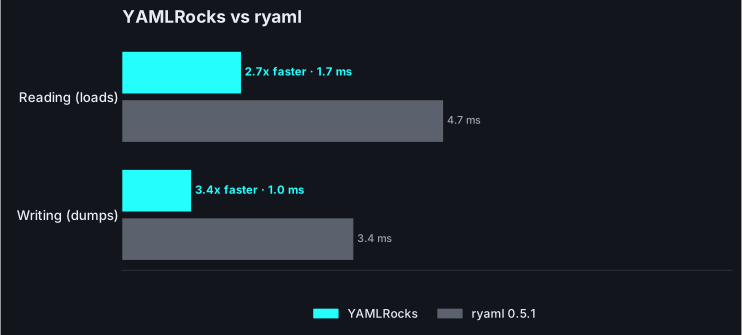
Both are Rust extensions, so this is Rust vs Rust. YAMLRocks is well ahead on both.
| Operation | ryaml | YAMLRocks | YAMLRocks is |
| --------- | -------: | --------: | ------------: |
| Reading | \~4.7 ms | \~1.7 ms | \~2.8x faster |
| Writing | \~3.4 ms | \~1.0 ms | \~3.4x faster |
Reproduce it
Wall-clock times from one machine and payload set. Run `python bench/compare.py` to measure on your own hardware.
## Correctness, verified rather than assumed
[Section titled “Correctness, verified rather than assumed”](#correctness-verified-rather-than-assumed)
YAMLRocks’s parsing is checked against the entire official YAML test suite on every change. ryaml publishes no such guarantee, describes itself as YAML 1.1 yet resolves `no` and `0o17` the 1.2 way, and does not implement merge keys:
```python
import yamlrocks
# Merge keys: YAMLRocks folds the base in; ryaml leaves `<<` as a literal key.
yamlrocks.loads(b"base: &b\n timeout: 30\nsvc:\n <<: *b\n name: api\n")
# {'base': {'timeout': 30}, 'svc': {'timeout': 30, 'name': 'api'}}
```
The point is not one missing feature; it is that YAMLRocks commits to a schema and proves it, so you always know which reading you get.
## Where ryaml is a reasonable pick
[Section titled “Where ryaml is a reasonable pick”](#where-ryaml-is-a-reasonable-pick)
ryaml is a small, MIT-licensed, `json`-style reader. For quickly loading trusted YAML 1.2 data with no writing and no merge keys, it is easy to reach for. It is alpha (0.5.x) with a thin surface by design.
## When to choose YAMLRocks
[Section titled “When to choose YAMLRocks”](#when-to-choose-yamlrocks)
Choose YAMLRocks when YAML is something you edit, validate, and depend on: round-trip with comments, includes, schema validation, and source locations, on a verified-correct parser that is also several times faster.
## See also
[Section titled “See also”](#see-also)
* [YAMLRocks vs yaml-rs](/comparisons/vs-yaml-rs/) and [vs py-yaml12](/comparisons/vs-py-yaml12/): the other Rust-backed parsers.
* [YAMLRocks vs PyYAML](/comparisons/vs-pyyaml/): the safety and speed comparison.
* [Performance](/guides/performance/): the benchmark methodology.
# YAMLRocks vs strictyaml
> How YAMLRocks answers strictyaml's safety concerns without crippling YAML or the throughput.
[strictyaml](https://pypi.org/project/strictyaml/) takes a strong position: YAML’s implicit typing and its more exotic features are footguns, so it parses only a restricted subset and makes you supply a schema to get anything other than strings. The concern is real. The remedy is heavy: strictyaml is pure Python built on ruamel.yaml, it removes large parts of YAML, it is load-only, and it is the slowest option in the field by a wide margin. YAMLRocks answers the same concern by defaulting to YAML 1.2 and offering real JSON Schema validation, without throwing away YAML or the speed.
## The concern, and how YAMLRocks addresses it
[Section titled “The concern, and how YAMLRocks addresses it”](#the-concern-and-how-yamlrocks-addresses-it)
strictyaml’s headline argument is the “Norway problem”: in YAML 1.1, `no` becomes boolean `False`, so a country list containing `NO` (Norway) silently corrupts. YAMLRocks does not have this problem, because it defaults to the YAML 1.2 core schema, where `no` is the string `"no"`.
```python
import yamlrocks
yamlrocks.loads(b"countries: [NO, SE, DK]")
# {'countries': ['NO', 'SE', 'DK']} strings, not [False, 'SE', 'DK']
```
Where strictyaml removes implicit typing entirely and hands you strings, YAMLRocks gives you correct 1.2 types by default and lets you *enforce* a shape with JSON Schema validation that reports line-numbered errors. You get type safety without giving up numbers, booleans, or a dumper.
## Feature comparison
[Section titled “Feature comparison”](#feature-comparison)
| Feature | strictyaml | YAMLRocks |
| ------------------------- | :------------------: | :-------------------: |
| Implicit `no` -> `False` | Avoided (subset) | Avoided (1.2 default) |
| Typed values without cast | No (strings only) | Yes (1.2 core schema) |
| Schema validation | Yes (own schema DSL) | Yes (JSON Schema) |
| Anchors/aliases | Rejected by design | Yes (preserved) |
| Flow style `{}` / `[]` | Rejected by design | Yes |
| Custom tags | Rejected by design | Yes |
| Dumping arbitrary data | No general dumper | Yes |
| Comment preservation | Yes (via ruamel) | Yes |
| Implementation | Pure Python (ruamel) | Rust extension |
| Speed (parse) | baseline | \~810x faster |
## Speed
[Section titled “Speed”](#speed)
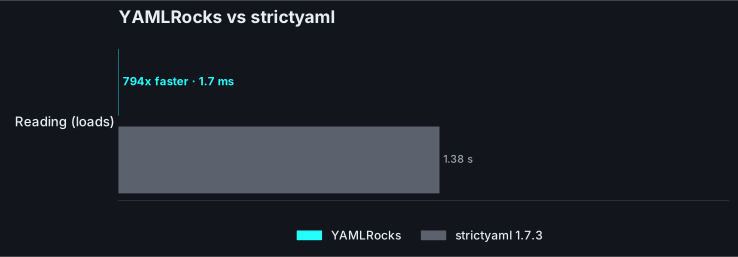
strictyaml is built for a specific safety story, not for throughput, and it shows: it is roughly three orders of magnitude slower to load than YAMLRocks, and it has no general-purpose dumper to benchmark at all.
| Operation | strictyaml | YAMLRocks | YAMLRocks is |
| --------- | ---------: | --------: | ------------: |
| load | \~1.38 s | \~1.7 ms | \~810x faster |
| dump | no dumper | \~1.0 ms | - |
Reproduce it
Wall-clock times from one machine and payload set. Run `python bench/compare.py` to measure on your own hardware.
## What strictyaml gives up
[Section titled “What strictyaml gives up”](#what-strictyaml-gives-up)
To enforce its subset, strictyaml rejects flow style, anchors and aliases, and tags outright, and it returns every leaf as a string until a schema casts it. That is a deliberate, sometimes reasonable trade for a locked-down config format you fully control. But it means strictyaml cannot read a large fraction of real-world YAML, and it cannot write YAML back out as a drop-in dumper.
YAMLRocks reads all of standard YAML 1.2, is safe by default (it never constructs arbitrary Python objects from tags), types scalars correctly, validates against a schema when you want enforcement, and round-trips with comments intact.
## When to choose YAMLRocks
[Section titled “When to choose YAMLRocks”](#when-to-choose-yamlrocks)
Choose strictyaml only if you specifically want a maximally restricted YAML dialect and are willing to pay for it in speed and in features. For everything else, safe loading, correct 1.2 types, schema-enforced validation, reading real-world YAML, round-trip editing, and speed, YAMLRocks covers the same safety goals without the sacrifices.
## See also
[Section titled “See also”](#see-also)
* [Schema validation](/guides/schema-validation/): enforce a shape with line-numbered errors.
* [YAML 1.1 vs 1.2](/guides/yaml-11-vs-12/): why the Norway problem does not happen by default.
* [YAMLRocks vs PyYAML](/comparisons/vs-pyyaml/) and [performance](/guides/performance/).
# YAMLRocks vs yaml-rs
> A detailed comparison of YAMLRocks and yaml-rs, with benchmarks and the capabilities that set them apart.
[yaml-rs](https://pypi.org/project/yaml-rs/) is a young Rust-backed YAML 1.2 parser that markets itself as the fastest in the ecosystem. It is genuinely fast, and the closest competitor to YAMLRocks on raw throughput. But it is only a parser: text in, Python values out. YAMLRocks is the whole toolkit real configuration work needs, comment-preserving round-trip, native includes, schema validation, source locations, rigorously verified correctness, and it is faster on top.
## Feature comparison
[Section titled “Feature comparison”](#feature-comparison)
| Feature | yaml-rs | YAMLRocks |
| ----------------------------- | :-------------------------: | :------------------------: |
| YAML 1.2 | Yes | Yes |
| Comment-preserving round-trip | No | Yes (byte-for-byte) |
| Native `!include` + writeback | No | Yes |
| JSON Schema validation | No | Yes (line-numbered) |
| Source line/column | No | Yes (annotated mode) |
| Custom tag handling | No | Yes |
| Verified vs the YAML suite | Not stated | Yes, in full |
| Anchors/aliases resolved | Yes | Yes |
| Merge keys (`<<`) | No | Yes |
| Timestamp resolution | On by default, incl. quoted | Opt-in, plain scalars only |
| Implementation | Rust (saphyr fork) | Rust (own scanner/emitter) |
| Speed (parse / dump) | baseline | \~1.2x / \~1.3x faster |
| Maturity | 0.1.x, public domain | Battle-tested corpus |
## A parser, or a toolkit
[Section titled “A parser, or a toolkit”](#a-parser-or-a-toolkit)
This is the difference that matters. yaml-rs reads YAML into Python values and stops there. YAMLRocks does that and everything a real configuration workflow needs around it:
* **Comment-preserving round-trip.** Load with `OPT_ROUND_TRIP`, change a value, and re-emit with every comment, anchor, and formatting choice intact; an unmodified document comes back byte-for-byte. yaml-rs discards comments and layout, so it cannot edit a file, only read it.
* **Native `!include`.** YAMLRocks resolves `!include` and the `!include_dir_*` family, and in round-trip mode writes edits back to the specific file each node came from. Split configurations (Home Assistant, Kubernetes overlays) work out of the box.
* **JSON Schema validation** with line-numbered errors, so a bad config is rejected with a message that points at the line, not a stack trace.
* **Annotated mode** attaches the source line and column to every node, which is what lets a tool underline the exact place a value came from.
* **Custom tag handling** through a `tags=` registry or a `tag_handler`.
* **Safe by default.** Loading never constructs arbitrary Python objects.
See [round-trip editing](/guides/round-trip/), [includes](/guides/includes/), [schema validation](/guides/schema-validation/), and [annotated mode](/guides/annotated/).
## Speed
[Section titled “Speed”](#speed)
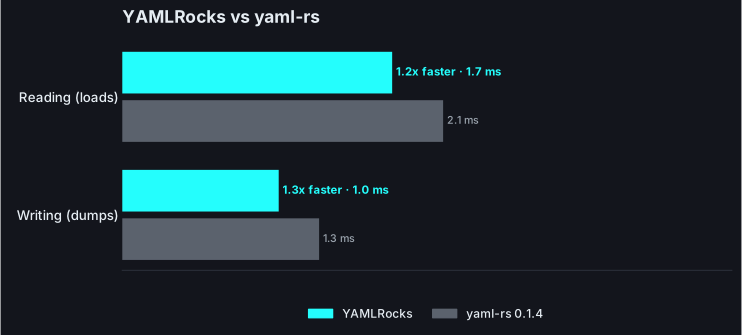
Both are Rust extensions, so this is Rust vs Rust, not Rust vs Python. yaml-rs is the nearest rival on the field, and YAMLRocks is still ahead on both directions.
| Operation | yaml-rs | YAMLRocks | YAMLRocks is |
| --------- | -------: | --------: | ------------: |
| Reading | \~2.1 ms | \~1.7 ms | \~1.2x faster |
| Writing | \~1.3 ms | \~1.0 ms | \~1.3x faster |
The gap is smaller than against a pure-Python library, as you would expect from two native implementations. Speed is real, but it is not the reason to choose between them, the capabilities above and the correctness below are.
Reproduce it
Wall-clock times from one machine and payload set, not a fixed law. Run `python bench/compare.py` to measure both on your own hardware.
## Correctness, verified rather than assumed
[Section titled “Correctness, verified rather than assumed”](#correctness-verified-rather-than-assumed)
YAMLRocks’s parsing is checked against the entire official YAML test suite on every change: a case must load, round-trip, and match its canonical result, or CI fails. That is the substantive correctness claim, and it is why the edges hold up. yaml-rs makes no such published guarantee, and it shows in cases like these:
```python
import yamlrocks
# Merge keys: YAMLRocks folds the base in; yaml-rs leaves `<<` as a literal key.
yamlrocks.loads(b"base: &b\n timeout: 30\nsvc:\n <<: *b\n name: api\n")
# {'base': {'timeout': 30}, 'svc': {'timeout': 30, 'name': 'api'}}
# Leading-zero integers: `0777` is a string in YAML 1.2, not the number 777.
yamlrocks.loads(b"mode: 0777")
# {'mode': '0777'}
```
Timestamps are a sharper example. yaml-rs resolves a date/datetime scalar to a Python object by default, and it does so even for a **quoted** scalar. In YAML a quoted scalar is explicitly a string, so quoting is exactly how you say “keep this as text”, and yaml-rs ignores that. YAMLRocks makes timestamp resolution opt-in ([`OPT_TIMESTAMPS`](/reference/options/#timestamps)) and only ever applies it to plain scalars, matching PyYAML and the spec:
```python
import yamlrocks
# A quoted scalar is a string, even with timestamp resolution enabled.
yamlrocks.loads(b'when: "2024-01-15"', option=yamlrocks.OPT_TIMESTAMPS)
# {'when': '2024-01-15'}
# yaml-rs returns {'when': datetime.date(2024, 1, 15)}, quoting ignored.
```
These are not the reason to switch on their own; they are evidence that “verified against the whole suite” is a real difference, not a slogan.
## Where yaml-rs is a reasonable pick
[Section titled “Where yaml-rs is a reasonable pick”](#where-yaml-rs-is-a-reasonable-pick)
yaml-rs is a small, fast, public-domain (Unlicense) parser. If all you need is to turn a trusted YAML 1.2 file into Python data as quickly as possible, and never write YAML back out, it does that one job well. It is early software (0.1.x) with a deliberately thin surface.
## When to choose YAMLRocks
[Section titled “When to choose YAMLRocks”](#when-to-choose-yamlrocks)
Choose YAMLRocks when YAML is something you edit and depend on, not just read: comment-preserving round-trip, native includes, schema validation, and source locations, on a parser that is verified correct against the full YAML test suite and is faster too. That is almost every real configuration use.
## See also
[Section titled “See also”](#see-also)
* [YAMLRocks vs PyYAML](/comparisons/vs-pyyaml/): the safety and speed comparison.
* [YAMLRocks vs ryaml](/comparisons/vs-ryaml/) and [vs py-yaml12](/comparisons/vs-py-yaml12/): the other Rust-backed parsers.
* [Performance](/guides/performance/): the benchmark methodology.
# YAMLRocks vs yamlium
> A detailed comparison of YAMLRocks and yamlium, with benchmarks and the capabilities that set them apart.
[yamlium](https://pypi.org/project/yamlium/) is a pure-Python, dependency-free YAML library that preserves comments and structure through a manipulation API, a real feature for a zero-dependency package. Where YAMLRocks pulls ahead is everything around that: it is one to two orders of magnitude faster, it commits to YAML 1.2 and proves it against the test suite, and it adds native includes and schema validation that yamlium has no equivalent for.
## Feature comparison
[Section titled “Feature comparison”](#feature-comparison)
| Feature | yamlium | YAMLRocks |
| ----------------------------- | :-------------: | :------------------: |
| Comment-preserving round-trip | Yes | Yes (byte-for-byte) |
| Native `!include` + writeback | No | Yes |
| JSON Schema validation | No | Yes (line-numbered) |
| Source line/column | No | Yes (annotated mode) |
| Verified vs the YAML suite | Not stated | Yes, in full |
| Declared YAML version | Undocumented | 1.2 (1.1 optional) |
| Anchors / merge keys | Preserved / yes | Preserved / yes |
| Implementation | Pure Python | Rust extension |
| Speed (parse / dump) | baseline | \~42x / \~11x faster |
## Speed: Rust vs pure Python
[Section titled “Speed: Rust vs pure Python”](#speed-rust-vs-pure-python)
yamlium is pure Python, which makes it portable but slow. YAMLRocks does the same work in Rust, one to two orders of magnitude faster on both directions.
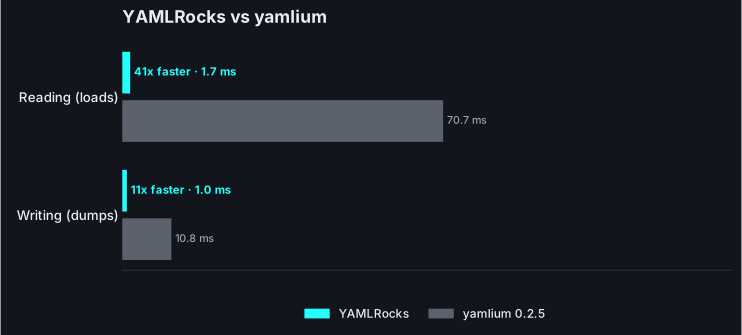
| Operation | yamlium | YAMLRocks | YAMLRocks is |
| --------- | ------: | --------: | -----------: |
| Reading | \~71 ms | \~1.7 ms | \~42x faster |
| Writing | \~11 ms | \~1.0 ms | \~11x faster |
Reproduce it
Wall-clock times from one machine and payload set. Run `python bench/compare.py` to measure on your own hardware.
## Same round-trip, more of everything else
[Section titled “Same round-trip, more of everything else”](#same-round-trip-more-of-everything-else)
yamlium’s comment-and-structure-preserving editing is its selling point, and YAMLRocks matches it: load with `OPT_ROUND_TRIP`, edit through a node API, and re-emit with comments, anchors, and layout intact, byte-for-byte when unmodified. On that same foundation YAMLRocks adds what yamlium does not have:
* **Native `!include`** with file-aware write-back across a split configuration.
* **JSON Schema validation** with line-numbered errors.
* **Annotated mode** with the source line and column on every node.
* **Safe-by-default** loading and correct YAML 1.2 typing.
See [round-trip editing](/guides/round-trip/), [includes](/guides/includes/), [schema validation](/guides/schema-validation/), and [annotated mode](/guides/annotated/).
## Correctness, verified rather than assumed
[Section titled “Correctness, verified rather than assumed”](#correctness-verified-rather-than-assumed)
YAMLRocks commits to the YAML 1.2 core schema and checks it against the entire official test suite in CI. yamlium does not document which YAML version it targets, and its scalar resolution lands between the two in surprising ways:
```python
import yamlrocks
yamlrocks.loads(b"mode: 0777") # {'mode': '0777'} a string, per YAML 1.2
yamlrocks.loads(b"mask: 0o17") # {'mask': 15} the 1.2 octal
# yamlium returns {'mode': 777} and {'mask': '0o17'}.
```
When you cannot tell which spec a library follows, you cannot tell what a value will become. YAMLRocks makes that explicit and pins it.
## Where yamlium is a reasonable pick
[Section titled “Where yamlium is a reasonable pick”](#where-yamlium-is-a-reasonable-pick)
yamlium is a fair choice when you specifically need a pure-Python, zero-dependency package (no binary wheel to install) and can accept its speed and its scalar quirks. Its comment-editing API is nicely done.
## When to choose YAMLRocks
[Section titled “When to choose YAMLRocks”](#when-to-choose-yamlrocks)
Choose YAMLRocks when you can install a wheel and want the same comment-preserving round-trip with real speed, native includes, schema validation, source locations, and correctness that is verified rather than undocumented.
## See also
[Section titled “See also”](#see-also)
* [Round-trip editing](/guides/round-trip/): the comment-preserving workflow.
* [YAMLRocks vs ruamel.yaml](/comparisons/vs-ruamel/): the other round-trip comparison.
* [Performance](/guides/performance/): the benchmark methodology.
# Contributing
> How to set up a development environment and contribute to YAMLRocks.
YAMLRocks is an open-source project, and contributions are welcome, whether that is a bug report, a documentation fix, or a pull request. This page covers the local development workflow. The full guidelines also live in [`CONTRIBUTING.md`](https://github.com/frenck/yamlrocks/blob/main/CONTRIBUTING.md) in the repository.
Using AI tools
AI tools are welcome as an aid, but you must review and understand everything you submit and be able to explain it in your own words. Autonomous agents are not allowed, and unreviewed AI output (in pull requests, issues, or review threads) will be closed. Read the [AI Policy](https://github.com/frenck/yamlrocks/blob/main/AI_POLICY.md) before contributing.
## Development setup
[Section titled “Development setup”](#development-setup)
The fastest way to start is the [dev container](https://containers.dev/): open the repository in a GitHub Codespace or in VS Code with the Dev Containers extension, and the toolchain is set up for you.
To set things up by hand you need a [Rust toolchain](https://rustup.rs/) and [uv](https://docs.astral.sh/uv/). uv manages the Python version (3.12 or newer), the virtual environment, and every dependency from `pyproject.toml`:
```bash
# Install all development dependencies into a managed virtual environment.
uv sync
# Activate it so `just` (shipped as a dev dependency) is on PATH.
source .venv/bin/activate
# Build and install the extension (release mode; rerun after Rust changes).
just develop
```
`just develop` compiles the Rust crate and installs `yamlrocks` into the managed environment as an editable build. Re-run it after changing any Rust code. For a faster, less-optimized build during tight iteration loops, use `just develop-debug`.
### Task runner
[Section titled “Task runner”](#task-runner)
`just` is the primary interface for everyday work: every common task (build, test, lint, type-check, docs) is a recipe that wraps the exact command CI runs, so you rarely need to remember the underlying invocation. It ships with the dev dependencies, so there is nothing extra to install.
```bash
just # list every recipe
just develop # build the extension (rerun after Rust changes)
just test # run the Python suite (just test -k anchors to filter)
just check # the full local gate: build, lint, types, clippy, tests, docs
```
If you would rather not activate the venv, prefix any recipe with `uv run --no-sync`, for example `uv run --no-sync just test`. Every recipe maps to the raw commands shown throughout this page, so either style works.
## Running the tests
[Section titled “Running the tests”](#running-the-tests)
The suite is grouped by capability under `tests/` and always runs under a memory cap (configured in `tests/conftest.py`). `just test` runs it; during development it is good practice to add a shell-level guard as well, so a parser bug can never exhaust the host:
```bash
just test # or: uv run --no-sync pytest
just test -k anchors # extra args pass straight through to pytest
# with an explicit shell guard:
timeout 120 bash -c 'ulimit -v 3000000; uv run --no-sync pytest'
```
It includes the [YAML test suite](https://github.com/yaml/yaml-test-suite) (a git submodule), golden-file snapshot tests, fuzz tests, security tests, and memory/refcount checks. See [`tests/README.md`](https://github.com/frenck/yamlrocks/blob/main/tests/README.md) for the layout.
### Rust unit tests
[Section titled “Rust unit tests”](#rust-unit-tests)
The pure-Rust engine (scanner, parser, resolver, decode, encode, and the include/schema helpers) carries direct unit tests alongside the Python suite, which covers the PyO3 boundary on top. They need no Python and run fast:
```bash
just test-rust # or: cargo test --lib
```
### Real-world configs
[Section titled “Real-world configs”](#real-world-configs)
A dedicated `realworld` category parses large public configurations across ecosystems (Home Assistant, ESPHome, Ansible, Kubernetes, Docker Compose) and asserts every file parses and round-trips byte-for-byte. The configs are git submodules, so they are opt-in and the category auto-skips when they are absent:
```bash
git submodule update --init # fetch the config repos once
uv run --no-sync pytest tests/realworld -m realworld # run just this category
```
## Coverage
[Section titled “Coverage”](#coverage)
The Rust core is exercised both by its own Rust unit tests and, end-to-end, through the Python suite. Coverage is measured by instrumenting the build with [`cargo-llvm-cov`](https://github.com/taiki-e/cargo-llvm-cov) and running both `cargo test` and `pytest` against it. The whole flow is wrapped in one recipe:
```bash
rustup component add llvm-tools-preview # one-time: the llvm coverage tools
cargo install cargo-llvm-cov # one-time
just coverage # instrument, run both suites, print a summary
```
`just coverage` runs the instrumented `cargo test --lib` and `pytest` under a fresh profile and prints a line-coverage summary. Check out the real-world submodules first (`git submodule update --init`) for a representative number; CI runs the same flow and fails when line coverage drops below 90% (`cargo llvm-cov report --fail-under-lines 90`).
## Benchmarks
[Section titled “Benchmarks”](#benchmarks)
There are two layers of performance tooling. `just bench` runs a one-off report comparing YAMLRocks against PyYAML, ruamel.yaml, and yamlium, while `just codspeed` runs YAMLRocks’s own operations through [CodSpeed](https://codspeed.io), which also runs on every pull request and comments on any regression. Build in release mode (`just develop`) before measuring; debug builds are far slower.
```bash
just bench # comparison report vs other libraries
just codspeed # YAMLRocks's own operations (local walltime; CI instruments)
```
See the [performance guide](/guides/performance/) for the headline numbers and how to read them.
## Fuzzing
[Section titled “Fuzzing”](#fuzzing)
`tests/robustness/test_fuzz.py` is a fast, always-on property check. For deeper, coverage-guided fuzzing of the Rust parser there are four [`cargo-fuzz`](https://github.com/rust-fuzz/cargo-fuzz) targets under `fuzz/`:
| Target | What it drives | Contract |
| -------------- | ---------------------------------------------------------- | --------------------------- |
| `parse` | scanner → parser → composer (the round-trip AST) | never panic or hang |
| `decode` | the fast `loads` path and fast `dumps`, under both schemas | never panic or hang |
| `roundtrip` | compose → emit → re-compose (the round-trip emitter) | never panic or hang |
| `differential` | `loads(dumps(loads(x)))` must equal `loads(x)` | never silently corrupt data |
```bash
cargo install cargo-fuzz # once; needs a nightly toolchain
just fuzz 60 # fuzz `parse` for 60s (the default target)
just fuzz 60 differential # fuzz any target by name
```
The first three targets check that no input *crashes* the parser. `differential` checks something a crash-only target cannot: that `dumps` never emits YAML which `loads` reads back as *different* data (a mis-quoted string re-resolving to a bool, a float losing precision). That shows up as wrong values, not a panic, so only comparing the two trees surfaces it. [ClusterFuzzLite](https://google.github.io/clusterfuzzlite/) builds and runs every target for a short batch on each pull request. A `parse`/`decode`/`roundtrip` crash is a parser bug; a `differential` failure is a correctness bug.
## Code quality
[Section titled “Code quality”](#code-quality)
All checks are wired into [prek](https://prek.j178.dev) (a drop-in pre-commit runner). `just precommit` runs the exact hook set CI runs, and `just check` runs the full local gate (build, every hook, the Rust and Python suites, and the documented examples) in one go:
```bash
just precommit # every pre-commit hook (the set CI runs)
just check # the full gate: build, hooks, tests, examples
```
You can also run each linter on its own:
```bash
just lint # ruff check + ruff format --check (Python lint + format)
just typecheck # mypy and ty (Python typing)
just clippy # cargo clippy --all-targets -D warnings (Rust lint)
just fmt # auto-format Python and Rust in place
just spellcheck # codespell
```
CI enforces all of the above, so make sure they pass before opening a pull request.
### Dependency audits
[Section titled “Dependency audits”](#dependency-audits)
Advisory and supply-chain checks run on a schedule and whenever a lockfile changes. Run them locally with `just audit` (all ecosystems at once), or one at a time with `just audit-rust`, `just audit-python`, and `just audit-docs`.
## Conventions
[Section titled “Conventions”](#conventions)
* Match the style of the surrounding code; the codebase favors small, well-named functions and explicit error handling.
* Add tests for new behavior. Round-trip changes must preserve byte-for-byte fidelity for unmodified documents (the YAML test suite enforces this).
* Update the documentation under `docs/` when adding or changing a user-facing feature, and keep its examples runnable: `just examples` runs every documented example and verifies its output, and `just docs-dev` serves the site locally with live reload.
* There is no changelog to edit: release notes are drafted automatically by [Release Drafter](https://github.com/release-drafter/release-drafter) from merged pull requests, grouped by label. A clear pull request title becomes the release-note line.
## See also
[Section titled “See also”](#see-also)
* [Architecture](/contributing/architecture/): how the parser is put together.
* [Security](/reference/security/): the threat model and how to report issues.
* [License](/license/): the terms YAMLRocks is distributed under.
# Architecture
> How YAMLRocks is built, from raw bytes through the scanner and parser to Python objects.
YAMLRocks is a Rust extension (via PyO3, built by maturin) with a thin Python package on top. It ships its own YAML scanner and parser rather than depending on an external one, which is what makes first-class comments, native includes, and source tracking possible. This page is a code map: it follows a document through the pipeline and points at where each stage lives in `src/`.
## The pipeline
[Section titled “The pipeline”](#the-pipeline)
```plaintext
bytes -> scanner -> tokens -> parser -> events ┬-> resolver -> Python objects (fast path)
└-> composer -> AST -> YAMLRocksDocument (round-trip)
```
The split after `events` is the central design choice: one front end (scanner + parser) feeds two back ends. The fast path is tuned for raw throughput; the round-trip path is tuned for fidelity. Which one runs is decided by the option flags on the call, chiefly `OPT_ROUND_TRIP`.
## Front end
[Section titled “Front end”](#front-end)
### Scanner (`src/scanner/`)
[Section titled “Scanner (src/scanner/)”](#scanner-srcscanner)
A state machine over a UTF-8 reader (`reader.rs`) that tracks indentation and block/flow context and recognizes every scalar style: plain, single- and double-quoted, literal (`|`), and folded (`>`). Scalars are scanned in `scalar.rs` and tokens are defined in `token.rs`.
Comments are extracted as first-class items with source spans (`comment.rs`), but **only on the round-trip path**. The fast path skips comment retention entirely so it does no work it will throw away.
### Parser (`src/parser/`)
[Section titled “Parser (src/parser/)”](#parser-srcparser)
Turns the token stream into a flat sequence of events (stream / document / mapping / sequence / scalar / alias start and end), each carrying a span. The event type lives in `event.rs`. Events are deliberately low-level and shared by both back ends, so neither has to re-walk tokens.
### Resolver (`src/resolver/`)
[Section titled “Resolver (src/resolver/)”](#resolver-srcresolver)
The only component that differs between YAML 1.1 and 1.2. A `Resolver` trait has two implementations, `yaml12.rs` (the default core schema) and `yaml11.rs` (`yes`/`no` booleans, `0777` octals, sexagesimal numbers). The resolver decides how a plain scalar gets typed; everything upstream is schema-agnostic. This is [ADR-004](https://github.com/frenck/yamlrocks/blob/main/adr/004-single-parser-with-dual-resolver-for-yaml-1-1-1-2.md): a single parser with a dual resolver.
## The two decode paths, and why
[Section titled “The two decode paths, and why”](#the-two-decode-paths-and-why)
### Fast path (`src/decode/`, `src/encode/`)
[Section titled “Fast path (src/decode/, src/encode/)”](#fast-path-srcdecode-srcencode)
Events become a compact `Value` tree (an internal enum), which is then materialized into Python objects. Merge keys (`<<`) are resolved here. This path is allocation-light and never touches comments, which is why it carries the bulk of the throughput advantage over PyYAML and ruamel.
`src/encode/` is the reverse: native Python objects to YAML bytes for `dumps`.
### Round-trip path (`src/roundtrip/`)
[Section titled “Round-trip path (src/roundtrip/)”](#round-trip-path-srcroundtrip)
Events become a rich `YamlNode` AST (`ast.rs`) built by the composer (`composer.rs`), carrying comments, scalar styles, anchors, and include markers. A post-pass reattaches comments to nodes by source position ([ADR-011](https://github.com/frenck/yamlrocks/blob/main/adr/011-reattach-comments-by-source-position-in-a-post-pass.md)): a comment above a node becomes its head comment, a comment trailing a value on the same line becomes its inline comment. The emitter (`emit.rs`) reproduces the document, and `document.rs` backs the Python `YAMLRocksDocument`/`YAMLRocksDocumentView` types. An unmodified document returns its original source verbatim; only changed nodes are re-rendered. `upgrade.rs` implements `yamlrocks.upgrade()` on top of this AST.
## Zero-copy scalar borrowing
[Section titled “Zero-copy scalar borrowing”](#zero-copy-scalar-borrowing)
Scalars are borrowed from the input buffer wherever possible. The scanner returns `Cow<'input, str>` (see `src/scanner/scalar.rs`): a plain scalar with no escapes borrows directly from the input bytes (the `Borrowed` variant, no allocation), and only a scalar that needs unescaping or unfolding allocates an `Owned` string. The lifetime `'input` threads through events and the `Value` tree (`src/decode/mod.rs`), so a typical document is parsed with very few string allocations. Strings are only copied into owned Python objects at the final materialization step.
## PyO3 FFI materialization (`src/ffi/`)
[Section titled “PyO3 FFI materialization (src/ffi/)”](#pyo3-ffi-materialization-srcffi)
The PyO3 module lives here:
* `mod.rs`: the `#[pyfunction]` entry points registered on the module: `loads`, `loads_all`, `dumps`, `to_json`, `schema_ref`, `yaml_version`, `dump_includes`, `dump_includes_map`, plus the internal round-trip helpers (`loads_roundtrip`, `loads_via_ast`). The public `load`, `load_all`, `dump`, and `upgrade` are thin Python wrappers in `pysrc/yamlrocks/__init__.py` that call these.
* `convert/`: the materialization layer that turns the internal `Value` tree into Python objects. The hot path (`value_to_python_with` in `convert/decode.rs`) builds containers with raw CPython calls (`PyList_New` + `PyList_SET_ITEM`, `PyDict_New` + `PyDict_SetItem`) to avoid per-element overhead, then hands back owned `Py` handles. `convert/encode.rs` is the reverse direction for `dumps`, and `convert/annotate.rs` produces `YAMLRocksAnnotatedDict`/`YAMLRocksAnnotatedList`/`YAMLRocksAnnotatedStr`.
* `types.rs`: the Python-facing `#[pyclass]` types defined here are `YAMLRocksTag` and the annotated containers `YAMLRocksAnnotatedDict`/`YAMLRocksAnnotatedList` (`YAMLRocksAnnotatedStr` is a pure-Python subclass; `YAMLRocksDocument`/`YAMLRocksDocumentView`/`YAMLRocksNode` live in `roundtrip/document.rs`).
The decode and encode hot paths drop to raw `pyo3-ffi`: list and dict materialization, exact-type dispatch, and direct iteration all go through the CPython API, and single-line plain scalars are parsed zero-copy by borrowing straight from the input ([ADR-012](https://github.com/frenck/yamlrocks/blob/main/adr/012-pyo3-ffi-materialization-pass-for-the-fast-paths.md) and [ADR-013](https://github.com/frenck/yamlrocks/blob/main/adr/013-zero-copy-scalar-scanning-with-cow-input-str.md)). High-level PyO3 is kept only where it makes the structure-preserving `YAMLRocksDocument` proxies and the `dict`/`list` subclasses memory-safe and tractable ([ADR-009](https://github.com/frenck/yamlrocks/blob/main/adr/009-start-on-high-level-pyo3-defer-pyo3-ffi-to-a-performance-pass.md), which supersedes the original low-level `pyo3-ffi` plan in [ADR-002](https://github.com/frenck/yamlrocks/blob/main/adr/002-use-pyo3-ffi-low-level-instead-of-high-level-pyo3.md)). The remaining headroom is a full arena rewrite of the scanner, deliberately left as a separate effort.
## Includes (`src/include/`)
[Section titled “Includes (src/include/)”](#includes-srcinclude)
Resolves the `!include` and `!include_dir_*` family (gated by `OPT_INCLUDES`), plus `!secret` (gated by `OPT_SECRETS`) and `!env_var` (gated by `OPT_ENV_VAR`). A `ResolveTags` struct threads which tags are enabled through the resolver, so each tag is inert unless its flag is set. Each resolved node’s span records the file it came from, which is what lets round-trip `save()` and `dump_includes()` write an edit back to the correct source file. Include cycles (`a.yaml -> b.yaml -> a.yaml`) are detected and rejected before recursing.
## Schema (`src/schema/`)
[Section titled “Schema (src/schema/)”](#schema-srcschema)
A focused JSON Schema validator (`mod.rs`) that runs against the AST, so a validation error carries the precise line and column of the offending node rather than a path-only message.
## Security and limits
[Section titled “Security and limits”](#security-and-limits)
Untrusted input is bounded at several points (see [security](/reference/security/)):
* **Nesting depth** is capped at `MAX_DEPTH = 1000` in both the fast-path decoder (`src/decode/mod.rs`) and the round-trip composer (`src/roundtrip/composer.rs`), preventing stack exhaustion from deeply nested input.
* **Alias expansion** is bounded by a node budget, `MAX_NODES = 10_000_000` in `src/decode/mod.rs`. Expansion is measured before an alias is cloned, so a “billion laughs” document is rejected instead of exhausting memory.
* **Include cycles** are rejected in `src/include/mod.rs`.
* **No arbitrary object construction**: tags never instantiate Python objects. Unknown tags keep their underlying scalar unless a `tag_handler` or `OPT_PASSTHROUGH_TAG` opts in.
## Design records
[Section titled “Design records”](#design-records)
The reasoning behind the major choices (custom parser over saphyr-parser, bytes output from `dumps`, dual resolver, annotated `dict`/`list` subclasses, position-based comment attachment, the PyO3 strategy) is recorded as ADRs in [the `adr/` folder](https://github.com/frenck/yamlrocks/tree/main/adr). Start there before proposing a structural change.
## See also
[Section titled “See also”](#see-also)
* [Security](/reference/security/): the limits above, from a user’s view.
* [Round-trip editing](/guides/round-trip/): the feature the round-trip path exists to serve.
* [Includes](/guides/includes/): the include and write-back model.
# Credits
> The open-source projects YAMLRocks is built on, tested with, and inspired by.
YAMLRocks stands on a great deal of excellent open-source work. This page is our thank-you to the projects and people that make it possible.
## Built on
[Section titled “Built on”](#built-on)
* **[Rust](https://www.rust-lang.org/)** and **[PyO3](https://pyo3.rs/)** give YAMLRocks a safe, fast native core and its bridge to Python.
* **[maturin](https://www.maturin.rs/)** builds and packages the extension into wheels for every platform.
### Bundled Rust crates
[Section titled “Bundled Rust crates”](#bundled-rust-crates)
The compiled extension links the Rust crates below. The complete list, including transitive crates and their full license texts, is generated into [`THIRD_PARTY_LICENSES.md`](https://github.com/frenck/yamlrocks/blob/main/THIRD_PARTY_LICENSES.md) and shipped inside every wheel under `.dist-info/licenses/`.
| Crate | Purpose | License |
| --------------------------------------------- | -------------------------------------------- | ----------------- |
| [pyo3](https://crates.io/crates/pyo3) | Python bindings for the native core | MIT OR Apache-2.0 |
| [smallvec](https://crates.io/crates/smallvec) | Small-buffer optimization on hot paths | MIT OR Apache-2.0 |
| [stacker](https://crates.io/crates/stacker) | On-demand native stack growth for deep input | MIT OR Apache-2.0 |
Each crate brings its own transitive dependencies (the `pyo3` macro crates, `libc`, `once_cell`, `unicode-ident`, and a few others); all are permissive (MIT, Apache-2.0, Unicode-3.0) and all are credited in full in the file linked above.
## Tested with
[Section titled “Tested with”](#tested-with)
* The official **[YAML test suite](https://github.com/yaml/yaml-test-suite)** is our correctness oracle for spec compliance.
* A corpus of real-world configurations from across the ecosystem (Home Assistant, ESPHome, Ansible, Kubernetes, Docker Compose, and more) keeps YAMLRocks honest against YAML that people actually ship. Thank you to every author whose public configuration we parse; the [corpus list](https://github.com/frenck/yamlrocks/blob/main/tests/realworld/README.md) names each one.
## Inspired by
[Section titled “Inspired by”](#inspired-by)
* **[orjson](https://github.com/ijl/orjson)** set the bar for what a fast, Rust-backed Python serialization library can be.
* **[PyYAML](https://pyyaml.org/)**, **[ruamel.yaml](https://pypi.org/project/ruamel.yaml/)**, and **[yamlium](https://pypi.org/project/yamlium/)** are the shoulders the Python YAML world stands on; our comparison benchmarks measure against them.
## Tooling
[Section titled “Tooling”](#tooling)
Day-to-day development leans on **[uv](https://docs.astral.sh/uv/)**, **[Ruff](https://docs.astral.sh/ruff/)**, **[mypy](https://mypy-lang.org/)** and **[ty](https://github.com/astral-sh/ty)**, **[zizmor](https://docs.zizmor.sh/)**, and the Rust toolchain (Clippy, rustfmt). This documentation site is built with **[Astro Starlight](https://starlight.astro.build/)**.
## License
[Section titled “License”](#license)
YAMLRocks is released under the [MIT license](https://github.com/frenck/yamlrocks/blob/main/LICENSE). The bundled Rust crates are licensed as noted above, and their full license texts travel with every wheel.
# Migration compatibility
> What YAMLRocks matches today, what intentionally differs, and what still needs battle testing before 1.0.
YAMLRocks is meant to be easy to adopt, but YAML compatibility is not one thing. Projects usually depend on a mix of library API, schema behavior, parser leniency, custom tags, error reporting, and formatting. This page makes those layers explicit so a migration can be planned without surprises.
The short version: the safe PyYAML surface has a compatibility shim, ruamel-style round-trip editing has a direct YAMLRocks workflow, and YAML 1.1-era booleans can be read deliberately. The work before 1.0 is mostly real downstream testing: finding which PyYAML quirks projects accidentally rely on, then deciding whether YAMLRocks should support them, warn about them, or reject them with clear docs.
## Strict defaults, explicit options
[Section titled “Strict defaults, explicit options”](#strict-defaults-explicit-options)
YAMLRocks tries to keep the default path as pure and predictable as possible: YAML 1.2 semantics, safe loading, spec-compliant parsing, and round-trip preservation when requested. That does not mean every project has to adopt those defaults all at once.
The `OPT_*` flags are the compatibility surface. They let a project opt into the behavior it needs for migration, legacy configuration, or domain-specific tags without weakening the default behavior for everyone else. A project can keep using PyYAML’s practical behavior, even where it differs from strict YAML 1.1, by enabling `OPT_PYYAML_COMPAT`. Another project can choose strict YAML 1.1 with `OPT_YAML_1_1`, or read legacy 1.1 spellings while writing canonical 1.2 with `OPT_UPGRADE_1_1`.
In other words: YAMLRocks is opinionated by default, but configurable on purpose. See the [options reference](/reference/options/) for the full flag surface.
## Compatibility matrix
[Section titled “Compatibility matrix”](#compatibility-matrix)
| Area | Status | Migration path |
| ----------------------------------- | ------------------------------------- | ---------------------------------------------------------------------------------------- |
| PyYAML safe loading | Compatible for common `safe_load` use | Use `yamlrocks.compat.safe_load` or native `yamlrocks.loads` |
| PyYAML safe dumping | Compatible through shim | Use `yamlrocks.compat.safe_dump` for `str` output and PyYAML-style sorting |
| PyYAML unsafe object tags | Intentionally not supported | Replace unsafe constructors with explicit `tags` or `tag_handler` callbacks |
| PyYAML 1.1 booleans | Supported with options | Use `OPT_PYYAML_COMPAT` for PyYAML’s boolean set, or `OPT_YAML_1_1` for spec 1.1 |
| PyYAML parser leniency | Case by case before 1.0 | Test real configs; use documented compatibility paths where they exist |
| PyYAML alias object identity | Supported on rich paths | Use `OPT_ANNOTATED`, `OPT_ROUND_TRIP`, or custom-tag paths when identity matters |
| ruamel safe load/dump | Compatible conceptually | Use native `loads`, `load`, `dumps`, and `dump` |
| ruamel round-trip editing | Supported with different API | Use `OPT_ROUND_TRIP`, `YAMLRocksDocument`, `YAMLRocksDocumentView`, and `YAMLRocksNode` |
| ruamel fine-grained comment editing | Not equivalent yet | YAMLRocks preserves comments, but does not expose a full `.ca`-style authoring API |
| Application tags | Supported explicitly | Use `tags`, `tag_handler`, `OPT_PASSTHROUGH_TAG`, or domain flags such as `OPT_INCLUDES` |
| Source locations | Supported | Use `OPT_ANNOTATED`, round-trip `YAMLRocksNode` handles, and structured exceptions |
| Includes and secrets | Supported with trust-boundary flags | Enable only the tags a document is trusted to use |
## PyYAML migration modes
[Section titled “PyYAML migration modes”](#pyyaml-migration-modes)
PyYAML compatibility has three useful levels.
| Need | Use | Notes |
| ---------------------- | ------------------------------------- | ------------------------------------------------------------------------------------------------------ |
| Drop-in safe API | `import yamlrocks.compat as yaml` | Keeps `safe_dump` returning `str` and accepts common PyYAML keyword arguments. |
| Native fast API | `yamlrocks.loads` / `yamlrocks.dumps` | Faster and smaller, but `dumps` returns `bytes` and YAML 1.2 is the default. |
| Legacy scalar behavior | `OPT_PYYAML_COMPAT` | Reads PyYAML’s off-spec boolean set, useful for Home Assistant, ESPHome, and Ansible style migrations. |
`OPT_YAML_1_1` follows the YAML 1.1 specification. `OPT_PYYAML_COMPAT` follows PyYAML’s practical behavior where words like `yes`, `no`, `on`, and `off` are booleans, but single-letter `y` and `n` stay strings. That difference matters for real configurations that use `y` as a coordinate or ordinary key.
```python
import yamlrocks
source = """
y: 2
on: 5
"""
yamlrocks.loads(source, option=yamlrocks.OPT_YAML_1_1)
# {True: 5}
yamlrocks.loads(source, option=yamlrocks.OPT_PYYAML_COMPAT)
# {'y': 2, True: 5}
```
For a gradual migration, combine compatibility reading with the upgrade path:
* use `OPT_YAML_1_1_WARN` to discover values that behave differently between schemas;
* use `OPT_UPGRADE_1_1` when you want to accept old spellings while writing back canonical YAML 1.2;
* use `OPT_PYYAML_COMPAT` when the project is migrating from PyYAML behavior, not strict YAML 1.1 behavior.
See [YAML 1.1 vs 1.2](/guides/yaml-11-vs-12/) for the scalar details.
## Known PyYAML leniency edges
[Section titled “Known PyYAML leniency edges”](#known-pyyaml-leniency-edges)
PyYAML accepts some inputs that are not valid YAML according to the spec. Some projects accidentally rely on this because PyYAML has been the default library for a long time. These cases are the migration edges that need real-world battle testing before 1.0.
| Pattern | YAMLRocks position | Migration note |
| --------------------------------------------------------------- | ------------------------------------- | ----------------------------------------------------------------------- |
| Comments not preceded by whitespace | Rejects as invalid YAML | Add whitespace before `#` or quote the value when `#` is data. |
| Multi-line quoted scalar continuations at the block indent | Rejects as invalid YAML | Indent continuation lines past the parent block. |
| Flow collection content not indented past the surrounding block | Rejects as invalid YAML | Re-indent the flow collection or use block style. |
| Template files with `.yaml` extension | Not standalone YAML | Render with the owning tool first, or exclude from parser-level checks. |
| Unknown application tags | Preserved or passed through by opt-in | Register handlers only for tags the application wants to interpret. |
These are not all permanent decisions. For each real downstream project, the question is whether a compatibility mode would make migration safer without weakening the parser’s default correctness and security.
## ruamel.yaml migration notes
[Section titled “ruamel.yaml migration notes”](#ruamelyaml-migration-notes)
ruamel.yaml users usually migrate for speed while keeping comment-preserving edits. YAMLRocks is closest when the workflow starts from an existing file, changes values, and writes the same document back.
| Need | YAMLRocks support | Notes |
| ---------------------------------------------- | ----------------------------------------------- | ------------------------------------------------------------- |
| Preserve comments and formatting | `OPT_ROUND_TRIP` | Unmodified documents re-emit byte-for-byte. |
| Edit mapping and sequence values | `YAMLRocksDocument` and `YAMLRocksDocumentView` | Normal indexing and assignment write through to the AST. |
| Inspect anchors, tags, comments, and locations | `YAMLRocksNode` handles | Use `YAMLRocksDocument.node` or `YAMLRocksDocumentView.node`. |
| Build commented documents from scratch | Limited before 1.0 | Preserve-and-edit is the primary target today. |
| Move or author individual comments | Limited before 1.0 | ruamel’s `.ca` API is still more complete here. |
See [Migrating from ruamel.yaml](/getting-started/migrating-from-ruamel/) and [Round-trip editing](/guides/round-trip/) for the editing workflow.
## How to test a migration
[Section titled “How to test a migration”](#how-to-test-a-migration)
For a project currently using PyYAML or ruamel.yaml, start with a shadow run instead of replacing the parser outright.
1. Load the same files with the current library and YAMLRocks.
2. Compare the resulting native values for the paths that matter to the application.
3. For config editors, load with `OPT_ROUND_TRIP` and confirm unmodified files write back byte-for-byte.
4. Enable `OPT_YAML_1_1_WARN` or `OPT_PYYAML_COMPAT` when migrating from PyYAML and inspect scalar warnings.
5. Record any PyYAML leniency cases separately from real parser bugs.
When a migration depends on behavior outside strict YAML, please open an issue with the smallest file that demonstrates it. Those reports are exactly what should shape the 1.0 compatibility contract.
## See also
[Section titled “See also”](#see-also)
* [Migrating from PyYAML](/getting-started/migrating-from-pyyaml/): drop-in shim and behavior differences.
* [Migrating from ruamel.yaml](/getting-started/migrating-from-ruamel/): round-trip editing migration.
* [YAML 1.1 vs 1.2](/guides/yaml-11-vs-12/): schema modes and upgrade warnings.
* [Stability and roadmap](/stability-roadmap/): what still blocks 1.0.
# Installation
> Install YAMLRocks from PyPI or build it from source, and verify the install.
YAMLRocks is a Rust extension for Python, distributed as pre-built wheels on PyPI. For the platforms most people run on, installing is a single command and no compiler is involved. This page covers the wheel install, the supported Python versions and platforms, building from source when you need to, the optional numpy dependency, and a runnable block to confirm everything works.
## Install from PyPI
[Section titled “Install from PyPI”](#install-from-pypi)
Installing is a single command. Pick your package manager below; a matching wheel for your operating system, architecture, and Python version is selected automatically:
* uv
```sh
uv add yamlrocks
```
* pip
```sh
pip install yamlrocks
```
* Poetry
```sh
poetry add yamlrocks
```
YAMLRocks has no required runtime dependencies. The Rust extension is statically linked and self-contained, so nothing else is pulled in.
Use a virtual environment
Install into a project virtual environment rather than the system Python. The usual incantation works as expected:
```bash
python -m venv .venv
source .venv/bin/activate # Windows: .venv\Scripts\activate
pip install yamlrocks
```
## Supported Python versions
[Section titled “Supported Python versions”](#supported-python-versions)
YAMLRocks targets **CPython 3.12 and newer**. Each release is built and tested against the active CPython series.
Free-threaded (“nogil”) CPython builds are supported as a first-class target. YAMLRocks holds no global interpreter lock of its own and shares no mutable global state across calls, so you can parse and emit YAML from many threads at once without contention. If you run a free-threaded interpreter, pip selects the matching free-threaded wheel.
## Platforms and wheels
[Section titled “Platforms and wheels”](#platforms-and-wheels)
YAMLRocks ships prebuilt wheels for a broad matrix of platforms and architectures, so `pip install` is quick and needs no Rust toolchain. That includes:
| Platform | Architectures |
| ------------------------------ | -------------------------------------- |
| Linux (manylinux) | x86\_64, aarch64, armv7, ppc64le, i686 |
| Linux (musllinux, e.g. Alpine) | x86\_64, aarch64, armv7 |
| macOS | x86\_64 (Intel), arm64 (Apple Silicon) |
| Windows | x86\_64, i686, arm64 |
No wheel for your platform?
If pip cannot find a matching wheel it falls back to building from source, which needs a Rust toolchain (see below). This is the normal path on uncommon architectures or very new Python pre-releases that wheels do not yet target.
## Building from source
[Section titled “Building from source”](#building-from-source)
You only need this if you are working on YAMLRocks itself, or installing on a platform without a published wheel. Building requires a [Rust toolchain](https://rustup.rs/) and [maturin](https://www.maturin.rs/), the build tool that bridges Rust and Python packaging.
Clone the repository and build into your active environment:
```bash
git clone https://github.com/frenck/yamlrocks
cd yamlrocks
pip install maturin
maturin develop --release
```
`maturin develop` compiles the extension and installs it into the current virtual environment in one step. The `--release` flag produces an optimized build; the performance numbers in these docs all refer to release builds. While iterating on Rust code you can omit `--release` for much faster compiles at the cost of runtime speed.
Always benchmark release builds
A debug build of the extension can be an order of magnitude slower than a release build. If you are measuring performance, or comparing against another library, build with `--release` first.
## Optional: numpy
[Section titled “Optional: numpy”](#optional-numpy)
YAMLRocks does not depend on numpy, but it can serialize numpy arrays and scalars when you opt in with `OPT_SERIALIZE_NUMPY`. If you want that, install numpy alongside YAMLRocks:
```bash
pip install yamlrocks numpy
```
Without the flag, passing a numpy value to `dumps` raises `YAMLRocksEncodeError`, the same as any other unsupported type. With the flag, numpy arrays serialize as nested sequences and numpy scalars as their plain Python equivalents. See [dumping](/guides/dumping/) for the details.
## Verify your install
[Section titled “Verify your install”](#verify-your-install)
After installing, run this block to confirm the extension loaded and can both parse and emit. Remember that `dumps` returns `bytes`, so we decode for display:
```python
import yamlrocks
source = """
name: yamlrocks
fast: true
version: [1, 2]
"""
# Parse YAML into native Python objects.
config = yamlrocks.loads(source)
print(config)
# {'name': 'yamlrocks', 'fast': True, 'version': [1, 2]}
# Emit Python objects back to YAML. dumps returns bytes.
print(yamlrocks.dumps(config).decode())
# name: yamlrocks
# fast: true
# version:
# - 1
# - 2
```
If both lines print without raising, YAMLRocks is installed and working.
## See also
[Section titled “See also”](#see-also)
* [Quick start](/getting-started/quick-start/): a five-minute tour of the API.
* [Migrating from PyYAML](/getting-started/migrating-from-pyyaml/): the drop-in compatibility shim.
* [Migrating from ruamel.yaml](/getting-started/migrating-from-ruamel/): round-trip editing without the slowdown.
* [API reference](/reference/api/) and [options](/reference/options/).
# Migrating from PyYAML
> Switch from PyYAML to YAMLRocks with a one-line import, and understand the behavior differences that matter.
If your code uses PyYAML’s safe API, YAMLRocks ships a compatibility shim that lets you switch with a one-line import change. This page shows the shim, maps the PyYAML functions you already know to their YAMLRocks equivalents, and then walks through the behavior differences that actually matter so nothing surprises you in production. The headline ones: native `dumps` returns **bytes**, `yes`/`no` are strings under YAML 1.2, and YAMLRocks never constructs arbitrary Python objects, so it is safe by default.
## The drop-in shim
[Section titled “The drop-in shim”](#the-drop-in-shim)
The `compat` module mirrors PyYAML’s safe surface. Alias it on import and most code keeps working unchanged:
```python
from yamlrocks import compat as yaml
data = yaml.safe_load("name: app\nport: 8080")
# {'name': 'app', 'port': 8080}
text = yaml.safe_dump(data)
# 'name: app\nport: 8080\n' (a str, like PyYAML)
```
Note that `compat.safe_dump` returns a **`str`**, exactly like PyYAML, even though native `yamlrocks.dumps` returns bytes. The shim exists precisely to smooth over that and the other differences below.
## Function mapping
[Section titled “Function mapping”](#function-mapping)
Every function in the table is importable from `yamlrocks.compat`:
| PyYAML | yamlrocks.compat | Notes |
| -------------------- | ---------------- | ----------------------------------------------- |
| `yaml.safe_load` | `safe_load` | parse the first document |
| `yaml.safe_load_all` | `safe_load_all` | iterate documents in a stream |
| `yaml.safe_dump` | `safe_dump` | emit to a `str` (or a stream) |
| `yaml.safe_dump_all` | `safe_dump_all` | emit several documents |
| `yaml.load` | `load` | mapped to the safe loader |
| `yaml.load_all` | `load_all` | mapped to the safe loader |
| `yaml.dump` | `dump` | mapped to the safe dumper |
| `yaml.dump_all` | `dump_all` | mapped to the safe dumper |
| `yaml.YAMLError` | `YAMLError` | alias for `yamlrocks.YAMLRocksError` (the base) |
Because the exception is the same class you catch today, your error handling keeps working:
```python
from yamlrocks import compat as yaml
try:
yaml.safe_load("a: 'unterminated")
except yaml.YAMLError as err:
print("could not parse:", type(err).__name__)
# could not parse: YAMLRocksParseError
```
`safe_dump` accepts a stream as its second argument, just like PyYAML, and writes to it instead of returning a string:
```python
import io
from yamlrocks import compat as yaml
buffer = io.StringIO()
yaml.safe_dump({"name": "app", "port": 8080}, buffer)
print(buffer.getvalue())
# name: app
# port: 8080
```
Safe by design
PyYAML’s plain `yaml.load` can construct arbitrary Python objects from tags such as `!!python/object`, which is why `safe_load` exists. YAMLRocks never does this: there is no unsafe loader to migrate away from. The `compat.load`/`compat.dump` aliases therefore behave like `safe_load`/`safe_dump`, and `Loader`/`Dumper` keyword arguments are accepted and ignored for source compatibility.
## Behavior differences that matter
[Section titled “Behavior differences that matter”](#behavior-differences-that-matter)
The shim covers the API surface, but a handful of semantic differences are worth understanding before you migrate. They are deliberate and, in most cases, fixes.
### Native `dumps` returns bytes, not str
[Section titled “Native dumps returns bytes, not str”](#native-dumps-returns-bytes-not-str)
This is the difference most likely to trip you up if you reach past the shim to the native API. PyYAML’s `safe_dump` returns a `str`; `yamlrocks.dumps` returns `bytes`:
```python
import yamlrocks
yamlrocks.dumps({"name": "app"})
# b'name: app\n'
yamlrocks.dumps({"name": "app"}).decode()
# 'name: app\n'
```
If you stay on `compat.safe_dump` you get a `str` and never notice. Reach for native `yamlrocks.dumps` when you want bytes, options, or the speed of the direct path.
### YAML 1.2 by default: `yes`/`no` are strings
[Section titled “YAML 1.2 by default: yes/no are strings”](#yaml-12-by-default-yesno-are-strings)
PyYAML follows YAML 1.1, where `yes`, `no`, `on`, and `off` parse as booleans. YAMLRocks follows YAML 1.2, where they are plain strings:
```python
import yamlrocks
yamlrocks.loads(b"a: yes")
# {'a': 'yes'}
yamlrocks.loads(b"a: yes", option=yamlrocks.OPT_YAML_1_1)
# {'a': True}
```
If your documents rely on the old behavior, pass `OPT_YAML_1_1` to opt back in, or run them through [`yamlrocks.upgrade`](/guides/yaml-11-vs-12/) once to normalize `yes` to `true` permanently. See [YAML 1.1 vs 1.2](/guides/yaml-11-vs-12/) for the full list of differences.
### Key order is preserved by default
[Section titled “Key order is preserved by default”](#key-order-is-preserved-by-default)
Native `yamlrocks.dumps` preserves insertion order; it does not sort keys unless you ask. PyYAML sorts by default, and `compat.safe_dump` keeps that PyYAML default (`sort_keys=True`) so the shim’s output matches what PyYAML would have produced. To sort with the native API, pass `OPT_SORT_KEYS`:
```python
import yamlrocks
yamlrocks.dumps({"b": 2, "a": 1})
# b'b: 2\na: 1\n' (insertion order)
yamlrocks.dumps({"b": 2, "a": 1}, option=yamlrocks.OPT_SORT_KEYS)
# b'a: 1\nb: 2\n' (sorted)
```
### Aliases and anchors
[Section titled “Aliases and anchors”](#aliases-and-anchors)
PyYAML resolves an alias (`*a`) to the *same* object as its anchor (`&a`), so a mutation through one reference is visible through every other. YAMLRocks matches this on the paths that build rich objects: [annotated mode](/guides/annotated/), [round-trip mode](/guides/round-trip/), and any load that resolves custom tags.
```python
import yamlrocks
source = """
base: &a
k: 1
ref: *a
"""
data = yamlrocks.loads(source, option=yamlrocks.OPT_ANNOTATED)
data["base"] is data["ref"] # True, the same object (as in PyYAML)
data["base"]["k"] = 99
data["ref"]["k"] # 99, seen through the shared reference
```
The plain fast path (`loads` with no options, which is what the `compat` shim uses) instead gives each alias an independent copy. The values compare equal, but they are separate objects, which is faster. Reach for `OPT_ANNOTATED` (or `OPT_ROUND_TRIP`) when you depend on shared-reference identity.
### Complex keys load instead of raising
[Section titled “Complex keys load instead of raising”](#complex-keys-load-instead-of-raising)
PyYAML’s `SafeLoader` rejects a sequence or mapping used as a mapping key with `found unhashable key`. That is a limitation of fitting YAML onto a Python `dict`, not a rule of the spec; complex keys are valid YAML (the spec even has a worked example). YAMLRocks accepts them, rendering a sequence key as a `tuple` and a mapping key as a `tuple` of its `(key, value)` pairs:
```python
import yamlrocks
yamlrocks.loads(b"[a, b]: paired\n")
# {('a', 'b'): 'paired'}
```
If you are migrating a test that asserted PyYAML raised on such input, that document is valid YAML and now loads. See [complex keys](/guides/loading/#complex-keys). If you specifically *want* PyYAML’s reject-on-complex-key behavior back (for example because your data model is strictly scalar-keyed), set `OPT_REJECT_COMPLEX_KEYS`, which raises `YAMLRocksComplexKeyError` with a source location instead of converting.
Common gotchas
* Decoding `dumps` output: native `dumps` returns bytes; call `.decode()` if you need a `str`.
* Boolean-looking strings: a column of `yes`/`no` values that used to be booleans now load as strings unless you set `OPT_YAML_1_1`.
* Sorting: native output keeps insertion order; add `OPT_SORT_KEYS` to match PyYAML’s sorted output.
* Tags: YAMLRocks will not build arbitrary objects, so any code that relied on `!!python/...` tags needs a different approach.
## Going further
[Section titled “Going further”](#going-further)
Once you are on YAMLRocks, you can drop the shim and adopt the native features PyYAML never had. Source locations for validation, and round-trip editing that preserves comments, are both a single option away:
```python
import yamlrocks
text = b"server:\n host: localhost\n port: 8080 # default\n"
# Source locations: each node carries its line and column.
data = yamlrocks.loads(text, option=yamlrocks.OPT_ANNOTATED)
print(data["server"].__line__)
# 2 (the server block's body starts on line 2)
# Round-trip editing: change a value, keep every comment.
doc = yamlrocks.loads(text, option=yamlrocks.OPT_ROUND_TRIP)
doc["server"]["port"] = 9090
print(doc.to_yaml().decode())
# server:
# host: localhost
# port: 9090 # default
```
## See also
[Section titled “See also”](#see-also)
* [Quick start](/getting-started/quick-start/): the five-minute tour.
* [Migration compatibility](/getting-started/compatibility/): the compatibility matrix and known migration gaps.
* [YAML 1.1 vs 1.2](/guides/yaml-11-vs-12/): why `yes` is a string now.
* [Round-trip editing](/guides/round-trip/) and [annotated mode](/guides/annotated/): features beyond PyYAML.
* [vs PyYAML](/comparisons/vs-pyyaml/): a feature and speed comparison.
* [Security](/reference/security/): why YAMLRocks is safe by default.
# Migrating from ruamel.yaml
> Move from ruamel.yaml to YAMLRocks while keeping round-trip fidelity, and gaining speed and native includes.
[ruamel.yaml](https://yaml.dev/doc/ruamel.yaml/) is the library people reach for when they need to preserve comments and formatting through an edit. YAMLRocks offers that same round-trip fidelity, but it is Rust-backed and dramatically faster, it returns a byte-for-byte round trip when you do not modify the document, and it adds native `!include` resolution and a JSON-Schema validator. This page maps ruamel’s round-trip API onto YAMLRocks’s, shows the edit workflow side by side, and is honest about what ruamel still does that YAMLRocks does not.
## Quick comparison
[Section titled “Quick comparison”](#quick-comparison)
| ruamel.yaml | YAMLRocks |
| -------------------------------------------- | ------------------------------------------------------ |
| `YAML()` instance with `typ="safe"` / `"rt"` | options on `loads` / `dumps` |
| `yaml.load(stream)` | `yamlrocks.loads(data)` / `yamlrocks.load(path)` |
| `yaml.dump(data, stream)` | `yamlrocks.dumps(data)` / `yamlrocks.dump(data, path)` |
| `CommentedMap` / `CommentedSeq` | `YAMLRocksDocument` + `YAMLRocksDocumentView` |
| round-trip preserves comments | `OPT_ROUND_TRIP`, byte-for-byte when unmodified |
| pure Python | Rust extension |
## Plain loading and dumping
[Section titled “Plain loading and dumping”](#plain-loading-and-dumping)
ruamel configures behavior on a `YAML()` instance; YAMLRocks takes options per call. For ordinary safe loading, the translation is direct. The ruamel block here is illustrative (it needs ruamel installed), while the YAMLRocks block runs as written:
ruamel.yaml
```python
from ruamel.yaml import YAML
yaml = YAML(typ="safe")
data = yaml.load("name: app\nport: 8080")
```
```python
# yamlrocks
import yamlrocks
source = """
name: app
port: 8080
"""
data = yamlrocks.loads(source)
# {'name': 'app', 'port': 8080}
```
ruamel writes to a stream you provide. YAMLRocks returns `bytes` from `dumps` (decode for text), or writes to a path or stream through `yamlrocks.dump`:
ruamel.yaml
```python
import sys
yaml.dump(data, sys.stdout)
```
```python
# yamlrocks
import sys
import yamlrocks
sys.stdout.write(yamlrocks.dumps({"name": "app", "port": 8080}).decode())
# name: app
# port: 8080
```
## Round-trip editing
[Section titled “Round-trip editing”](#round-trip-editing)
This is the heart of a ruamel migration. ruamel’s default round-trip mode returns `CommentedMap`/`CommentedSeq` objects that you mutate in place and dump back. YAMLRocks returns a [`YAMLRocksDocument`](/guides/round-trip/) with the same workflow: index into it, assign, and re-emit.
ruamel.yaml
```python
from ruamel.yaml import YAML
import sys
yaml = YAML() # typ="rt" is the default
doc = yaml.load("# config\nname: app # service\nport: 8080\n")
doc["port"] = 9090
yaml.dump(doc, sys.stdout)
```
The YAMLRocks equivalent loads with `OPT_ROUND_TRIP`, edits the same way, and re-emits with `to_yaml`:
```python
import yamlrocks
doc = yamlrocks.loads(
b"# config\nname: app # service\nport: 8080\n",
option=yamlrocks.OPT_ROUND_TRIP,
)
doc["port"] = 9090
print(doc.to_yaml().decode())
# # config
# name: app # service
# port: 9090
```
The comment survives the edit and only the changed line is re-rendered.
Byte-for-byte when unmodified
If you load a document with `OPT_ROUND_TRIP` and emit it again without changing anything, YAMLRocks gives you back the original bytes exactly: same comments, anchors, quoting, and indentation. ruamel reserializes through its representer, which can normalize whitespace and quoting even on an untouched document. When an unchanged round trip needs to stay identical, YAMLRocks preserves it more faithfully.
## Comments
[Section titled “Comments”](#comments)
ruamel exposes comments through its `.ca` (comment attribute) API, which is powerful but intricate to drive directly. YAMLRocks preserves comments automatically during a round trip: editing a value keeps the comments around it intact, and you rarely need to touch them at all. When you do, every `YAMLRocksNode` has a writable `comment` (the inline `# ...`) and `comment_before` (the standalone line(s) above a key), so you can read, set, or clear them by name:
```python
import yamlrocks
doc = yamlrocks.loads(b"name: app\nport: 8080\n", option=yamlrocks.OPT_ROUND_TRIP)
doc.node["port"].comment = "the listen port"
doc.node["name"].comment_before = "service identity"
```
A round-trip keeps comments byte-for-byte, and editing a value preserves the spacing around it too: the comment and its gap stay put while only the value changes. The sole exception is a comment you *set* through the `comment` API, which uses a single space (a freshly written comment has no original spacing):
```python
import yamlrocks
doc = yamlrocks.loads(
b"name: app # spacing is kept\nport: 8080\n",
option=yamlrocks.OPT_ROUND_TRIP,
)
doc["name"] = "web"
doc.to_yaml()
# b'name: web # spacing is kept\nport: 8080\n'
```
## Things ruamel does that YAMLRocks maps differently
[Section titled “Things ruamel does that YAMLRocks maps differently”](#things-ruamel-does-that-yamlrocks-maps-differently)
* **Indentation control** (`yaml.indent(mapping=..., sequence=..., offset=...)`): use `OPT_INDENT_2` (the default) or `OPT_INDENT_4` on `dumps`. Round-trip output preserves the source document’s own indentation rather than imposing a setting.
* **Preserve quotes** (`preserve_quotes=True`): always on in YAMLRocks’s round-trip mode. Quoting styles are kept as written, with no flag to set.
* **Merge keys** (`<<`): resolved by default in `yamlrocks.loads`, the same as ruamel.
* **YAML version**: both libraries default to YAML 1.2. For 1.1 documents, read with `OPT_YAML_1_1` or normalize once with the [upgrade helper](/guides/yaml-11-vs-12/).
## What ruamel still does that YAMLRocks does not
[Section titled “What ruamel still does that YAMLRocks does not”](#what-ruamel-still-does-that-yamlrocks-does-not)
Be honest with yourself about this before migrating:
* **Building a commented document from nothing.** YAMLRocks edits comments on a loaded document (including keys you add to it), but there is no constructor for a fresh round-trip document with no parsed source, the way ruamel can assemble a fully commented `CommentedMap` in memory.
YAMLRocks does write comments in every position, including the foot: inline (`comment`), leading (`comment_before`), and trailing (`comment_after`) comments are all editable, on mapping values, keys, and sequence items. A foot comment attaches to a block collection or the document root.
When to stick with ruamel
If your workflow depends on assembling a fully commented document from nothing, ruamel’s `.ca` API still does that and YAMLRocks does not. For loading, editing existing configuration in place (comments included, on values, keys, and sequence items, in every position), and high-volume parsing or emitting, YAMLRocks is the faster and stricter choice.
## What you gain
[Section titled “What you gain”](#what-you-gain)
* **Speed.** Against ruamel, YAMLRocks parses on the order of 85 to 135 times faster and serializes on the order of 155 to 210 times faster in release-build benchmarks. See [Performance](/guides/performance/).
* **Native includes.** Resolve and write back `!include` files directly, far faster than a Python constructor ([Includes](/guides/includes/)).
* **Schema validation.** Validate during the parse with line-numbered errors ([Schema validation](/guides/schema-validation/)).
* **Source locations.** `OPT_ANNOTATED` attaches `__line__` and `__column__` to every node ([Annotated mode](/guides/annotated/)).
## See also
[Section titled “See also”](#see-also)
* [Round-trip editing](/guides/round-trip/): the full `YAMLRocksDocument` API.
* [Includes](/guides/includes/): native `!include` resolution and write-back.
* [Migration compatibility](/getting-started/compatibility/): the compatibility matrix and known migration gaps.
* [vs ruamel.yaml](/comparisons/vs-ruamel/): a feature and speed comparison.
* [Quick start](/getting-started/quick-start/): the five-minute tour.
# Quick start
> A five-minute tour of YAMLRocks, covering load, dump, multi-document streams, options, and round-trip editing.
This is a five-minute tour of YAMLRocks. By the end you will have parsed YAML into Python objects, emitted Python objects back to YAML, handled a multi-document stream, tuned the output with an option, and seen a round-trip edit that preserves comments. Every block is self-contained and runnable, so copy them into a REPL as you read.
If you have not installed YAMLRocks yet, see [installation](/getting-started/installation/).
## Loading YAML
[Section titled “Loading YAML”](#loading-yaml)
`loads` parses the first document in its input and returns native Python objects. It accepts `str`, `bytes`, `bytearray`, or any buffer such as a `memoryview`:
```python
import yamlrocks
source = """
key: value
list:
- 1
- 2
"""
yamlrocks.loads(source)
# {'key': 'value', 'list': [1, 2]}
```
Scalars resolve to their natural Python types following the YAML 1.2 core schema, so booleans, integers, floats, and nulls come back ready to use:
```python
source = """
count: 42
ratio: 3.14
enabled: true
empty: ~
"""
yamlrocks.loads(source)
# {'count': 42, 'ratio': 3.14, 'enabled': True, 'empty': None}
```
`yes` and `no` are strings
Under YAML 1.2, `yes`, `no`, `on`, and `off` are plain strings, not booleans. If you need the older YAML 1.1 behavior, pass `option=yamlrocks.OPT_YAML_1_1`. See [YAML 1.1 vs 1.2](/guides/yaml-11-vs-12/).
## Emitting YAML
[Section titled “Emitting YAML”](#emitting-yaml)
`dumps` is the reverse direction. It returns **`bytes`**, not a string:
```python
yamlrocks.dumps({"name": "app", "ports": [80, 443]})
# b'name: app\nports:\n - 80\n - 443\n'
```
When you need text (to print it, or write it to a text-mode file), decode the result:
```python
yamlrocks.dumps({"a": 1}).decode()
# 'a: 1\n'
```
Why bytes?
YAML is UTF-8, and most destinations (sockets, files opened in binary mode, HTTP responses) want bytes. Returning bytes avoids an encode-then-decode round trip on the hot path. Decode only at the boundary where you actually need a `str`.
## Multiple documents
[Section titled “Multiple documents”](#multiple-documents)
A single YAML stream can hold several documents separated by `---`. Use `loads_all` to get them all back as a list, one entry per document:
```python
source = """
---
a: 1
---
b: 2
"""
yamlrocks.loads_all(source)
# [{'a': 1}, {'b': 2}]
```
## Tuning the output with options
[Section titled “Tuning the output with options”](#tuning-the-output-with-options)
Options are composable integer bit flags. Combine flags with `|` and pass them as `option`. Here we sort the keys alphabetically and indent with four spaces:
```python
yamlrocks.dumps(
{"b": 2, "a": 1},
option=yamlrocks.OPT_SORT_KEYS | yamlrocks.OPT_INDENT_4,
)
# b'a: 1\nb: 2\n'
```
There are flags for flow style, sorted keys, explicit document markers, datetime handling, and more. The [options reference](/reference/options/) lists the complete set.
## A round-trip teaser
[Section titled “A round-trip teaser”](#a-round-trip-teaser)
YAMLRocks can load a document while preserving its comments, anchors, and exact formatting. Pass `OPT_ROUND_TRIP` and you get back a [`YAMLRocksDocument`](/guides/round-trip/) you can edit in place. Re-emitting changes only what you touched and leaves the rest of the document intact:
```python
doc = yamlrocks.loads(
b"# app config\nname: app # service name\nport: 8080\n",
option=yamlrocks.OPT_ROUND_TRIP,
)
doc["port"] = 9090
print(doc.to_yaml().decode())
# # app config
# name: app # service name
# port: 9090
```
The comments survive the edit, and only the port value changed. This is the feature that makes YAMLRocks suitable for editing configuration files in place, not just reading them.
## Where to go next
[Section titled “Where to go next”](#where-to-go-next)
* [Loading YAML](/guides/loading/): every way to parse, and the type rules.
* [Dumping YAML](/guides/dumping/): emitting, formatting, and custom types.
* [Round-trip editing](/guides/round-trip/): preserve comments and formatting.
* [Includes](/guides/includes/): resolve and write back `!include` files.
* [Schema validation](/guides/schema-validation/): validate during the parse.
* [Migrating from PyYAML](/getting-started/migrating-from-pyyaml/) or [from ruamel.yaml](/getting-started/migrating-from-ruamel/).
# Annotated mode
> Load YAML into dict, list, and str subclasses that remember their source line, column, and file.
When a tool needs to point a user at the exact spot of a problem (“the port on line 7 is out of range”), it needs to know where each value came from. Plain parsing throws that information away the moment the text becomes objects.
`OPT_ANNOTATED` keeps it. Instead of plain containers it returns lightweight subclasses (`YAMLRocksAnnotatedDict`, `YAMLRocksAnnotatedList`, and `YAMLRocksAnnotatedStr`) that behave exactly like `dict`, `list`, and `str`, but also carry the source location of the node they represent. Your existing code keeps working unchanged; the location is there when you reach for it.
```python
import yamlrocks
data = yamlrocks.loads(
b"name: app\nserver:\n host: localhost\n port: 8080\n",
option=yamlrocks.OPT_ANNOTATED,
)
isinstance(data, dict) # True (a real dict subclass)
data.__line__ # 1
data.__column__ # 1
data["server"].__line__ # 3 (the mapping body starts here)
data["server"]["host"].__line__ # 3
data["server"]["host"].__column__ # 9
```
Every annotated node exposes five attributes:
| Attribute | Meaning |
| ---------------- | ------------------------------------------------------- |
| `__line__` | 1-based source line where the node starts |
| `__column__` | 1-based source column where the node starts |
| `__file__` | originating file path, or `None` |
| `__end_line__` | 1-based line just past the node’s last character |
| `__end_column__` | 1-based column just past the node’s last character |
| `__offset__` | 0-based byte offset of the node’s first character |
| `__end_offset__` | 0-based byte offset just past the node’s last character |
Lines and columns are 1-based
The first character of a file is line 1, column 1, matching how editors and compilers report positions, so you can hand these numbers straight to a user without adjusting them.
The start and end together give a full span you can underline. For a scalar the end is just past its last character; for a mapping or sequence it reaches the end of the block (the furthest point of any child). This mirrors the start/end marks PyYAML exposes as `node.start_mark`/`node.end_mark`.
```python
import yamlrocks
data = yamlrocks.loads(b"key: value\nbroad: x\n", option=yamlrocks.OPT_ANNOTATED)
key = list(data)[1] # the 'broad' key
(key.__line__, key.__column__) # (2, 1)
(key.__end_line__, key.__end_column__) # (2, 6) (just past 'broad')
```
End positions are exact, quotes included
The end position marks the source just past the node’s last character, so for a quoted or escaped scalar it lands past the **closing quote**, not at the shorter decoded value’s length. Start and end positions are both exact, and this matches what round-trip [`YAMLRocksNode.range()`](/guides/round-trip/) reports.
When you need the raw bytes rather than a line/column, the byte offsets (`__offset__` / `__end_offset__`) slice the source directly: `source[node.__offset__ : node.__end_offset__]` yields the verbatim source token, quotes and all.
## They behave like the builtins
[Section titled “They behave like the builtins”](#they-behave-like-the-builtins)
The whole point of annotated mode is that nothing else changes. A `YAMLRocksAnnotatedDict` is a `dict`, a `YAMLRocksAnnotatedList` is a `list`, and a `YAMLRocksAnnotatedStr` is a `str`, so they pass `isinstance` checks, support every method and operator, and serialize the way you expect:
```python
import yamlrocks
source = """
name: app
server:
host: localhost
"""
data = yamlrocks.loads(source, option=yamlrocks.OPT_ANNOTATED)
# Dict behavior.
list(data.keys()) # ['name', 'server']
{**data["server"]} # {'host': 'localhost'}
# Str behavior on a scalar.
host = data["server"]["host"]
host.upper() # 'LOCALHOST'
host == "localhost" # True
host + ":8080" # 'localhost:8080'
```
Because they are genuine subclasses, you can pass annotated values to any function that expects a plain `dict`, `list`, or `str` and it will not notice the difference.
### Attaching attributes
[Section titled “Attaching attributes”](#attaching-attributes)
Some libraries hook a type by setting a **class attribute** on it (for example voluptuous looks for a `__voluptuous_compile__` method to compile a value). That is supported: the annotated classes are writable, so you can attach methods or other class attributes to them.
```python
import yamlrocks
data = yamlrocks.loads(b"name: app", option=yamlrocks.OPT_ANNOTATED)
# Attach a class attribute (here a method) to the annotated string type.
type(data["name"]).__shout__ = lambda self: self.upper() + "!"
data["name"].__shout__() # 'APP!'
```
Class attributes, not instance attributes
You can always attach **class** attributes (as above). Setting an arbitrary **instance** attribute, such as `node.custom = 1`, works only on `YAMLRocksAnnotatedStr` instances; the native dict and list nodes reject it with `AttributeError`. Class attributes are the portable choice.
## Which nodes are annotated
[Section titled “Which nodes are annotated”](#which-nodes-are-annotated)
Mappings become `YAMLRocksAnnotatedDict`, sequences become `YAMLRocksAnnotatedList`, and string scalars become `YAMLRocksAnnotatedStr`, **including mapping keys**, so you can point an error at the exact key rather than only its value. By default the remaining scalars (integers, floats, booleans, and `None`) stay as their plain Python types. Annotated keys are still ordinary, hashable strings, so dict lookups with a plain `str` work unchanged.
```python
import yamlrocks
data = yamlrocks.loads(
b"server:\n host: localhost\n port: 8080\n",
option=yamlrocks.OPT_ANNOTATED,
)
type(data).__name__ # 'YAMLRocksAnnotatedDict'
next(iter(data)).__line__ # 1 (the `server` key's own line)
type(data["server"]["host"]).__name__ # 'YAMLRocksAnnotatedStr'
type(data["server"]["port"]).__name__ # 'int' (plain by default)
```
So by default a string value like `host` carries `__line__`/`__column__`, but an integer like `port` does not. To locate a non-string scalar, read the position from the mapping or sequence that contains it, or opt into numeric annotation (below).
### Locating numbers: `OPT_ANNOTATE_NUMBERS`
[Section titled “Locating numbers: OPT\_ANNOTATE\_NUMBERS”](#locating-numbers-opt_annotate_numbers)
Add `OPT_ANNOTATE_NUMBERS` to also annotate integers and floats, so an error on a numeric value (an out-of-range port, say) can point at its own line. Integers become `YAMLRocksAnnotatedInt` and floats `YAMLRocksAnnotatedFloat`, carrying the same attributes as annotated strings:
```python
import yamlrocks
data = yamlrocks.loads(
b"port: 8080\n",
option=yamlrocks.OPT_ANNOTATED | yamlrocks.OPT_ANNOTATE_NUMBERS,
)
data["port"] # 8080
data["port"].__line__ # 1
data["port"] + 1 # 8081 (still an int in every way that matters)
```
An annotated number is an `int`/`float` *subclass*: `isinstance(x, int)`, equality, arithmetic, and hashing all behave normally, but `type(x) is int` is `False`, and there is a small per-number boxing cost. The flag is off by default so the common case stays plain (and fast). `bool` and `None` are never annotated, even with the flag: Python does not allow subclassing them, which is also why PyYAML leaves them unannotated.
A [complex key](/guides/loading/#complex-keys) (a sequence or mapping used as a mapping key) is rendered the same way as on the plain path, a `tuple` (a mapping key becomes a `tuple` of its pairs), since a Python `dict` cannot key on an unhashable annotated container. Scalar keys are still annotated; only collection keys convert.
### Knowing how a string was written: `__style__`
[Section titled “Knowing how a string was written: \_\_style\_\_”](#knowing-how-a-string-was-written-__style__)
A `YAMLRocksAnnotatedStr` also carries `__style__`, the source style of the scalar: `"plain"`, `"single"` (`'...'`), `"double"` (`"..."`), `"literal"` (`|`), or `"folded"` (`>`). This lets a tool tell a block scalar from an inline one, for example to offset a generated `#line` directive to the block body, since a block scalar’s `__line__` points at the `|`/`>` indicator line and the content begins on the next line. The vocabulary matches round-trip [`YAMLRocksNode.style`](/guides/round-trip/).
```python
import yamlrocks
source = """
inline: hi
block: |
body
"""
data = yamlrocks.loads(source, option=yamlrocks.OPT_ANNOTATED)
data["inline"].__style__ # 'plain'
data["block"].__style__ # 'literal' (a | block; content starts at __line__ + 1)
```
### Knowing which tag produced a value: `__source_tag__`
[Section titled “Knowing which tag produced a value: \_\_source\_tag\_\_”](#knowing-which-tag-produced-a-value-__source_tag__)
Every annotated node carries `__source_tag__`: the tag that produced it, or `None` for a plain inline scalar. It is the originating config directive (`"!secret"`, `"!env_var"`, an `"!include"` family tag) when the value came from one, or the node’s own custom application tag (`"!mytag"`) otherwise. Core `!!type` tags are not provenance and report `None`.
For the three built-in config tags there are convenience predicates, `is_secret`, `is_env_var`, and `is_include` (the last covers all five `!include*` variants), so a tool can react without string-matching:
```python
import os
import tempfile
import yamlrocks
workdir = tempfile.mkdtemp()
with open(os.path.join(workdir, "secrets.yaml"), "w") as f:
f.write("api_key: s3cr3t\n")
with open(os.path.join(workdir, "configuration.yaml"), "w") as f:
f.write("api_key: !secret api_key\ntitle: My App\n")
opt = yamlrocks.OPT_ANNOTATED | yamlrocks.OPT_SECRETS | yamlrocks.OPT_INCLUDES
data = yamlrocks.load(os.path.join(workdir, "configuration.yaml"), option=opt)
data["api_key"].is_secret # True (from `api_key: !secret api_key`)
data["api_key"].__source_tag__ # '!secret'
data["api_key"].__source_target__ # 'api_key' (the directive's argument)
data["title"].__source_tag__ # None (a plain inline value)
```
`__source_target__` carries the directive’s *argument*: the secret name for `!secret`, the path for `!include`, the variable spec for `!env_var` (or `None` when there is no directive). Together with `__source_tag__` it reconstructs the original directive, e.g. `f"{n.__source_tag__} {n.__source_target__}"` gives back `"!secret api_key"`, which is what a tool needs to redact a value *and* re-emit the reference rather than the resolved secret.
This is what lets a viewer or linter working on the parsed tree redact secret-derived values, or flag where an env var or include fed a value, without a separate bookkeeping pass. The same attribute and predicates are on the round-trip [`YAMLRocksNode`](/guides/round-trip/).
Provenance, not the resolved tag
`__source_tag__` records *what produced* the node, which is why it survives even though `!secret`/`!include` resolve the value in place (a secret’s value is a plain string by the time you see it, but `__source_tag__` still says `"!secret"`). It is distinct from a node’s YAML *type* tag; with `OPT_PASSTHROUGH_TAG` a custom tag instead comes back as a [`YAMLRocksTag`](/reference/api/#yamlrockstag) object.
Timestamps, decimals, and UUIDs decode as strings
YAMLRocks only ever loads seven kinds of value: `dict`, `list`, `str`, `int`, `float`, `bool`, and `None`. A scalar that looks like a timestamp (`2024-01-01T12:00:00`), a decimal, or a UUID is decoded as a plain string, so it comes back as a `YAMLRocksAnnotatedStr` and carries its location like any other string. This is the same asymmetry as [`dumps`](/guides/dumping/), which can *write* a `datetime`, `Decimal`, or `UUID` but never reconstructs one on load. There is therefore no annotated `datetime` (or annotated dataclass): those types simply never appear on the load path.
Sequence elements are annotated individually, so you can locate any item:
```python
import yamlrocks
data = yamlrocks.loads(b"items:\n - a\n - b\n", option=yamlrocks.OPT_ANNOTATED)
type(data["items"]).__name__ # 'YAMLRocksAnnotatedList'
data["items"].__line__ # 2
data["items"][0].__line__ # 2
data["items"][1].__line__ # 3
```
## Tracking the originating file
[Section titled “Tracking the originating file”](#tracking-the-originating-file)
`__file__` is `None` for input parsed from a string or bytes, since there is no file behind it. It becomes meaningful when a value is pulled in from another file through an [`!include`](/guides/includes/) directive: each annotated node then reports the file it physically came from, which is exactly what you need to send a user to the right place in a split configuration.
The example below is self-contained: it writes a small two-file configuration to a temporary directory, then reads back the file each node belongs to.
```python
import os
import tempfile
import yamlrocks
config = tempfile.mkdtemp()
with open(os.path.join(config, "configuration.yaml"), "wb") as handle:
handle.write(b"automation: !include automations.yaml\n")
with open(os.path.join(config, "automations.yaml"), "wb") as handle:
handle.write(b"- alias: night\n trigger: time\n")
data = yamlrocks.load(
os.path.join(config, "configuration.yaml"),
option=yamlrocks.OPT_ANNOTATED | yamlrocks.OPT_INCLUDES,
)
# The included list and its items report the file they came from.
assert data["automation"].__file__.endswith("automations.yaml")
assert data["automation"][0].__file__.endswith("automations.yaml")
```
## Aliases share their anchor’s object
[Section titled “Aliases share their anchor’s object”](#aliases-share-their-anchors-object)
An anchor (`&a`) and every alias (`*a`) that references it resolve to the **same** annotated object, exactly as PyYAML does. They are not independent copies, so a mutation made through one reference is visible through all of them:
```python
import yamlrocks
source = """
base: &a
k: 1
ref: *a
"""
data = yamlrocks.loads(source, option=yamlrocks.OPT_ANNOTATED)
data["base"] is data["ref"] # True, the same object
data["base"]["k"] = 99
data["ref"]["k"] # 99, seen through the shared reference
```
This matters for tools that define a block once under an anchor and reuse it in several places, then process the result in place: the work is done once and seen everywhere. The plain [fast path](/guides/loading/) (`loads` with no options) instead gives each alias an independent copy, which is faster when you do not need shared identity.
## Home Assistant compatibility
[Section titled “Home Assistant compatibility”](#home-assistant-compatibility)
Annotated mode mirrors the node classes Home Assistant uses internally for exactly this purpose. `YAMLRocksAnnotatedDict`, `YAMLRocksAnnotatedList`, and `YAMLRocksAnnotatedStr` stand in for Home Assistant’s `NodeDictClass`, `NodeListClass`, and `NodeStrClass`, exposing the same `__line__`, `__column__`, and `__file__` attributes. Code that inspects those attributes to produce friendly, location-aware error messages works against YAMLRocks’s annotated objects unchanged.
Annotated or round-trip?
The two modes draw a clean line. Reach for `OPT_ANNOTATED` on the **loader** path, when you only need to *read* positions: validators, linters, and error reporters. Its values are real `dict`/`list`/`str` objects, so they pass straight through a validation library unchanged. Reach for [`OPT_ROUND_TRIP`](/guides/round-trip/) on the **editor** path, when you need to *edit* the document and write it back with comments and formatting preserved; round-trip nodes also expose positions through `range()`.
Annotated values deliberately carry no handle back to a round-trip node: that would pin the whole document in memory and grow stale the moment a validator rebuilds the data. If you locate a problem in annotated mode and then want to fix it, re-load with `OPT_ROUND_TRIP` and navigate to the same key path (`doc.node["server"]["port"]`). The path is the stable bridge between the modes.
## See also
[Section titled “See also”](#see-also)
* [Loading YAML](/guides/loading/): plain parsing without annotations.
* [Round-trip editing](/guides/round-trip/): editable positions via `range()`.
* [Includes](/guides/includes/): where `__file__` comes from.
* [Home Assistant recipe](/recipes/home-assistant/): annotated mode in practice.
* [API reference](/reference/api/) and [options](/reference/options/).
# Dumping YAML
> Serialize Python objects to YAML bytes with dumps, including custom types and emitting options.
Dumping is the act of turning native Python objects back into YAML. `dumps` takes any supported object and returns the encoded document. Its companion `dump` writes to a file or file-like target instead. Both share the same type rules and the same emitting options, so what you learn here applies to either.
## `dumps` returns bytes
[Section titled “dumps returns bytes”](#dumps-returns-bytes)
`dumps` returns `bytes`, not `str`. The bytes are UTF-8 encoded and end with a trailing newline:
```python
import yamlrocks
yamlrocks.dumps({"name": "app", "ports": [80, 443]})
# b'name: app\nports:\n - 80\n - 443\n'
```
Returning bytes is a deliberate, performance-minded choice: most destinations for a serialized document (a file opened in binary mode, a socket, an HTTP response body, a subprocess stdin) want bytes anyway, so handing you bytes avoids an extra encode step.
Write straight to a file or socket
Because `dumps` already returns UTF-8 bytes, you can send them to a binary sink with no conversion:
```python
import yamlrocks
payload = yamlrocks.dumps({"name": "app", "ports": [80, 443]})
with open("config.yaml", "wb") as f: # note the "wb" binary mode
f.write(payload)
```
If you genuinely need text, decode explicitly with `payload.decode()`. For writing to disk you usually want [`dump`](/reference/api/) instead, which takes a path or file object directly.
## Emitting options
[Section titled “Emitting options”](#emitting-options)
The shape of the output is controlled with option flags, combined with `|`. Each flag below is shown with a runnable before-and-after so you can see exactly what changes.
### Indentation: `OPT_INDENT_2` and `OPT_INDENT_4`
[Section titled “Indentation: OPT\_INDENT\_2 and OPT\_INDENT\_4”](#indentation-opt_indent_2-and-opt_indent_4)
Block indentation defaults to two spaces (`OPT_INDENT_2`). Pass `OPT_INDENT_4` for four:
```python
import yamlrocks
data = {"server": {"host": "localhost", "port": 8080}}
yamlrocks.dumps(data)
# b'server:\n host: localhost\n port: 8080\n'
yamlrocks.dumps(data, option=yamlrocks.OPT_INDENT_4)
# b'server:\n host: localhost\n port: 8080\n'
```
### Sequence indentation: `OPT_INDENTLESS_SEQUENCES`
[Section titled “Sequence indentation: OPT\_INDENTLESS\_SEQUENCES”](#sequence-indentation-opt_indentless_sequences)
A block sequence under a key is indented one level by default (`key:` then `- item`), the style most configuration ecosystems use. Pass `OPT_INDENTLESS_SEQUENCES` to align the dashes with the key instead (`key:` then `- item`), the “indentless” style favored by `kubectl` and much of the Kubernetes world:
```python
import yamlrocks
data = {"ports": [80, 443]}
yamlrocks.dumps(data)
# b'ports:\n - 80\n - 443\n'
yamlrocks.dumps(data, option=yamlrocks.OPT_INDENTLESS_SEQUENCES)
# b'ports:\n- 80\n- 443\n'
```
### Sorting keys: `OPT_SORT_KEYS`
[Section titled “Sorting keys: OPT\_SORT\_KEYS”](#sorting-keys-opt_sort_keys)
By default keys are emitted in insertion order. `OPT_SORT_KEYS` sorts every mapping alphabetically, which is handy for stable diffs and reproducible output:
```python
import yamlrocks
yamlrocks.dumps({"b": 1, "a": 2})
# b'b: 1\na: 2\n'
yamlrocks.dumps({"b": 1, "a": 2}, option=yamlrocks.OPT_SORT_KEYS)
# b'a: 2\nb: 1\n'
```
### Flow style: `OPT_FLOW_STYLE`
[Section titled “Flow style: OPT\_FLOW\_STYLE”](#flow-style-opt_flow_style)
The default is block style, where each entry sits on its own line. `OPT_FLOW_STYLE` emits the compact JSON-like flow form with `{}` and `[]`:
```python
import yamlrocks
yamlrocks.dumps({"a": [1, 2]})
# b'a:\n - 1\n - 2\n'
yamlrocks.dumps({"a": [1, 2]}, option=yamlrocks.OPT_FLOW_STYLE)
# b'{a: [1, 2]}\n'
```
### Multi-line strings
[Section titled “Multi-line strings”](#multi-line-strings)
A multi-line string is emitted as a literal `|` block by default, which is how real-world YAML overwhelmingly writes multi-line content (embedded scripts, certificates, descriptions) and far more readable than a double-quoted scalar full of `\n` escapes:
```python
import yamlrocks
yamlrocks.dumps({"s": "line 1\nline 2\n"})
# b's: |\n line 1\n line 2\n'
```
The chomping indicator is chosen automatically so the block round-trips exactly: `|` keeps a single trailing newline, `|-` strips it when there is none, and `|+` keeps extra trailing blank lines. A string a literal block cannot represent faithfully (it contains a carriage return or other control character, or its first line begins with whitespace) falls back to a double-quoted scalar, so `loads(dumps(x)) == x` holds for every string.
### Document markers: `OPT_EXPLICIT_START` and `OPT_EXPLICIT_END`
[Section titled “Document markers: OPT\_EXPLICIT\_START and OPT\_EXPLICIT\_END”](#document-markers-opt_explicit_start-and-opt_explicit_end)
These add the explicit `---` start marker and `...` end marker. They are useful when concatenating documents into a single stream:
```python
import yamlrocks
yamlrocks.dumps(
{"a": 1}, option=yamlrocks.OPT_EXPLICIT_START | yamlrocks.OPT_EXPLICIT_END
)
# b'---\na: 1\n...\n'
```
Combining options
Flags compose freely with `|`, and any flag that does not apply to a given call is simply ignored:
```python
import yamlrocks
yamlrocks.dumps(
{"b": 1, "a": 2}, option=yamlrocks.OPT_SORT_KEYS | yamlrocks.OPT_INDENT_4
)
# b'a: 2\nb: 1\n'
```
### Null style: empty, `null`, or `~`
[Section titled “Null style: empty, null, or \~”](#null-style-empty-null-or-)
`None` is left **blank** by default (`key:` with nothing after the colon), which is what hand-written configs and PyYAML-based tools overwhelmingly produce. Some formats prefer the explicit `null` keyword (data and spec formats such as OpenAPI), and some prefer the `~` indicator. Set `OPT_NULL_AS_KEYWORD` or `OPT_NULL_AS_TILDE` to make that style the default (the two flags are mutually exclusive):
```python
import yamlrocks
yamlrocks.dumps({"a": None, "b": None})
# b'a:\nb:\n'
yamlrocks.dumps({"a": None, "b": None}, option=yamlrocks.OPT_NULL_AS_KEYWORD)
# b'a: null\nb: null\n'
yamlrocks.dumps({"a": None}, option=yamlrocks.OPT_NULL_AS_TILDE)
# b'a: ~\n'
```
The three styles all parse back to `None`, so the choice is cosmetic. The blank form is only used where it is unambiguous, a block mapping value or a block sequence entry; at the top level, inside a flow collection, or as a mapping key it falls back to `null` so the output stays valid YAML 1.2.
### Line width: `width`
[Section titled “Line width: width”](#line-width-width)
By default `dumps` never wraps: a long scalar or flow collection emits on one line. Pass `width=N` to fold lines to a best-effort maximum, the way PyYAML’s `width` does. A long scalar folds at spaces and flow collections break after commas. A plain scalar that needs wrapping is emitted double-quoted, because a bare plain scalar cannot fold safely (a continuation line could start an indicator or land at an enclosing indent), whereas a break inside quotes always folds back to a single space:
```python
import yamlrocks
config = {
"description": "a fairly long sentence that we would like wrapped onto a few lines"
}
yamlrocks.dumps(config, width=40)
# b'description: "a fairly long sentence\n that we would like wrapped\n onto a few lines"\n'
```
The one rule that is never broken is **value fidelity**: a fold only happens where it cannot change the decoded string, so `loads(dumps(x, width=N)) == x` always holds. That makes the width a *soft* limit, because some lines have no safe place to break:
* A run of two or more spaces is never split (a fold there would drop one space).
* A long word with no spaces (a URL, a token) stays on its line.
* A multi-line string emits as a literal `|` block, whose lines are preserved verbatim and so are not re-wrapped.
```python
import yamlrocks
yamlrocks.dumps(
{"url": "https://example.com/a/very/long/unbreakable/path/here"}, width=20
)
# b'url: https://example.com/a/very/long/unbreakable/path/here\n'
```
This is the knob to reach for when a project requires lines at or under a length (for example to satisfy [yamllint](https://yamllint.readthedocs.io/)’s `line-length` rule, whose default also exempts a single unbreakable word).
`width` applies only to the fast `dumps` path. Round-trip mode preserves the original layout byte-for-byte, so it is unaffected.
## Quoting
[Section titled “Quoting”](#quoting)
YAMLRocks quotes scalars only when needed to keep the document unambiguous. A string that would otherwise parse back as another type (a bool, a number, null) is quoted automatically, so a round-trip never silently changes a value:
```python
import yamlrocks
yamlrocks.dumps({"version": "1.0", "flag": "yes"})
# b'version: "1.0"\nflag: "yes"\n'
```
Here `1.0` is quoted so it stays a string rather than becoming the float `1.0`, and `yes` is quoted so it is not mistaken for a YAML 1.1 boolean by downstream tools. See [YAML 1.1 vs 1.2](/guides/yaml-11-vs-12/) for why that matters.
Quoting uses **double quotes** by default. Pass `OPT_SINGLE_QUOTES` to use single quotes instead, which avoid backslash escaping for values that contain many backslashes (a regex or a Windows path, say); a value that cannot be single-quoted (it contains a line break) still falls back to double quotes.
```python
import yamlrocks
yamlrocks.dumps({"flag": "yes"}, option=yamlrocks.OPT_SINGLE_QUOTES)
# b"flag: 'yes'\n"
```
## Supported types
[Section titled “Supported types”](#supported-types)
Beyond the core YAML types, YAMLRocks serializes a set of common Python types directly. The table below lists the built-in mapping:
| Python type | YAML output | Notes |
| -------------------- | ------------------- | ------------------------------------------------------- |
| `dict` | mapping | keys in insertion order, or sorted with `OPT_SORT_KEYS` |
| `list`, `tuple` | sequence | |
| `str` | scalar | quoted only when needed |
| `int`, `float` | scalar | |
| `bool` | `true` / `false` | |
| `None` | `null` | |
| `datetime` | ISO 8601 timestamp | see datetime options below |
| `date` | `'YYYY-MM-DD'` | |
| `time` | `HH:MM:SS[.ffffff]` | |
| `uuid.UUID` | scalar string | unquoted; a UUID is not a YAML number |
| `decimal.Decimal` | scalar | exact, no float rounding |
| `enum.Enum` | the member’s value | |
| dataclass instance | mapping of fields | |
| `pathlib.Path` | scalar string | |
| numpy array / scalar | sequence / scalar | requires `OPT_SERIALIZE_NUMPY` |
A few of these are worth seeing in action:
```python
import yamlrocks
import uuid
import decimal
import enum
import pathlib
from dataclasses import dataclass
yamlrocks.dumps({"id": uuid.UUID("12345678-1234-5678-1234-567812345678")})
# b'id: 12345678-1234-5678-1234-567812345678\n'
yamlrocks.dumps({"price": decimal.Decimal("3.14")})
# b'price: 3.14\n'
class Color(enum.Enum):
GREEN = "green"
yamlrocks.dumps({"color": Color.GREEN})
# b'color: green\n'
@dataclass
class Point:
x: int
y: int
yamlrocks.dumps(Point(1, 2))
# b'x: 1\ny: 2\n'
yamlrocks.dumps({"path": pathlib.Path("/etc/app/config.yaml")})
# b'path: /etc/app/config.yaml\n'
```
### Datetime options
[Section titled “Datetime options”](#datetime-options)
A timezone-aware `datetime` serializes to a full ISO 8601 timestamp by default:
```python
import yamlrocks
import datetime
dt = datetime.datetime(2026, 6, 5, 12, 30, 45, 123456, tzinfo=datetime.timezone.utc)
yamlrocks.dumps(dt)
# b'2026-06-05T12:30:45.123456+00:00\n'
```
Three flags adjust how timestamps render:
* `OPT_OMIT_MICROSECONDS` drops the microsecond component.
* `OPT_NAIVE_UTC` treats a naive datetime (no `tzinfo`) as UTC and appends the `+00:00` offset.
* `OPT_UTC_Z` renders a `+00:00` offset as the shorter `Z`.
```python
import yamlrocks
import datetime
dt = datetime.datetime(2026, 6, 5, 12, 30, 45, 123456, tzinfo=datetime.timezone.utc)
yamlrocks.dumps(dt, option=yamlrocks.OPT_OMIT_MICROSECONDS | yamlrocks.OPT_UTC_Z)
# b'2026-06-05T12:30:45Z\n'
naive = datetime.datetime(2026, 6, 5, 12, 30, 45)
yamlrocks.dumps(naive)
# b'2026-06-05T12:30:45\n'
yamlrocks.dumps(naive, option=yamlrocks.OPT_NAIVE_UTC | yamlrocks.OPT_UTC_Z)
# b'2026-06-05T12:30:45Z\n'
```
### numpy
[Section titled “numpy”](#numpy)
numpy support is off by default, so an unflagged numpy value is treated as an unsupported type:
```python
import yamlrocks
import numpy as np
yamlrocks.dumps({"a": np.array([1, 2])})
# yamlrocks.YAMLRocksUnserializableError: type ndarray is not YAML serializable
```
Pass `OPT_SERIALIZE_NUMPY` to serialize arrays and scalars:
```python
import yamlrocks
import numpy as np
yamlrocks.dumps({"a": np.array([1, 2])}, option=yamlrocks.OPT_SERIALIZE_NUMPY)
# b'a:\n - 1\n - 2\n'
yamlrocks.dumps({"n": np.int64(5)}, option=yamlrocks.OPT_SERIALIZE_NUMPY)
# b'n: 5\n'
```
Why numpy is opt-in
numpy is a heavy, optional dependency. Keeping it behind a flag means YAMLRocks never imports it unless you ask, so projects that do not use numpy pay nothing.
## Custom types and the `default` callback
[Section titled “Custom types and the default callback”](#custom-types-and-the-default-callback)
When YAMLRocks meets a value it does not know how to serialize, it calls your `default` callback with that value. Return something serializable and YAMLRocks emits that instead:
```python
import yamlrocks
yamlrocks.dumps(
{"point": complex(1, 2)},
default=lambda o: [o.real, o.imag] if isinstance(o, complex) else o,
)
# b'point:\n - 1.0\n - 2.0\n'
```
The callback can return a nested structure, and YAMLRocks will serialize that in turn, so you can map a custom object onto a mapping or sequence:
```python
import yamlrocks
class Money:
def __init__(self, amount, currency):
self.amount = amount
self.currency = currency
def encode(obj):
if isinstance(obj, Money):
return {"amount": obj.amount, "currency": obj.currency}
raise TypeError
yamlrocks.dumps({"total": Money(42, "EUR")}, default=encode)
# b'total:\n amount: 42\n currency: EUR\n'
```
### When nothing handles a value
[Section titled “When nothing handles a value”](#when-nothing-handles-a-value)
If no `default` is given, or `default` raises, or it returns a value that is itself unsupported, YAMLRocks raises `YAMLRocksEncodeError`. This is a subclass of `TypeError`, so existing `except TypeError` handlers keep working:
```python
import yamlrocks
yamlrocks.dumps({"x": object()})
# yamlrocks.YAMLRocksUnserializableError: type object is not YAML serializable
```
### Passthrough: route built-in types to `default`
[Section titled “Passthrough: route built-in types to default”](#passthrough-route-built-in-types-to-default)
Sometimes you want to override how a type YAMLRocks already supports is emitted. The passthrough flags tell YAMLRocks to skip its built-in handling for a type and send it to `default` instead.
`OPT_PASSTHROUGH_DATETIME` routes `datetime`, `date`, and `time` to `default`:
```python
import yamlrocks
import datetime
yamlrocks.dumps(
datetime.date(2026, 6, 5),
option=yamlrocks.OPT_PASSTHROUGH_DATETIME,
default=lambda o: o.strftime("%d/%m/%Y"),
)
# b'05/06/2026\n'
```
`OPT_PASSTHROUGH_DATACLASS` routes dataclass instances to `default`, so you can emit them in a custom shape instead of a field mapping:
```python
import yamlrocks
from dataclasses import dataclass
@dataclass
class Point:
x: int
y: int
yamlrocks.dumps(
Point(1, 2),
option=yamlrocks.OPT_PASSTHROUGH_DATACLASS,
default=lambda o: [o.x, o.y],
)
# b'- 1\n- 2\n'
```
Passthrough needs a `default`
A passthrough flag only diverts the type to your callback; it does not provide a fallback. If you enable a passthrough flag without a `default` that handles the diverted type, YAMLRocks raises `YAMLRocksEncodeError`.
## Full control with `represent`
[Section titled “Full control with represent”](#full-control-with-represent)
`default` and `serializers` shape *unknown* types. When you need to control how **any** value emits, builtins included, with a specific tag or scalar style, pass a `represent` callback. YAMLRocks calls it for every value it is about to emit. Return a node descriptor to say exactly how to render that value, or `None` to defer to the built-in rendering:
```python
import yamlrocks
class Secret:
def __init__(self, name):
self.name = name
def represent(value):
if isinstance(value, Secret):
return yamlrocks.YAMLRocksScalar(value.name, tag="!secret")
return None
yamlrocks.dumps({"password": Secret("wifi"), "ssid": "home"}, represent=represent)
# b"password: !secret 'wifi'\nssid: home\n"
```
The value that returned `None` (`"home"`) rendered exactly as a plain `dumps` would. The `Secret` became a `!secret` node. Note the single quotes: a scalar carrying a custom tag is quoted automatically. This is PyYAML’s default style for a tagged scalar (the `!secret` tag survives a plain `!secret wifi` too; the quoting is the style, not what preserves the tag), so a host’s representers port across without hand-annotating quote styles.
### The node descriptors
[Section titled “The node descriptors”](#the-node-descriptors)
`represent` returns one of three descriptors, or `None`:
```python
yamlrocks.YAMLRocksScalar(value, *, tag=None, style="auto")
yamlrocks.YAMLRocksSequence(items, *, tag=None, flow=None)
yamlrocks.YAMLRocksMapping(pairs, *, tag=None, flow=None)
```
* `tag` writes an explicit tag. A standard tag the value already resolves to (`!!bool` on `true`, `!!float` on `1.0e17`) is elided; a custom tag is kept.
* `style` is one of `"auto"`, `"plain"`, `"single"`, `"double"`, `"literal"` (a `|` block), or `"folded"` (a `>` block). `"auto"` lets the emitter quote as needed. An explicit style is honored, but one the value cannot survive a reload in raises `ValueError` instead of silently corrupting the output: a `"plain"` with a line break, a leading indicator, or a `': '`/`' #'` sequence; a `"single"` with a control character; a `"literal"`/`"folded"` with content a block scalar cannot hold. `"double"` can escape anything and is never rejected. A plain rendering that merely re-reads as another *type* (forcing `"plain"` on `"true"` or `"1.5"`) is allowed; that type change is the point of forcing it. Two positional downgrades apply after that validation: a block style inside a flow collection, or on a mapping key, is emitted quoted (block scalars are invalid there), and a plain style whose value cannot stand plain inside a flow collection (it contains a flow indicator such as `,`) is emitted quoted in that position too. Both keep the value intact.
* `items` and `pairs` hold your **original** objects, not pre-rendered nodes. YAMLRocks re-dispatches each child through `represent`, so you only ever describe one level. Indentation, flow, `sort_keys`, and shared-object anchoring stay with the library. A one-shot iterable (a generator, `dict.items()`) is snapshotted when the descriptor is constructed, so returning the same descriptor for several values emits the same items every time.
* A collection-valued mapping key emits inline as a flow collection (`{x: 1}: v`), matching a plain `dumps`; a descriptor with `flow=False` opts a key into the explicit `? `block form instead.
A forced block scalar, for example, is just a style:
```python
import yamlrocks
def represent(value):
if isinstance(value, str) and value.startswith("return"):
return yamlrocks.YAMLRocksScalar(value, tag="!lambda", style="literal")
return None
yamlrocks.dumps({"on_press": "return x + 1;"}, represent=represent)
# b'on_press: !lambda |-\n return x + 1;\n'
```
### Shared objects become anchors
[Section titled “Shared objects become anchors”](#shared-objects-become-anchors)
Because the emitter drives the recursion, it sees the whole object graph. A value that appears more than once emits once with an anchor and aliases the repeats, so the YAML stays compact and the anchor/alias structure is preserved:
```python
import yamlrocks
shared = {"host": "localhost", "port": 8080}
yamlrocks.dumps({"primary": shared, "backup": shared}, represent=lambda v: None)
# b'primary: &id001\n host: localhost\n port: 8080\nbackup: *id001\n'
```
On a plain `loads`, an alias reloads as an equal but distinct object (the fast loader copies the anchored value); load with `OPT_ANNOTATED` if you need the reloaded Python objects to share identity the way the anchors imply.
Anchoring follows the object that actually produces the emitted node. A value that only renders through a per-occurrence conversion (a `default` callback minting a fresh result each call, a NumPy array’s `tolist()`) emits an independent copy per occurrence, exactly as a plain `dumps` does; when the conversion returns the *same* object every time (a cached result), that shared result is anchored and aliased as usual.
`represent` composes with everything else. It runs first; a value it defers on (`None`) falls through to the normal pipeline, so `default`, `serializers`, and the datetime/dataclass/numpy handling still apply, and a deferred value renders as it would from a plain `dumps`. `represent` is offered every value, including those nested inside a deferred set, dataclass, or `default` result. `OPT_SORT_KEYS` (by type and value, numbers numerically), `OPT_FLOW_STYLE`, `OPT_EXPLICIT_START`, `OPT_EXPLICIT_END`, `OPT_INDENT_4`, `OPT_INDENTLESS_SEQUENCES`, the null-style flags, and the quote-style flag all apply, to what `represent` returns and to deferred values alike.
Deferred output is byte-for-byte identical to a plain `dumps` in all but a few documented corners: a shared object gets a PyYAML-style anchor/alias where a plain `dumps` duplicates it (and a tag wrapping an already-anchored shared value raises, since a YAML alias cannot carry the tag); a mapping key that needs a conversion (a `datetime`, `UUID`, `Path`, `Decimal`, `Enum`, or custom object) keeps insertion order under `OPT_SORT_KEYS` rather than being sorted by its converted form (`bytes` keys sort with the strings, as a plain `dumps` does); `width` line-wrapping is not implemented (passing `width` with `represent` raises rather than silently ignoring it); and because the lowering re-enters Python for every value, the supported nesting depth is bounded by the thread’s stack (hundreds of levels; deeper raises a clean error where a plain `dumps` goes further).
## Writing to a file with `dump`
[Section titled “Writing to a file with dump”](#writing-to-a-file-with-dump)
`dump` is the file-oriented counterpart to `dumps`. Give it a path or an open file object as the target. It takes the same `default` and `option` arguments:
```python
import yamlrocks
yamlrocks.dump({"name": "app", "port": 8080}, "config.yaml")
with open("config.yaml", "wb") as f:
yamlrocks.dump({"name": "app", "port": 8080}, f)
```
For round-trip documents loaded from disk, `dump(doc)` with no target writes only the files that actually changed, including any split-out includes. See [round-trip editing](/guides/round-trip/) and [includes](/guides/includes/) for the `dump_includes` helpers that go with that workflow.
## Async dumping
[Section titled “Async dumping”](#async-dumping)
`dump` has an `async` counterpart, `async_dump`, which writes a file off the event loop. It takes the same arguments and runs the serialize-and-write in a worker thread, so a slow disk does not stall an asyncio application:
```python
import asyncio
import yamlrocks
async def main():
await yamlrocks.async_dump({"name": "app", "port": 8080}, "config.yaml")
asyncio.run(main())
with open("config.yaml") as f:
f.read()
# 'name: app\nport: 8080\n'
```
### There is no async serializer
[Section titled “There is no async serializer”](#there-is-no-async-serializer)
`async_dump` exists only because it does file I/O. There is deliberately **no** `async_dumps` and no `async_to_json`. Unlike parsing (where the native scan releases the GIL and genuinely runs off the loop thread), serializing must walk the Python object graph, and that traversal holds the GIL the whole time. Moving it to a worker thread buys little, because the worker still cannot run in parallel with the loop while it holds the GIL.
On the rare occasion you do need an in-memory serialize off the loop, wrap the synchronous call yourself:
```python
import asyncio
import yamlrocks
async def main():
return await asyncio.to_thread(yamlrocks.dumps, {"name": "app"})
asyncio.run(main())
# b'name: app\n'
```
The same reasoning and workaround apply to JSON export; see [the JSON guide](/guides/json/#off-the-event-loop). For the load side, where async genuinely runs off the loop, see [async loading](/guides/loading/#async-loading-off-the-event-loop).
## See also
[Section titled “See also”](#see-also)
* [Loading YAML](/guides/loading/): the reverse direction.
* [YAML 1.1 vs 1.2](/guides/yaml-11-vs-12/): why some strings get quoted.
* [Round-trip editing](/guides/round-trip/): emit while preserving comments.
* [Custom tags](/guides/tags/): handling application-defined tags.
* [API reference](/reference/api/) and [options](/reference/options/).
# Includes
> Resolve and write back !include directives natively, with no Python constructor.
Large configurations rarely live in a single file. The convention popularized by Home Assistant is to split a configuration across many small files and stitch them back together with `!include` tags. YAMLRocks understands these tags natively: there is no Python constructor to register and no per-file overhead, so a configuration spread over hundreds of files resolves in one fast pass.
Includes are opt-in. Pass `OPT_INCLUDES` and tell YAMLRocks where to look for the referenced files. With [`load`](/guides/loading/) you usually do not even have to: when you load a file and omit `include_dir`, includes resolve relative to that file’s own directory, which is almost always what you want.
## Supported tags
[Section titled “Supported tags”](#supported-tags)
YAMLRocks resolves the native `!include` tag plus four directory-oriented variants:
| Tag | Reads | Produces |
| ------------------------------ | ------------------- | ----------------------------- |
| `!include file.yaml` | one file | that file’s parsed content |
| `!include_dir_list dir` | every file in `dir` | a `list`, one entry per file |
| `!include_dir_named dir` | every file in `dir` | a `dict` keyed by file stem |
| `!include_dir_merge_list dir` | every file in `dir` | the files’ lists concatenated |
| `!include_dir_merge_named dir` | every file in `dir` | the files’ mappings merged |
The `_dir_*` tags read every YAML file in the named directory. Use `_list` when each file contributes one item, `_named` when you want them keyed by filename, and the `merge_` forms when each file already holds a list or mapping that should be flattened into one.
Files in a directory are read in sorted filename order. For `!include_dir_merge_named` that order is also the precedence: if two files define the same key, the file sorted later wins. This is a cross-file override, so `OPT_DUPLICATE_KEYS_ERROR` (which guards duplicates inside a single document) does not turn it into an error. Keep keys unique across a merged directory, or rely on the documented last-file-wins rule deliberately.
## Reading a split configuration
[Section titled “Reading a split configuration”](#reading-a-split-configuration)
The example below is fully runnable: it builds a small configuration tree in a temporary directory and then loads it. In a real project these files already exist on disk and you simply point `load` at the entry file.
```python
import os
import tempfile
import yamlrocks
config = tempfile.mkdtemp()
with open(os.path.join(config, "configuration.yaml"), "wb") as handle:
handle.write(
b"name: home\n"
b"automation: !include automations.yaml\n"
b"sensors: !include_dir_list sensors\n"
)
with open(os.path.join(config, "automations.yaml"), "wb") as handle:
handle.write(b"- alias: night\n trigger: time\n")
os.mkdir(os.path.join(config, "sensors"))
for name, body in (("a.yaml", b"name: A\n"), ("b.yaml", b"name: B\n")):
with open(os.path.join(config, "sensors", name), "wb") as handle:
handle.write(body)
# `load` infers include_dir from the file's own directory.
data = yamlrocks.load(
os.path.join(config, "configuration.yaml"),
option=yamlrocks.OPT_INCLUDES,
)
assert data["automation"] == [{"alias": "night", "trigger": "time"}]
assert data["sensors"] == [{"name": "A"}, {"name": "B"}]
```
When you hold the bytes yourself rather than a path (for example, content fetched over the network), use `loads` and pass `include_dir` explicitly so YAMLRocks knows where the referenced files live:
```python
raw = open(os.path.join(config, "configuration.yaml"), "rb").read()
data = yamlrocks.loads(raw, option=yamlrocks.OPT_INCLUDES, include_dir=config)
assert data["sensors"] == [{"name": "A"}, {"name": "B"}]
```
`loads` needs an explicit `include_dir`
`loads` only sees bytes, so it cannot guess where includes live. Without `include_dir` it has no base directory to resolve against. `load` is different: it knows the source path and defaults `include_dir` to that file’s directory.
## The directory variants
[Section titled “The directory variants”](#the-directory-variants)
The four `_dir_*` tags differ only in how they combine the files they read. The following self-contained example exercises all of them at once:
```python
import os
import tempfile
import yamlrocks
config = tempfile.mkdtemp()
with open(os.path.join(config, "configuration.yaml"), "wb") as handle:
handle.write(
b"lights: !include_dir_named lights\n"
b"packages: !include_dir_merge_named packages\n"
b"rules: !include_dir_merge_list rules\n"
)
os.mkdir(os.path.join(config, "lights"))
with open(os.path.join(config, "lights", "kitchen.yaml"), "wb") as handle:
handle.write(b"brightness: 80\n")
with open(os.path.join(config, "lights", "hall.yaml"), "wb") as handle:
handle.write(b"brightness: 40\n")
os.mkdir(os.path.join(config, "packages"))
with open(os.path.join(config, "packages", "p1.yaml"), "wb") as handle:
handle.write(b"sensor_a: 1\n")
with open(os.path.join(config, "packages", "p2.yaml"), "wb") as handle:
handle.write(b"sensor_b: 2\n")
os.mkdir(os.path.join(config, "rules"))
with open(os.path.join(config, "rules", "r1.yaml"), "wb") as handle:
handle.write(b"- one\n- two\n")
with open(os.path.join(config, "rules", "r2.yaml"), "wb") as handle:
handle.write(b"- three\n")
data = yamlrocks.load(
os.path.join(config, "configuration.yaml"),
option=yamlrocks.OPT_INCLUDES,
)
# _named keys each file by its stem.
assert data["lights"] == {"kitchen": {"brightness": 80}, "hall": {"brightness": 40}}
# _merge_named folds the per-file mappings into one.
assert data["packages"] == {"sensor_a": 1, "sensor_b": 2}
# _merge_list concatenates the per-file lists.
assert data["rules"] == ["one", "two", "three"]
```
By default the `_dir_*` tags read only the top level of the directory. Add `OPT_INCLUDE_DIR_RECURSIVE` to descend into subdirectories as well (top level first, then deeper, each level visited in sorted order):
```python
data = yamlrocks.load(
os.path.join(config, "configuration.yaml"),
option=yamlrocks.OPT_INCLUDES | yamlrocks.OPT_INCLUDE_DIR_RECURSIVE,
)
```
Either way the walk skips hidden entries (any file or directory whose name begins with `.`), and when `OPT_SECRETS` is active it also skips a `secrets.yaml` (it is configuration for the [`!secret`](/guides/tags/) feature, not content to include).
## Merging an included file with `<<`
[Section titled “Merging an included file with <<”](#merging-an-included-file-with-)
A [merge key](/guides/loading/#anchors-aliases-and-merge-keys) can take an `!include` as its value: `<<: !include defaults.yaml` folds the included mapping into the current one, and locally written keys still win. This is the shared “defaults” idiom (Home Assistant’s packages pattern), and it works because the merge runs after the include resolves:
```python
import os
import tempfile
import yamlrocks
config = tempfile.mkdtemp()
with open(os.path.join(config, "defaults.yaml"), "wb") as handle:
handle.write(b"retries: 3\ntimeout: 30\n")
with open(os.path.join(config, "service.yaml"), "wb") as handle:
handle.write(b"service:\n <<: !include defaults.yaml\n timeout: 60\n")
data = yamlrocks.load(
os.path.join(config, "service.yaml"),
option=yamlrocks.OPT_INCLUDES,
)
# The included defaults are merged in; the local `timeout` overrides.
assert data["service"] == {"retries": 3, "timeout": 60}
```
## Editing includes and writing them back
[Section titled “Editing includes and writing them back”](#editing-includes-and-writing-them-back)
The real power of native includes shows up when you combine `OPT_INCLUDES` with [`OPT_ROUND_TRIP`](/guides/round-trip/). The returned `YAMLRocksDocument` presents the configuration as one merged tree you can edit, while quietly remembering which file each value came from. When you write, YAMLRocks puts each change back into its own source file, and writes only the files that actually changed.
Each included file keeps its original source, so a file you did not touch is written back **byte-for-byte**; only a file you actually edited is re-rendered. Editing one automation never reflows the rest of `automations.yaml`.
```python
import os
import tempfile
import yamlrocks
config = tempfile.mkdtemp()
with open(os.path.join(config, "configuration.yaml"), "wb") as handle:
handle.write(b"name: home\nautomation: !include automations.yaml\n")
with open(os.path.join(config, "automations.yaml"), "wb") as handle:
handle.write(b"- alias: night\n trigger: time\n")
doc = yamlrocks.load(
os.path.join(config, "configuration.yaml"),
option=yamlrocks.OPT_ROUND_TRIP | yamlrocks.OPT_INCLUDES,
)
# The root view keeps the directive itself, not the inlined content.
assert doc.to_yaml() == b"name: home\nautomation: !include automations.yaml\n"
# Edit a value that physically lives in automations.yaml.
doc["automation"][0]["trigger"] = "state"
```
With the edit in place, there are three ways to persist it.
`dump_includes` writes the changed files to disk and leaves the rest untouched:
```python
yamlrocks.dump_includes(doc, include_dir=config)
# Only automations.yaml changed; configuration.yaml still holds the directive.
assert open(os.path.join(config, "automations.yaml"), "rb").read() == (
b"- alias: night\n trigger: state\n"
)
assert open(os.path.join(config, "configuration.yaml"), "rb").read() == (
b"name: home\nautomation: !include automations.yaml\n"
)
```
`dump_includes_map` returns a `{path: bytes}` mapping of what *would* be written, without touching the disk: ideal for a preview, a dry run, or a diff:
```python
changes = yamlrocks.dump_includes_map(doc)
# {'.../automations.yaml': b'- alias: night\n trigger: state\n'}
assert any(path.endswith("automations.yaml") for path in changes)
```
Finally, because the document was loaded from a file, `save()` knows its origin and does the same selective write with no arguments, returning the list of files it wrote:
```python
written = doc.save()
# ['.../automations.yaml']
assert all(path.endswith("automations.yaml") for path in written)
```
Only what changed is written
All three paths share the same rule: an included file that you did not modify is never rewritten. That keeps timestamps stable, diffs small, and version control quiet, even across a configuration split over hundreds of files.
## A note on absolute paths
[Section titled “A note on absolute paths”](#a-note-on-absolute-paths)
Real Home Assistant configurations live under a fixed root such as `/config`. The blocks below show the typical shape against that root. They are marked to skip execution because that path does not exist in the docs sandbox; the runnable examples above use a temporary directory to prove the same behavior.
```python
import yamlrocks
# Read a real split configuration.
data = yamlrocks.load("/config/configuration.yaml", option=yamlrocks.OPT_INCLUDES)
# Edit and write back only the changed include files.
doc = yamlrocks.load(
"/config/configuration.yaml",
option=yamlrocks.OPT_ROUND_TRIP | yamlrocks.OPT_INCLUDES,
)
doc["automation"][0]["trigger"] = "state"
yamlrocks.dump_includes(doc, include_dir="/config")
```
## Performance
[Section titled “Performance”](#performance)
Native include resolution is roughly **18x faster** than a PyYAML `!include` constructor for configurations split across hundreds of files, because the work happens in Rust without bouncing back into Python for every file. See [performance](/guides/performance/) for the full benchmarks.
## See also
[Section titled “See also”](#see-also)
* [Round-trip editing](/guides/round-trip/): the editing model behind writable includes.
* [Loading YAML](/guides/loading/): the parsing entry points and options.
* [Annotated mode](/guides/annotated/): track which file each node came from.
* [Home Assistant recipe](/recipes/home-assistant/): includes in a real config.
* [API reference](/reference/api/) and [options](/reference/options/).
# JSON import and export
> Convert between YAML and JSON with to_json and loads, and understand the lossy YAML-to-JSON projection.
YAML is a superset of JSON, which makes converting between the two easy. Importing JSON needs no special function at all, and exporting to JSON is a single call: `to_json`.
## Importing JSON is just `loads`
[Section titled “Importing JSON is just loads”](#importing-json-is-just-loads)
Every valid JSON document is also valid YAML 1.2, so `loads` already reads JSON:
```python
import yamlrocks
yamlrocks.loads(b'{"name": "app", "ports": [80, 443], "enabled": true}')
# {'name': 'app', 'ports': [80, 443], 'enabled': True}
```
There is no separate `from_json`; you have already been parsing JSON this whole time.
## Exporting to JSON with `to_json`
[Section titled “Exporting to JSON with to\_json”](#exporting-to-json-with-to_json)
`to_json` is the JSON counterpart of [`dumps`](/guides/dumping/). It takes any supported Python object and returns JSON **bytes**:
```python
import yamlrocks
yamlrocks.to_json({"name": "app", "ports": [80, 443]})
# b'{"name":"app","ports":[80,443]}'
```
Output is compact by default (no spaces), like a fast JSON writer. It shares `dumps`’s `default=` callback and the same option flags.
### YAML to JSON, and back
[Section titled “YAML to JSON, and back”](#yaml-to-json-and-back)
Combine `loads` and `to_json` to convert a YAML document to JSON, and `loads` and `dumps` to go the other way:
```python
import yamlrocks
# YAML -> JSON
config = """
name: app
ports:
- 80
- 443
"""
yamlrocks.to_json(yamlrocks.loads(config))
# b'{"name":"app","ports":[80,443]}'
# JSON -> YAML
yamlrocks.dumps(yamlrocks.loads(b'{"name": "app", "ports": [80, 443]}'))
# b'name: app\nports:\n - 80\n - 443\n'
```
## Pretty-printing and sorting
[Section titled “Pretty-printing and sorting”](#pretty-printing-and-sorting)
The indent and sort options that apply to `dumps` apply here too:
```python
import yamlrocks
opt = yamlrocks.OPT_INDENT_2 | yamlrocks.OPT_SORT_KEYS
print(yamlrocks.to_json({"b": 2, "a": 1}, option=opt).decode())
# {
# "a": 1,
# "b": 2
# }
```
Use `OPT_INDENT_4` for four-space indentation. Without an indent option the output stays compact.
## Exporting part of a document
[Section titled “Exporting part of a document”](#exporting-part-of-a-document)
With [round-trip mode](/guides/round-trip/), `to_json` accepts a `YAMLRocksDocument` or a nested view, so you can export the whole document or just a sub-tree:
```python
import yamlrocks
doc = yamlrocks.loads(
b"service:\n name: web\n ports: [80, 443]\nmeta:\n owner: ops\n",
option=yamlrocks.OPT_ROUND_TRIP,
)
yamlrocks.to_json(doc) # the whole document
# b'{"service":{"name":"web","ports":[80,443]},"meta":{"owner":"ops"}}'
yamlrocks.to_json(doc["service"]) # just one sub-tree
# b'{"name":"web","ports":[80,443]}'
```
Anchors and aliases are resolved to the values they reference, so the JSON has no `*alias` placeholders.
An empty round-trip document (for example `loads(b"", option=OPT_ROUND_TRIP)`) has no root value, so `to_json` returns JSON `null`:
```python
import yamlrocks
empty = yamlrocks.loads(b"", option=yamlrocks.OPT_ROUND_TRIP)
assert yamlrocks.to_json(empty) == b"null"
```
## The YAML-to-JSON projection
[Section titled “The YAML-to-JSON projection”](#the-yaml-to-json-projection)
JSON is the *lossy subset* of YAML, so a few YAML features have to be projected when they have no JSON equivalent. `to_json` does this consistently:
| YAML feature | JSON result |
| ---------------------------------------------- | ---------------------------------------- |
| Tags (`!!str`, `!custom`) | dropped; the underlying value is emitted |
| `NaN`, `Infinity`, `-Infinity` | `null` (not valid JSON numbers) |
| Non-string scalar key (`1:`, `true:`, `null:`) | stringified: `"1"`, `"true"`, `"null"` |
| A collection used as a key (`[a, b]: v`) | error (no JSON representation) |
| `datetime`, `uuid`, `Decimal`, `Enum`, sets, … | the same form `dumps` uses |
Stringifying non-string keys matches the canonical YAML-to-JSON mapping used by the official YAML test suite. A collection key is the one thing JSON genuinely cannot represent, so it raises instead of guessing:
```python
import yamlrocks
# A sequence key has no JSON form.
yamlrocks.to_json({(1, 2): "value"})
# yamlrocks.YAMLRocksEncodeError: a collection cannot be a JSON object key
```
## Off the event loop
[Section titled “Off the event loop”](#off-the-event-loop)
There is no `async_to_json` (nor `async_dumps`): serializing holds the GIL while it walks the Python object, so wrapping it in a thread buys little. On the rare occasion you need it off the loop, wrap the sync call yourself with `asyncio.to_thread(yamlrocks.to_json, obj)`. Loading is different: `async_loads` and `async_load` exist because the native parse runs fully off the GIL.
# Loading YAML
> Parse YAML into native Python objects with loads, loads_all, and load.
Loading is the act of turning YAML text into native Python objects. YAMLRocks gives you three entry points: `loads` for a string or bytes you already hold, `load` for a file on disk, and `loads_all` / `load_all` for streams that contain more than one document. All of them share the same options and the same type rules, so once you know one you know them all.
## `loads`: parse a string or bytes
[Section titled “loads: parse a string or bytes”](#loads-parse-a-string-or-bytes)
`loads` parses the first document in its input and returns native Python objects. The input may be `str`, `bytes`, `bytearray`, or any object that supports the buffer protocol (such as `memoryview`):
```python
import yamlrocks
yamlrocks.loads(b"key: value") # {'key': 'value'}
yamlrocks.loads("count: 42") # {'count': 42}
yamlrocks.loads(bytearray(b"x: 1")) # {'x': 1}
yamlrocks.loads(memoryview(b"x: 1")) # {'x': 1}
```
An empty document (or input that is only comments) returns `None`:
```python
import yamlrocks
print(yamlrocks.loads(b"")) # None
print(yamlrocks.loads(b"# just a comment")) # None
```
Bytes are fastest
YAMLRocks is happiest with `bytes`. If your YAML already arrives as bytes from a socket or file, pass them straight through. A `str` is accepted and encoded to UTF-8 internally.
## Type resolution
[Section titled “Type resolution”](#type-resolution)
By default YAMLRocks follows the **YAML 1.2 core schema**. Scalars resolve to Python types as follows:
| YAML | Python | Examples |
| ---------------------- | ------- | ----------------------------- |
| `null`, `~`, *(empty)* | `None` | `key:` |
| `true` / `false` | `bool` | `enabled: true` |
| integers | `int` | `42`, `0xFF`, `0o17`, `-5` |
| floats | `float` | `3.14`, `1e3`, `.inf`, `.nan` |
| everything else | `str` | `hello`, `2026-01-02`, `yes` |
```python
import yamlrocks
source = """
n: null
b: true
i: 42
x: 0xFF
f: 3.14
s: hello
"""
yamlrocks.loads(source)
# {'n': None, 'b': True, 'i': 42, 'x': 255, 'f': 3.14, 's': 'hello'}
```
The most common surprise for people coming from PyYAML is that `yes`, `no`, `on`, and `off` are **plain strings** in YAML 1.2, not booleans:
```python
import yamlrocks
yamlrocks.loads(b"a: yes") # {'a': 'yes'}
```
Want the old 1.1 behavior?
Pass `option=yamlrocks.OPT_YAML_1_1` to get `yes`/`no` booleans, `0777` octals, and the rest of the YAML 1.1 schema. See [YAML 1.1 vs 1.2](/guides/yaml-11-vs-12/) for the full list of differences and why 1.2 is the safer default.
## `load`: parse a file
[Section titled “load: parse a file”](#load-parse-a-file)
`load` is the file-oriented counterpart to `loads`. Pass it a path (a `str` or any `os.PathLike`) or an open file object:
```python
import yamlrocks
with open("config.yaml", "w") as f:
f.write("name: app\nport: 8080\n")
yamlrocks.load("config.yaml") # {'name': 'app', 'port': 8080}
with open("config.yaml") as f:
yamlrocks.load(f) # {'name': 'app', 'port': 8080}
```
`load` shines with split configurations: when you set `OPT_INCLUDES` and do not pass an `include_dir`, includes resolve relative to the file’s own directory, which is almost always what you want. See [includes](/guides/includes/).
## Multiple documents
[Section titled “Multiple documents”](#multiple-documents)
A single YAML stream can hold several documents separated by `---`. Use `loads_all` (or `load_all` for a file) to get them all as a list:
```python
import yamlrocks
source = """
---
a: 1
---
b: 2
"""
yamlrocks.loads_all(source)
# [{'a': 1}, {'b': 2}]
```
`loads_all` and `load_all` accept `option`, `tag_handler`, and `tags`, the same as their single-document twins. They do **not** take `schema=` or `include_dir`: schema validation and `!include` resolution are single-document operations, so apply them per document instead. Iterate the result and call `loads` with a `schema` on each, or split the stream and resolve includes one document at a time.
## Block scalars
[Section titled “Block scalars”](#block-scalars)
Literal (`|`) and folded (`>`) block scalars are fully supported, including the chomping indicators (`-` strip, `+` keep):
```python
import yamlrocks
literal = """
text: |
line 1
line 2
"""
yamlrocks.loads(literal)["text"]
# 'line 1\nline 2\n'
folded = """
text: >
one
long
paragraph
"""
yamlrocks.loads(folded)["text"]
# 'one long paragraph\n'
```
A literal block keeps newlines verbatim; a folded block joins lines with spaces.
## Anchors, aliases, and merge keys
[Section titled “Anchors, aliases, and merge keys”](#anchors-aliases-and-merge-keys)
Anchors (`&name`) mark a node, aliases (`*name`) reuse it, and the merge key (`<<`) folds one mapping into another. YAMLRocks resolves all three while parsing:
```python
import yamlrocks
alias = """
base: &b
x: 1
use: *b
"""
yamlrocks.loads(alias)
# {'base': {'x': 1}, 'use': {'x': 1}}
merge = """
base: &b {x: 1}
use:
<<: *b
y: 2
"""
yamlrocks.loads(merge)
# {'base': {'x': 1}, 'use': {'x': 1, 'y': 2}}
```
Explicit keys win over merged ones, and earlier merges win over later ones, matching PyYAML and ruamel.yaml.
Alias expansion is bounded
A malicious document can use nested aliases to blow up exponentially (the “billion laughs” attack). YAMLRocks caps total node expansion and nesting depth, so such input raises `YAMLRocksDecodeError` instead of exhausting memory. See [security](/reference/security/).
## Duplicate keys
[Section titled “Duplicate keys”](#duplicate-keys)
By default a repeated mapping key keeps the **last** value, as PyYAML does:
```python
import yamlrocks
source = """
a: 1
a: 2
"""
yamlrocks.loads(source) # {'a': 2}
```
Pass `OPT_DUPLICATE_KEYS_ERROR` to reject duplicates instead. The error reports the line and column of the offending key:
```python
import yamlrocks
source = """
a: 1
b: 2
a: 3
"""
yamlrocks.loads(source, option=yamlrocks.OPT_DUPLICATE_KEYS_ERROR)
# yamlrocks.YAMLRocksDuplicateKeyError: duplicate mapping key: a at line 3, column 1
```
The merge key `<<` is exempt, since repeating it is how multiple mappings are merged.
## Complex keys
[Section titled “Complex keys”](#complex-keys)
YAML lets a mapping key be any node, including a sequence or another mapping (a “complex key”). [Example 2.11 of the spec](https://yaml.org/spec/1.2.2/#example-mapping-between-sequences), “Mapping between Sequences,” is built on exactly this. A Python `dict`, however, needs **hashable** keys, and a `list` or `dict` is unhashable. Rather than reject valid YAML, YAMLRocks renders a complex key as its hashable counterpart: a sequence becomes a `tuple`, and a mapping becomes a `tuple` of its `(key, value)` pairs (in order). A `tuple` is used (rather than a `frozenset`) so the key survives a `dumps`/`loads` round-trip unchanged: a `frozenset` re-serializes as a sequence and would reload as a different type.
```python
import yamlrocks
# A sequence key becomes a tuple.
data = yamlrocks.loads(b"[a, b]: paired\n")
assert data == {("a", "b"): "paired"}
# A mapping key becomes a tuple of its (key, value) pairs.
source = """
? {x: 1}
: nested
"""
data = yamlrocks.loads(source)
assert data == {(("x", 1),): "nested"}
```
The key may also be a compact block collection written after the `?`, the form used in [spec example 8.19](https://yaml.org/spec/1.2.2/#example-compact-block-mappings):
```python
source = """
? earth: blue
: moon: white
"""
data = yamlrocks.loads(source)
assert data == {(("earth", "blue"),): {"moon": "white"}}
```
The conversion is recursive, so nested collections inside a key are made hashable too. It applies on every load path that builds Python values, plain `loads`, [annotated mode](/guides/annotated/), and custom-tag resolution, so they all produce the same key.
More compliant than PyYAML
PyYAML’s `SafeLoader` rejects a complex key with `found unhashable key`, which is a limitation of mapping YAML onto a Python `dict`, not a rule of the YAML spec. YAMLRocks accepts the document instead (ruamel.yaml does too, via its own wrapper types). If you are migrating tests that expected PyYAML to raise on a complex key, those documents are valid YAML and now load.
### Rejecting complex keys: `OPT_REJECT_COMPLEX_KEYS`
[Section titled “Rejecting complex keys: OPT\_REJECT\_COMPLEX\_KEYS”](#rejecting-complex-keys-opt_reject_complex_keys)
Accept-and-convert is the right default, but some consumers have a strictly scalar-keyed data model (a config loader, say) where a complex key is always a mistake, and would rather catch it early with a precise location than convert it and fail vaguely later. `OPT_REJECT_COMPLEX_KEYS` switches to that behavior: a collection used as a mapping key raises `YAMLRocksComplexKeyError` instead of converting.
```python
import yamlrocks
try:
yamlrocks.loads(b"{a: 1}: b\n", option=yamlrocks.OPT_REJECT_COMPLEX_KEYS)
except yamlrocks.YAMLRocksComplexKeyError as err:
print(err.line, err.column)
# 1 1
```
`YAMLRocksComplexKeyError` is a [`YAMLRocksDecodeError`](/reference/exceptions/) (so `except YAMLRocksError` and `except ValueError` still catch it) and carries `.file`/`.line`/`.column` pointing at the offending key, including when the key is inside an [`!include`](/guides/includes/)d file. The flag rejects **any** complex key (both sequence and mapping keys), applies on the plain, annotated, and tag-resolving paths, and leaves scalar keys untouched. `OPT_ROUND_TRIP` is unaffected, since a `YAMLRocksDocument` models source bytes rather than Python containers.
The unquoted-template trap
The most common way to hit this by accident is an unquoted template that occupies a whole value:
```yaml
state: { { states('sensor.x') } } # YAML sees a mapping used as a key
```
Because the value starts with `{`, YAML reads it as a flow mapping in key position, not as text. Quoting it (`state: "{{ states('sensor.x') }}"`) makes it a plain string. `OPT_REJECT_COMPLEX_KEYS` turns this typo into an immediate, located error rather than a value that fails later. (An *embedded* template like `name: app_{{ env }}` starts with a normal character, so it is already a plain scalar and is unaffected.)
## Custom tags
[Section titled “Custom tags”](#custom-tags)
By default an unrecognized tag like `!mytag` is dropped and its underlying value kept. To intercept tags, pass a `tag_handler` callback, or use `OPT_PASSTHROUGH_TAG` to receive `YAMLRocksTag` objects. See [custom tags](/guides/tags/):
```python
import yamlrocks
yamlrocks.loads(
b"value: !double 5",
tag_handler=lambda tag, value: int(value) * 2 if tag == "!double" else value,
)
# {'value': 10}
```
## Async loading: off the event loop
[Section titled “Async loading: off the event loop”](#async-loading-off-the-event-loop)
Each loader has an `async` counterpart: `async_loads`, `async_load`, and `async_load_all`. They take the same arguments as their synchronous twins and return the same values, but run the work in a worker thread so an asyncio application never blocks its loop while parsing:
```python
import asyncio
import yamlrocks
source = """
name: app
port: 8080
"""
async def main():
data = await yamlrocks.async_loads(source)
return data
asyncio.run(main())
# {'name': 'app', 'port': 8080}
```
`async_load` and `async_load_all` move the file read off the loop as well, so a slow disk does not stall it either:
```python
import asyncio
import yamlrocks
with open("config.yaml", "w") as f:
f.write("name: app\nport: 8080\n")
async def main():
return await yamlrocks.async_load("config.yaml")
asyncio.run(main())
# {'name': 'app', 'port': 8080}
```
What makes this more than a convenience wrapper is that the native scan and parse release the GIL on byte input. The worker thread does the heavy parsing while the event loop keeps running, so other coroutines genuinely make progress during a large parse rather than waiting behind it. You can `asyncio.gather` several loads and let them overlap:
```python
import asyncio
import yamlrocks
async def main():
docs = [b"a: %d" % i for i in range(3)]
return await asyncio.gather(*(yamlrocks.async_loads(d) for d in docs))
asyncio.run(main())
# [{'a': 0}, {'a': 1}, {'a': 2}]
```
The GIL release applies to the fast path
The full GIL release covers plain parsing. When a call also runs your Python code (a `tag_handler`, a `tags` function, `schema` validation, annotated mode, or round-trip), that work still holds the GIL inside the worker thread, so the loop is freed only partially. There is no async tag resolution.
For serializing there is deliberately no async loader counterpart on the dump side beyond file I/O; see [async dumping](/guides/dumping/#async-dumping) for why and the recommended workaround.
## When parsing fails
[Section titled “When parsing fails”](#when-parsing-fails)
A genuinely malformed document raises `YAMLRocksDecodeError`, a subclass of `ValueError`. The message carries the source location:
```python
import yamlrocks
yamlrocks.loads(b"a: 'unterminated")
# yamlrocks.YAMLRocksParseError: unterminated single-quoted scalar at line 1, column 4
```
See [exceptions](/reference/exceptions/) for the full error model.
## See also
[Section titled “See also”](#see-also)
* [Dumping YAML](/guides/dumping/): the reverse direction.
* [Round-trip editing](/guides/round-trip/): load while preserving comments.
* [Annotated mode](/guides/annotated/): load with source line and column.
* [Schema validation](/guides/schema-validation/): validate while parsing.
* [API reference](/reference/api/) and [options](/reference/options/).
# Performance
> How fast YAMLRocks is, why, and how to get the most from it.
YAMLRocks is built for speed from the ground up: a custom Rust scanner and parser, zero-copy scalar borrowing, direct Python object construction through the CPython API, interned mapping keys, and a release profile tuned with fat LTO. The result is a library that is faster than PyYAML’s C loader on every operation and dramatically faster than the pure-Python round-trip libraries.
Run `python bench/bench.py` in the repository to reproduce these numbers on your own machine. The figures below come from a release build and are indicative. Your hardware, payload, and Python version will move them around.
## Across the field
[Section titled “Across the field”](#across-the-field)
Loading and dumping a representative set of payloads once, across ten YAML libraries. Lower is faster, and the scale is logarithmic, so each gridline is 10x.
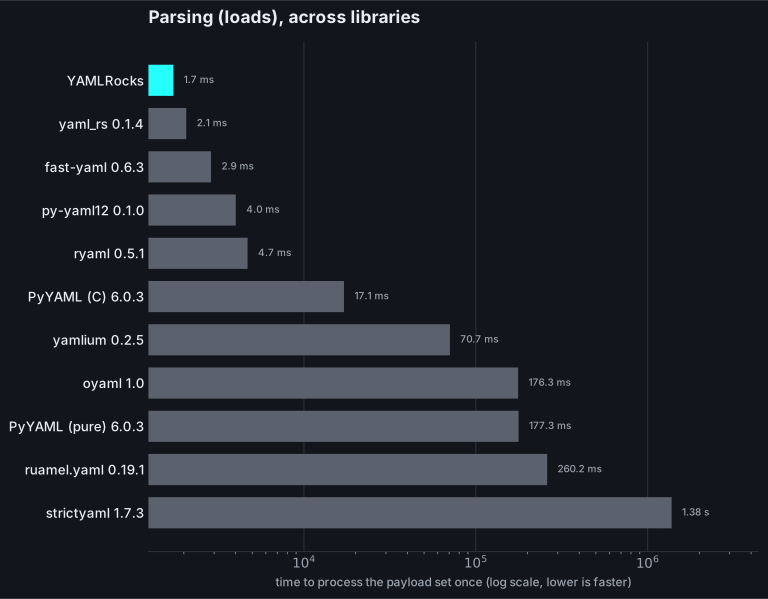
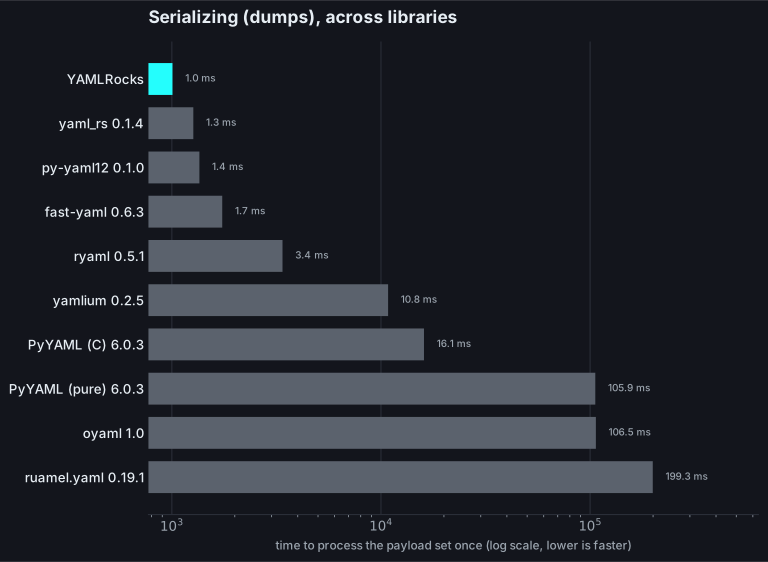
YAMLRocks leads on both. The closest contenders are the other Rust-backed parsers (`yaml_rs`, `ryaml`, `py-yaml12`), and the comparison is not quite like for like: none of them apply YAML merge keys (a `<<` is left as a literal key); `ryaml` and `yaml_rs` reject a duplicate key outright where YAMLRocks (and PyYAML) keep the last; `ryaml` errors on an integer larger than 64 bits and `py-yaml12` returns it as a lossy float. `oyaml` is PyYAML with ordered dicts, so it tracks pure-Python PyYAML exactly. `strictyaml` is deliberately restrictive (it rejects flow style and returns every scalar as a string) and has no general dumper, so it appears in the parsing chart only.
Regenerate the charts with `just charts`, which builds a release extension first (a debug build is several times slower, and would understate YAMLRocks against the other libraries’ release wheels).
## Headline numbers
[Section titled “Headline numbers”](#headline-numbers)
Every figure below is how many times **faster YAMLRocks is** than the named library.
* **Parsing**: YAMLRocks is **\~6-10x faster than PyYAML’s C `CSafeLoader`**, \~64-87x faster than pure-Python PyYAML, \~105-141x faster than ruamel.yaml, and \~27-34x faster than yamlium.
* **Serializing**: YAMLRocks is **\~17-19x faster than PyYAML’s C `CSafeDumper`**, \~75-94x faster than pure-Python PyYAML, \~160-208x faster than ruamel.yaml, and \~8-12x faster than yamlium.
* **Native includes**: YAMLRocks is **\~17x faster** than a PyYAML `!include` constructor for configurations split across hundreds of files, exactly the Home Assistant startup and reload pattern.
Most environments without `libyaml` installed fall back to pure-Python PyYAML, which is where the largest gap shows.
## Parsing (`loads`)
[Section titled “Parsing (loads)”](#parsing-loads)
How many times faster YAMLRocks is at parsing each payload:
| Payload | vs PyYAML (C) | vs PyYAML (pure) | vs ruamel | vs yamlium |
| --------------------- | ------------: | ---------------: | ------------: | -----------: |
| small (10 lines) | \~8x faster | \~64x faster | \~105x faster | \~28x faster |
| medium (k8s manifest) | \~9x faster | \~80x faster | \~124x faster | \~31x faster |
| large (500 items) | \~10x faster | \~87x faster | \~141x faster | \~34x faster |
| deep (30 levels) | \~6x faster | \~69x faster | \~105x faster | \~27x faster |
## Serializing (`dumps`)
[Section titled “Serializing (dumps)”](#serializing-dumps)
How many times faster YAMLRocks is at serializing each payload:
| Payload | vs PyYAML (C) | vs PyYAML (pure) | vs ruamel | vs yamlium |
| ------- | ------------: | ---------------: | ------------: | -----------: |
| small | \~18x faster | \~94x faster | \~208x faster | \~11x faster |
| medium | \~18x faster | \~92x faster | \~201x faster | \~12x faster |
| large | \~17x faster | \~86x faster | \~199x faster | \~12x faster |
| deep | \~17x faster | \~75x faster | \~163x faster | \~8x faster |
yamlium emits comparatively quickly, so its dump gap is the smallest of the four, but YAMLRocks still leads on every shape. The margin narrows as individual strings grow very long (where yamlium serializes straight from the original Python `str` objects and YAMLRocks copies each string once more), yet YAMLRocks stays ahead even for an array of 500 long plain strings.
## Includes (Home Assistant-style split config)
[Section titled “Includes (Home Assistant-style split config)”](#includes-home-assistant-style-split-config)
How many times faster YAMLRocks’s native include resolver is than a PyYAML `!include` constructor:
| Files | YAMLRocks is |
| ----- | -----------: |
| 50 | \~17x faster |
| 200 | \~17x faster |
| 500 | \~17x faster |
The constructor approach re-enters the Python parser once per file and rebuilds the loader machinery each time. YAMLRocks resolves the whole include graph in Rust in a single pass, which is why the gap stays wide as the file count grows.
## Why it is fast
[Section titled “Why it is fast”](#why-it-is-fast)
The speed is not one trick; it is a stack of decisions that each remove work from the hot path.
* **A custom Rust scanner and parser.** There is no general-purpose dependency to fight. The scanner is tuned for the shapes real configs use (short keys, plain scalars, repetitive structure), so the common cases stay on the fast path.
* **Zero-copy scalar borrowing.** A single-line plain scalar that needs no unescaping is read directly out of the input buffer rather than copied into a fresh allocation. The bytes you passed in *are* the scalar, right up until a Python `str` is built from them.
* **Direct Python object construction.** Plain `loads` skips the rich round-trip AST (the one that preserves comments, styles, and spans). It resolves events into a lean Rust `Value` tree and builds the Python `dict`s and `list`s from it with raw CPython calls (`PyList_New` + `PyList_SET_ITEM`, `PyDict_New` + `PyDict_SetItem`), avoiding the per-element overhead of `append`/`__setitem__`.
* **Interned, cached mapping keys.** Repeated keys (the norm in configuration, where every list item shares the same fields) are interned once per document and reused, so the intern-table lookup happens once per distinct key rather than per occurrence. That cuts allocations and makes later dictionary lookups faster.
* **A tuned release profile.** The release build uses `lto = "fat"`, `codegen-units = 1`, and `opt-level = 3`, letting the optimizer inline across the whole crate.
## Getting the most from it
[Section titled “Getting the most from it”](#getting-the-most-from-it)
* **Pass `bytes`, not `str`.** YAMLRocks is happiest with `bytes`. If your YAML already arrives as bytes from a socket or file, hand them straight to `loads` and skip a UTF-8 round trip.
* **Write `dumps` output directly.** `dumps` returns `bytes`, so you can write it to a file or socket without an extra `.encode()`.
```python
import yamlrocks
source = """
name: app
port: 8080
"""
data = yamlrocks.loads(source)
payload = yamlrocks.dumps(data) # already bytes
with open("out.yaml", "wb") as f: # note "wb"
f.write(payload)
```
* **Use the fast path, not round-trip, unless you need comments.** Plain `loads`/`dumps` skip building the rich `YAMLRocksDocument` tree. Reach for `OPT_ROUND_TRIP` only when you actually need to preserve comments and layout.
* **Prefer native includes.** For split configurations, `OPT_INCLUDES` resolves the whole graph in Rust, far faster than a hand-rolled `!include` constructor.
* **Build a release wheel.** Install from PyPI (`pip install yamlrocks`) or build with `maturin build --release`. Debug builds are many times slower; never benchmark one.
## Reproducing the benchmarks
[Section titled “Reproducing the benchmarks”](#reproducing-the-benchmarks)
The benchmark harness lives in the repository and compares YAMLRocks against PyYAML (C loader) and ruamel.yaml across the payloads in the tables above:
```bash
python bench/bench.py
```
It prints per-payload timings and the relative speedups. Run it on the machine and Python build you care about; numbers from someone else’s laptop are only a rough guide.
## Free-threaded Python (nogil)
[Section titled “Free-threaded Python (nogil)”](#free-threaded-python-nogil)
YAMLRocks is free-threaded safe. On a free-threaded (nogil) CPython build, parsing and serializing run without holding the GIL, so multiple threads can load and dump YAML in parallel and actually use multiple cores. There is no special flag to set: the same `loads`/`dumps` calls scale across threads on a free-threaded interpreter.
## See also
[Section titled “See also”](#see-also)
* [Loading YAML](/guides/loading/) and [Dumping YAML](/guides/dumping/).
* [Includes](/guides/includes/): the native `!include` resolver.
* [Comparisons](/comparisons/): YAMLRocks against PyYAML and ruamel.yaml.
* [Architecture](/contributing/architecture/): how the parser is built.
# Round-trip editing
> Edit YAML in place while preserving comments, anchors, and formatting byte for byte.
Most YAML libraries treat a document as a one-way trip: you parse it into plain Python objects, and any comments, quoting choices, anchors, and blank lines are gone forever. Re-emitting that data produces a file that no longer looks like the one a human wrote.
`OPT_ROUND_TRIP` keeps the trip open in both directions. Instead of plain objects it returns a `YAMLRocksDocument`: a live, editable view over the parsed tree that still remembers every byte of the original. An unmodified document re-emits exactly what it parsed, and when you change a value, only that value moves. Every comment, quote, and blank line around it stays put.
```python
import yamlrocks
source = b"""\
# Application config
name: my-app # the service name
version: 1.0.0
"""
doc = yamlrocks.loads(source, option=yamlrocks.OPT_ROUND_TRIP)
# Nothing touched yet: the output is byte-for-byte identical to the input.
assert doc.to_yaml() == source
doc["version"] = "2.0.0"
print(doc.to_yaml().decode())
# # Application config
# name: my-app # the service name
# version: 2.0.0
```
The `# Application config` header and the `# the service name` inline comment survive the edit, and `version` carries its new value. This is the core promise of round-trip mode: edits are surgical.
When to reach for round-trip mode
Use it whenever a human also edits the file: configuration editors, migration tools, linters that auto-fix, or anything that writes a user’s YAML back to disk. For pure data interchange where formatting does not matter, plain [`loads`](/guides/loading/) is smaller and faster.
## Byte-for-byte for unmodified documents
[Section titled “Byte-for-byte for unmodified documents”](#byte-for-byte-for-unmodified-documents)
A freshly parsed document that you have not modified re-emits the bytes it came from. That includes anchors and aliases, quoting styles, and block scalars:
```python
import yamlrocks
original = b"base: &b\n x: 1\nuse: *b\n"
doc = yamlrocks.loads(original, option=yamlrocks.OPT_ROUND_TRIP)
assert doc.to_yaml() == original
```
This makes round-trip mode safe to drop into a save pipeline: loading and saving a file the user did not change leaves it untouched, so version control stays quiet and diffs stay meaningful.
Byte fidelity is a UTF-8 guarantee
The byte-for-byte promise is for UTF-8 input, which is what real configuration files use. YAMLRocks still reads UTF-16 and UTF-32 (the YAML spec requires it, detected by a byte order mark or the leading-byte pattern), but it decodes to text internally and re-emits as UTF-8. So loading a UTF-16 file gives you the right data, but re-emitting it produces the same text encoded as UTF-8, not the original UTF-16 bytes. Convert a file to UTF-8 first if you need byte-for-byte round-trip editing of it.
## Reading values
[Section titled “Reading values”](#reading-values)
A `YAMLRocksDocument` reads like the mapping it wraps. Scalar access returns plain Python values; mappings and sequences return live views (more on those below):
```python
import yamlrocks
doc = yamlrocks.loads(b"name: my-app\nport: 8080\n", option=yamlrocks.OPT_ROUND_TRIP)
doc["name"] # 'my-app'
doc.get("missing", 0) # 0 (default, like dict.get)
"port" in doc # True
len(doc) # 2
doc.keys() # ['name', 'port']
```
| Operation | Method | Returns |
| ------------ | ---------------------------- | ------------------------------------ |
| Index access | `doc[key]` | a value or a `YAMLRocksDocumentView` |
| Safe access | `doc.get(key, default=None)` | a value or the default |
| Membership | `key in doc` | `bool` |
| Length | `len(doc)` | number of top-level keys |
| Keys | `doc.keys()` | a `list` of keys |
To get a plain snapshot with no formatting attached, call `to_dict()`. It returns an ordinary `dict` (recursively), which is handy for comparisons, JSON serialization, or handing data to code that does not care about layout:
```python
doc.to_dict() # {'name': 'my-app', 'port': 8080}
```
## Deep edits write through
[Section titled “Deep edits write through”](#deep-edits-write-through)
Indexing into a nested mapping or sequence returns a `YAMLRocksDocumentView`: a live proxy onto that node rather than a detached copy. Assigning through a view writes back into the document, so deep edits stick:
```python
import yamlrocks
doc = yamlrocks.loads(
b"server:\n host: localhost\n ports:\n - 80\n - 443\n",
option=yamlrocks.OPT_ROUND_TRIP,
)
doc["server"]["host"] = "example.com"
doc["server"]["ports"][1] = 8443
print(doc.to_yaml().decode())
# server:
# host: example.com
# ports:
# - 80
# - 8443
```
A `YAMLRocksDocumentView` offers the same navigation surface as the `YAMLRocksDocument` itself (indexing, `get`, `in`, `len`, `keys`), plus a few methods for inspecting the slice it points at:
```python
view = doc["server"]
view.to_dict() # {'host': 'example.com', 'ports': [80, 8443]}
view.unwrap() # same plain dict/list snapshot
view.keys() # ['host', 'ports']
```
Views are windows, not copies
A `YAMLRocksDocumentView` stays attached to its parent `YAMLRocksDocument`. Read through it to inspect a sub-tree, and assign through it to edit in place. When you want a detached, formatting-free copy instead, call `unwrap()` or `to_dict()`.
## Deleting keys
[Section titled “Deleting keys”](#deleting-keys)
`del` removes a mapping key or a sequence item. The deleted entry takes its own comments with it, while everything around it — the document header, sibling keys, and their inline comments — stays untouched:
```python
import yamlrocks
doc = yamlrocks.loads(
b"# app config\nname: my-app # the service\ndebug: true\nport: 8080\n",
option=yamlrocks.OPT_ROUND_TRIP,
)
del doc["debug"]
print(doc.to_yaml().decode())
# # app config
# name: my-app # the service
# port: 8080
```
Deletes write through a `YAMLRocksDocumentView` too, so a nested key can be removed in place:
```python
doc = yamlrocks.loads(
b"server:\n host: localhost # keep me\n debug: true\n",
option=yamlrocks.OPT_ROUND_TRIP,
)
del doc["server"]["debug"]
print(doc.to_yaml().decode())
# server:
# host: localhost # keep me
```
Deleting an absent mapping key raises `KeyError`; an out-of-range sequence index raises `IndexError`:
```python
del doc["server"]["missing"]
```
## Walking the tree
[Section titled “Walking the tree”](#walking-the-tree)
`walk()` flattens the whole document into a list of `(path, value)` pairs, where each path is a tuple of keys and indices leading to a leaf value. It is the quickest way to scan every scalar, for example to validate values or collect the locations you want to change:
```python
import yamlrocks
doc = yamlrocks.loads(b"name: app\nport: 8080\n", option=yamlrocks.OPT_ROUND_TRIP)
doc.walk()
# [(('name',), 'app'), (('port',), 8080)]
```
Sequence elements appear with integer indices in their path, so nested structures flatten predictably:
```python
import yamlrocks
doc = yamlrocks.loads(
b"server:\n host: localhost\n ports:\n - 80\n - 443\n",
option=yamlrocks.OPT_ROUND_TRIP,
)
doc["server"].walk()
# [(('host',), 'localhost'), (('ports', 0), 80), (('ports', 1), 443)]
```
## Source locations with `range()`
[Section titled “Source locations with range()”](#source-locations-with-range)
Every `YAMLRocksDocument` and `YAMLRocksDocumentView` can report the span of source text it covers. `range()` returns a four-tuple `(start_line, start_col, end_line, end_col)`, all 1-based, which is exactly what you need to underline a node in an editor or point a user at a problem:
```python
import yamlrocks
doc = yamlrocks.loads(
b"# header\nname: app # inline\nport: 8080\n",
option=yamlrocks.OPT_ROUND_TRIP,
)
doc.range() # (2, 1, 3, 11)
```
The body of this document starts on line 2 (after the header comment) at column 1, and ends on line 3 at column 11. Views report the span of their own node, so you can locate any nested value:
```python
doc["name"] # 'app'
```
For read-only access to line and column on plain objects (without the editing machinery), see [annotated mode](/guides/annotated/).
## The node cursor: comments, styles, and locations
[Section titled “The node cursor: comments, styles, and locations”](#the-node-cursor-comments-styles-and-locations)
Item access is deliberately value-shaped: `doc["server"]["port"]` gives you the plain integer `8080`, not a wrapper. That is what you want most of the time, but a bare `8080` has nowhere to carry its comment, its line number, or the fact that it was written in single quotes.
`doc.node` solves that. It is a `YAMLRocksNode` cursor, and unlike item access, indexing a `YAMLRocksNode` *always* returns another `YAMLRocksNode` (scalars included), so every piece of metadata stays reachable down to a single leaf:
```python
import yamlrocks
source = b"""\
# HTTP front end
server:
host: localhost
port: 8080 # the http port
tags: [web, edge]
"""
doc = yamlrocks.loads(source, option=yamlrocks.OPT_ROUND_TRIP)
port = doc.node["server"]["port"] # a YAMLRocksNode, even though the value is a scalar
port.value # 8080
port.comment # 'the http port' (inline comment, no leading '#')
port.line # 4 (1-based)
port.column # 9
port.style # 'plain'
doc.node["server"]["tags"].style # 'flow'
```
### Reading metadata
[Section titled “Reading metadata”](#reading-metadata)
Every `YAMLRocksNode` exposes the same attributes, whatever it points at:
| Attribute | Meaning |
| ----------------- | --------------------------------------------------------------------- |
| `value` | the resolved Python value (scalar, `dict`, or `list`) |
| `comment` | the inline comment trailing the value, or `None` |
| `comment_before` | the standalone comment line(s) above the node, or `None` |
| `comment_after` | the trailing comment block after the node (a block’s foot), or `None` |
| `line` / `column` | 1-based source position |
| `file` | the source file the node came from, or `None` without includes |
| `style` | `plain`, `single`, `double`, `literal`, `folded`, `block`, or `flow` |
| `anchor` | the node’s anchor name (`&name`), or `None` |
| `tag` | the node’s explicit tag (`!!str`, `!custom`), or `None` |
Comment text is always bare (no leading `#`, no surrounding whitespace), so you read and write the words, not the punctuation. A multi-line `comment_before` or `comment_after` is returned as one string with `\n` between the lines.
`comment` follows YAML, not the shape of the value. When the value is a block mapping or sequence, the trailing comment goes on the key’s own line, and that is where `comment` reads and writes it:
```python
import yamlrocks
doc = yamlrocks.loads(
b"servers: # the whole pool\n - alpha\n - beta\n",
option=yamlrocks.OPT_ROUND_TRIP,
)
doc.node["servers"].comment # 'the whole pool'
doc.node["servers"][0].comment # None
```
The same holds for a sequence item written under its own dash (`- # note`).
### Writing metadata
[Section titled “Writing metadata”](#writing-metadata)
`value`, `comment`, `comment_before`, and `comment_after` are writable, and the change re-emits in the right place:
```python
import yamlrocks
doc = yamlrocks.loads(
b"# HTTP front end\nserver:\n port: 8080 # the http port\n",
option=yamlrocks.OPT_ROUND_TRIP,
)
port = doc.node["server"]["port"]
port.value = 8443
port.comment = "now uses TLS"
doc.node["server"].comment_before = "HTTP front end (TLS)"
doc.node["server"].comment_after = "end of server block"
print(doc.to_yaml().decode())
# # HTTP front end (TLS)
# server:
# port: 8443 # now uses TLS
# # end of server block
```
`comment_after` is the counterpart to `comment_before`: it writes a trailing comment block after a node. On a block mapping or sequence it lands at the collection’s own indent, after its last entry; on the document root it becomes a comment at the end of the file. Set it to `None` to remove the block. It applies only to block collections and the root: a scalar or a flow collection has nowhere to place a foot, so setting one there raises `ValueError` instead of silently dropping it.
Setting `value` keeps the node’s comments, anchor, and tag, so editing a value never silently drops the comment beside it. Set `comment` or `comment_before` to `None` to remove a comment entirely.
Where “before” comments live
For a mapping pair, the comment *above* the line belongs to the key, and `comment_before` reads and writes it there. The one subtlety is the very first key of a mapping: a comment above it is also the document’s (or sub-tree’s) leading comment, so `doc.node["server"].comment_before` and the parent’s own leading comment are the same text. Setting it replaces that one comment.
A `YAMLRocksDocumentView` exposes the same cursor through its own `.node`, so `doc["server"].node["port"]` and `doc.node["server"]["port"]` reach the same node.
## Anchors and aliases
[Section titled “Anchors and aliases”](#anchors-and-aliases)
Round-trip mode keeps `&anchor` definitions and `*alias` references intact, and the node cursor lets you find, follow, and detach them.
```python
import yamlrocks
source = b"""\
defaults: &d
retries: 3
timeout: 30
prod:
<<: *d
timeout: 60
staging: *d
"""
doc = yamlrocks.loads(source, option=yamlrocks.OPT_ROUND_TRIP)
```
### Finding anchors
[Section titled “Finding anchors”](#finding-anchors)
`YAMLRocksDocument.anchors` maps every anchor name to the `YAMLRocksNode` that defines it, and a definition’s `aliases` lists the references that point back at it: the basis for “find usages” or a safe rename:
```python
doc.anchors # {'d': YAMLRocksNode(mapping)}
defaults = doc.anchors["d"]
defaults.value # {'retries': 3, 'timeout': 30}
len(defaults.aliases) # 2 (the `<<: *d` merge and `staging: *d`)
```
On an alias node, `is_alias` is `True` and `target` is the defining `YAMLRocksNode`, so you can hop from a use to its definition (and read *its* comment or line):
```python
staging = doc.node["staging"]
staging.is_alias # True
staging.target.anchor # 'd'
```
### Following aliases
[Section titled “Following aliases”](#following-aliases)
Indexing an alias follows it transparently to the anchor it points at, so you can read straight through a `*alias`:
```python
doc.node["staging"]["retries"].value # 3
```
Because the alias and its anchor are the *same* node, an edit made through a followed alias changes the shared definition, and therefore every use of it:
```python
doc.node["staging"]["retries"].value = 99
doc.node["defaults"]["retries"].value # 99 (the anchor itself changed)
```
That is usually what you want for shared config. When it is not, detach first.
### Detaching an alias
[Section titled “Detaching an alias”](#detaching-an-alias)
`detach()` replaces a `*alias` with an independent deep copy of the anchor it referenced. The copy keeps the original’s styles and comments but carries no anchor of its own, and any aliases nested inside it are expanded, so editing it no longer touches the original:
```python
import yamlrocks
doc = yamlrocks.loads(
b"defaults: &d\n retries: 3\n timeout: 30\nstaging: *d\n",
option=yamlrocks.OPT_ROUND_TRIP,
)
doc.node["staging"].detach()
doc.node["staging"]["retries"].value = 7
print(doc.to_yaml().decode())
# defaults: &d
# retries: 3
# timeout: 30
# staging:
# retries: 7
# timeout: 30
```
`defaults` keeps its `&d` anchor and its original `retries: 3`; only the now-independent `staging` block changed. Calling `detach()` on a node that is not an alias raises `TypeError`.
### Creating anchors and aliases
[Section titled “Creating anchors and aliases”](#creating-anchors-and-aliases)
`anchor` is writable, and `make_alias(name)` turns a node into a reference to an existing anchor. Mark the shared node, then point others at it:
```python
import yamlrocks
doc = yamlrocks.loads(
b"defaults:\n retries: 3\nprod:\n retries: 5\n",
option=yamlrocks.OPT_ROUND_TRIP,
)
doc.node["defaults"].anchor = "d" # mark &d
doc.node["prod"].make_alias("d") # prod: *d
print(doc.to_yaml().decode())
# defaults: &d
# retries: 3
# prod: *d
```
Creation is validated so it can never emit a broken document:
* An anchor name must be **unique**. Assigning a name already used by another node raises `ValueError` (the document would otherwise have two `&name`).
* `make_alias` requires the anchor to **already exist and appear earlier** in the document; a missing or forward reference raises `ValueError`, because YAML resolves an alias only to a prior anchor.
Set `anchor` to `None` to remove an anchor. To break an existing alias into an independent copy instead, use [`detach()`](#detaching-an-alias).
## Emitting
[Section titled “Emitting”](#emitting)
There are two equivalent ways to render a `YAMLRocksDocument` back to YAML bytes. Both return `bytes`, like every other emitter in YAMLRocks:
```python
import yamlrocks
doc = yamlrocks.loads(b"name: app\n", option=yamlrocks.OPT_ROUND_TRIP)
doc.to_yaml() # b'name: app\n'
yamlrocks.dumps(doc) # b'name: app\n' (accepts a YAMLRocksDocument too)
```
Use `doc.to_yaml()` when you have a `YAMLRocksDocument` in hand; reach for `yamlrocks.dumps(doc)` when a `YAMLRocksDocument` flows through code that already calls `dumps` on whatever it is given.
## Saving to disk
[Section titled “Saving to disk”](#saving-to-disk)
A `YAMLRocksDocument` loaded from a file with [`load`](/guides/loading/) remembers where it came from. Its `origin` attribute holds that path, and `save()` writes the document back, returning the list of files it wrote:
```python
import yamlrocks
doc = yamlrocks.load("/config/app.yaml", option=yamlrocks.OPT_ROUND_TRIP)
doc["port"] = 9090
doc.origin # '/config/app.yaml'
doc.save() # ['/config/app.yaml'] - written in place
```
A document parsed with `loads` (from bytes, not a file) has `origin == None`. Give it a destination with `set_origin`, or pass a path straight to `save`. The following example is fully self-contained: it creates a real file in a temporary directory, edits it, and saves it back.
```python
import os
import tempfile
import yamlrocks
work = tempfile.mkdtemp()
path = os.path.join(work, "app.yaml")
with open(path, "wb") as handle:
handle.write(b"# service\nname: app\nport: 8080\n")
doc = yamlrocks.load(path, option=yamlrocks.OPT_ROUND_TRIP)
assert doc.origin == path
doc["port"] = 9090
written = doc.save()
assert written == [path]
# Only `port` changed; the comment and the rest are intact.
assert open(path, "rb").read() == b"# service\nname: app\nport: 9090\n"
# Redirect a document to a new path, then save a copy there.
other = os.path.join(work, "copy.yaml")
doc.set_origin(other)
doc.save()
assert os.path.exists(other)
```
You can also pass an explicit path to `save(path)` for a one-off write without changing `origin`.
Includes save too
When a round-trip document was assembled from `!include` directives, `save()` writes back only the included files you actually changed and leaves the rest alone. See [includes](/guides/includes/) for the full story.
## What is preserved (and one thing that normalizes)
[Section titled “What is preserved (and one thing that normalizes)”](#what-is-preserved-and-one-thing-that-normalizes)
Round-trip mode keeps the parts of a document that carry human intent:
* Head, inline, and trailing comments
* Inline-comment alignment (`x: 1 # note`) and `key:` / `-` to value padding (`example: true`)
* Single- and double-quoting, and literal (`|`) / folded (`>`) block scalars
* Flow (`[a, b]`, `{a: 1}`) versus block collection layout, and a block sequence’s indentation (`-` at the key’s column versus indented a step)
* An explicit `---` document-start marker
* Blank lines and indentation
* Anchors (`&name`), aliases (`*name`), and merge keys (`<<`)
* Custom tags and `!include` directives (see [includes](/guides/includes/))
Editing a value keeps all of that alignment intact: only the value itself changes, and the spacing and comment on its line come along untouched.
```python
import yamlrocks
source = b"name: app # three spaces before the hash\nport: 8080\n"
doc = yamlrocks.loads(source, option=yamlrocks.OPT_ROUND_TRIP)
# Untouched: byte-for-byte identical.
assert doc.to_yaml() == source
# Editing the value keeps the comment and its three-space gap; only "app" moves.
doc["name"] = "web"
doc.to_yaml()
# b'name: web # three spaces before the hash\nport: 8080\n'
```
There is one honest exception, and it applies only to a comment you write yourself: a comment **set** through the [`comment`](#yamlrocksnode) API uses a single space before the `#`, because a freshly written comment has no original spacing to keep.
## Upgrading 1.1 spellings in place
[Section titled “Upgrading 1.1 spellings in place”](#upgrading-11-spellings-in-place)
Because round-trip mode is byte-preserving, a document written with YAML 1.1 spellings (`yes`/`no`, `0777`) is dumped back out exactly as written: the legacy forms survive. To accept that input but emit canonical 1.2 while keeping comments and layout, add `OPT_UPGRADE_1_1`:
```python
import yamlrocks
source = b"# device settings\nenabled: yes # was on\nmask: 0777\n"
doc = yamlrocks.loads(
source, option=yamlrocks.OPT_ROUND_TRIP | yamlrocks.OPT_UPGRADE_1_1
)
doc.to_yaml()
# b'%YAML 1.2\n---\n# device settings\nenabled: true # was on\nmask: 511\n'
```
The re-emitted document is stamped with a `%YAML 1.2` directive so it declares itself upgraded and is read back as 1.2, not re-coerced. This is the gentle way to ease a configuration off the old schema without a reformat. See [easing into YAML 1.2](/guides/yaml-11-vs-12/#easing-into-yaml-12).
## See also
[Section titled “See also”](#see-also)
* [Loading YAML](/guides/loading/): plain parsing without the editing layer.
* [Includes](/guides/includes/): edit and save values that live in `!include`d files.
* [Annotated mode](/guides/annotated/): read-only line and column for every node.
* [YAML 1.1 vs 1.2](/guides/yaml-11-vs-12/): the `OPT_UPGRADE_1_1` bridge mode.
* [Dumping YAML](/guides/dumping/): emit plain Python objects.
* [API reference](/reference/api/) and [options](/reference/options/).
# Schema validation
> Validate documents against a JSON Schema, with line-accurate errors.
YAMLRocks can validate a document against a [JSON Schema](https://json-schema.org/). Pass the schema as a Python `dict` to `loads` (or `load`) through the `schema=` keyword. If the document conforms, you get the parsed value back exactly as without a schema. If it does not, YAMLRocks raises `YAMLRocksDecodeError` with a precise source location and a JSON path to the offending node.
Validation runs against the rich syntax tree (the same structure that powers round-trip mode), so every node still knows its source line and column. That is how a schema failure can point at an exact `line, column` rather than just “somewhere in your data”.
```python
import yamlrocks
schema = {
"type": "object",
"required": ["name", "port"],
"properties": {
"name": {"type": "string", "minLength": 1},
"port": {"type": "integer", "minimum": 1, "maximum": 65535},
"tags": {"type": "array", "items": {"type": "string"}},
},
"additionalProperties": False,
}
source = """
name: app
port: 8080
"""
yamlrocks.loads(source, schema=schema)
# {'name': 'app', 'port': 8080}
```
When a value is out of range, the error names both the JSON path (`$.port`) and the line and column in the original YAML:
```python
import yamlrocks
schema = {
"type": "object",
"required": ["name", "port"],
"properties": {
"name": {"type": "string", "minLength": 1},
"port": {"type": "integer", "minimum": 1, "maximum": 65535},
},
"additionalProperties": False,
}
source = """
name: app
port: 70000
"""
yamlrocks.loads(source, schema=schema)
# yamlrocks.YAMLRocksDecodeError: schema validation failed: value 70000 is greater than
# maximum 65535 at $.port (line 2, column 7)
```
Errors carry line numbers because validation runs on the syntax tree
YAMLRocks validates the syntax tree, where every node keeps the source location it was parsed from. That is why a schema failure points at `line 2, column 7` and not just “somewhere in your data”. The JSON path (`$.port`, `$.server.host`, `$[3]`) tells you *which* node; the line and column tell you *where* to fix it.
## Nested objects
[Section titled “Nested objects”](#nested-objects)
Schemas nest the same way your data does. A `properties` entry can itself be an object schema with its own `required` and `properties`:
```python
import yamlrocks
schema = {
"type": "object",
"properties": {
"server": {
"type": "object",
"required": ["host"],
"properties": {
"host": {"type": "string"},
"port": {"type": "integer", "minimum": 1, "maximum": 65535},
},
},
},
}
source = """
server:
host: db
port: 5432
"""
yamlrocks.loads(source, schema=schema)
# {'server': {'host': 'db', 'port': 5432}}
```
A violation deep in the tree reports the full path to it:
```python
import yamlrocks
schema = {
"type": "object",
"properties": {
"server": {
"type": "object",
"properties": {
"port": {"type": "integer", "minimum": 1},
},
},
},
}
source = """
server:
port: 0
"""
yamlrocks.loads(source, schema=schema)
# yamlrocks.YAMLRocksDecodeError: schema validation failed: value 0 is less than
# minimum 1 at $.server.port (line 2, column 9)
```
## Arrays
[Section titled “Arrays”](#arrays)
Use `items` to validate every element of a sequence against one schema, and `minItems` / `maxItems` to bound its length:
```python
import yamlrocks
schema = {
"type": "array",
"items": {"type": "integer", "minimum": 0},
"minItems": 1,
"maxItems": 3,
}
source = """
- 1
- 2
"""
yamlrocks.loads(source, schema=schema)
# [1, 2]
```
When an element fails, the path uses array index notation (`$[1]`):
```python
import yamlrocks
schema = {"type": "array", "items": {"type": "integer", "minimum": 0}}
source = """
- 1
- -5
"""
yamlrocks.loads(source, schema=schema)
# yamlrocks.YAMLRocksDecodeError: schema validation failed: value -5 is less than
# minimum 0 at $[1] (line 2, column 3)
```
## Enums and constants
[Section titled “Enums and constants”](#enums-and-constants)
`enum` restricts a value to a fixed set; `const` pins it to exactly one value:
```python
import yamlrocks
schema = {
"type": "object",
"properties": {
"level": {"enum": ["debug", "info", "warning", "error"]},
"version": {"const": 1},
},
}
source = """
level: info
version: 1
"""
yamlrocks.loads(source, schema=schema)
# {'level': 'info', 'version': 1}
```
A value outside the enum is rejected at its exact location:
```python
import yamlrocks
schema = {
"type": "object",
"properties": {"level": {"enum": ["debug", "info", "warning", "error"]}},
}
yamlrocks.loads(b"level: verbose\n", schema=schema)
# yamlrocks.YAMLRocksDecodeError: schema validation failed: value is not one of the
# allowed enum values at $.level (line 1, column 8)
```
## Combinators
[Section titled “Combinators”](#combinators)
`allOf`, `anyOf`, `oneOf`, and `not` compose smaller schemas. A common pattern is “this field is either a string or an integer”:
```python
import yamlrocks
schema = {
"type": "object",
"properties": {
"id": {"anyOf": [{"type": "string"}, {"type": "integer"}]},
},
}
yamlrocks.loads(b"id: 7\n", schema=schema) # {'id': 7}
yamlrocks.loads(b"id: abc123\n", schema=schema) # {'id': 'abc123'}
```
If the value matches none of the branches, validation fails:
```python
import yamlrocks
schema = {"anyOf": [{"type": "string"}, {"type": "integer"}]}
yamlrocks.loads(b"3.14", schema=schema)
# yamlrocks.YAMLRocksDecodeError: schema validation failed: value does not match any of
# the anyOf schemas at $ (line 1, column 1)
```
## Patterns
[Section titled “Patterns”](#patterns)
`pattern` constrains a string with a regular expression, and `patternProperties` applies a schema to every key that matches a pattern. The regex engine runs in guaranteed linear time, so an untrusted schema pattern cannot stall the validator, and an invalid pattern is reported as a schema error rather than silently skipped.
```python
import yamlrocks
schema = {
"type": "object",
"properties": {"name": {"type": "string", "pattern": "^[a-z][a-z0-9-]*$"}},
"patternProperties": {"^port_": {"type": "integer"}},
}
source = """
name: web-app
port_http: 80
port_https: 443
"""
yamlrocks.loads(source, schema=schema)
# {'name': 'web-app', 'port_http': 80, 'port_https': 443}
```
A property name is always treated as a string, so `propertyNames` and a `patternProperties` key match a numeric-looking key like `123` as the text `"123"`.
## Supported keywords
[Section titled “Supported keywords”](#supported-keywords)
YAMLRocks implements a practical, draft-7-ish subset of JSON Schema, enough to express the constraints configuration files actually need, without pulling in a full validator. The supported keywords are:
| Group | Keywords |
| ----------- | ------------------------------------------------------------------------------------------------------------------------------------------------------------ |
| Types | `type` (`null`, `boolean`, `integer`, `number`, `string`, `array`, `object`; a whole-number float counts as `integer`) |
| Values | `enum`, `const` |
| Objects | `properties`, `patternProperties`, `required`, `additionalProperties` (boolean or schema), `propertyNames`, `minProperties`, `maxProperties`, `dependencies` |
| Arrays | `items` (single schema or the draft-7 tuple form), `additionalItems`, `minItems`, `maxItems`, `contains`, `uniqueItems` |
| Numbers | `minimum`, `maximum`, `exclusiveMinimum`, `exclusiveMaximum`, `multipleOf` |
| Strings | `minLength`, `maxLength`, `pattern` |
| Combinators | `allOf`, `anyOf`, `oneOf`, `not` |
| References | `$ref` (local `#/...` pointers, including `#/$defs/...`) |
Unknown keywords are ignored
This is a deliberately small subset. Keywords YAMLRocks does not implement (such as `format`, or `if`/`then`/`else`) are skipped rather than rejected, so a richer schema written for another validator still works here; it just validates against the keywords listed above. If you need a feature that is missing, validate with a dedicated JSON Schema library after `loads` returns.
### Known limits of the built-in validator
[Section titled “Known limits of the built-in validator”](#known-limits-of-the-built-in-validator)
The validator is tuned for the scalar-and-shape constraints configuration files actually use. Three boundaries are worth knowing, and all three are reasons to reach for a dedicated JSON Schema library when you need them:
* **`$ref` resolves local pointers only.** A `$ref` into the same schema (`#/$defs/...`, `#/definitions/...`, or any `#/`-path) is resolved and validated. A remote reference (an external URL) is not fetched; it is reported as an unresolvable `$ref` rather than silently passing.
* **Object rules apply to scalar keys.** `properties`, `required`, and `additionalProperties` match string keys. A YAML *collection key* (`[a, b]: ...`) is not a JSON object key and is not subject to these rules, so it neither satisfies `required` nor trips `additionalProperties: false`.
* **The first error is reported.** Validation stops at the first violation and raises it with its path, line, and column. It does not accumulate every problem in one pass, so fixing one error may reveal the next on the following run.
## In-file schema references
[Section titled “In-file schema references”](#in-file-schema-references)
Editors such as VS Code (through the [`yaml-language-server`](https://github.com/redhat-developer/yaml-language-server) extension) let a document declare its own schema with a comment, conventionally on the first line:
```yaml
# yaml-language-server: $schema=https://example.com/config.schema.json
name: app
port: 8080
```
YAMLRocks recognizes this directive, but treats detecting it and acting on it as two separate steps, on purpose.
### Detecting the reference
[Section titled “Detecting the reference”](#detecting-the-reference)
`schema_ref` reads the leading comment block and returns the declared reference, or `None` if the document does not declare one. It only inspects comments at the top of the file; it never parses the body and never performs any I/O, so it is always cheap and safe to call:
```python
import yamlrocks
doc = b"# yaml-language-server: $schema=https://example.com/config.schema.json\nport: 8080\n"
yamlrocks.schema_ref(doc)
# 'https://example.com/config.schema.json'
yamlrocks.schema_ref(b"port: 8080\n")
# None
```
### Validating against the declared schema
[Section titled “Validating against the declared schema”](#validating-against-the-declared-schema)
YAMLRocks never fetches the reference for you
A schema reference is usually a URL. Fetching arbitrary URLs at parse time would mean surprise network I/O, unpredictable latency, and a server-side request forgery (SSRF) risk, so YAMLRocks does **not** do it. Resolving a reference to an actual schema is always under your control.
To validate against the in-file reference, pass `schema="auto"` together with a `schema_resolver`, a callable that receives the reference string and returns a schema `dict` (or `None` to decline). YAMLRocks detects the directive, calls your resolver, and validates against whatever it returns. If there is no directive, or the resolver returns `None`, validation is skipped and the parsed value is returned as usual.
```python
import yamlrocks
# A real resolver might read from a local cache, a bundled file, or an
# allow-listed fetch. Here we just map known references to schemas.
SCHEMAS = {
"https://example.com/config.schema.json": {
"type": "object",
"required": ["name", "port"],
"properties": {
"name": {"type": "string"},
"port": {"type": "integer", "minimum": 1, "maximum": 65535},
},
},
}
def resolve(ref):
return SCHEMAS.get(ref)
doc = b"# yaml-language-server: $schema=https://example.com/config.schema.json\nname: app\nport: 8080\n"
yamlrocks.loads(doc, schema="auto", schema_resolver=resolve)
# {'name': 'app', 'port': 8080}
```
A document that declares a schema and violates it fails exactly like the explicit `schema=` path, with a line-accurate error:
```python
import yamlrocks
SCHEMAS = {
"https://example.com/config.schema.json": {
"type": "object",
"properties": {"port": {"type": "integer"}},
},
}
doc = b"# yaml-language-server: $schema=https://example.com/config.schema.json\nport: not-a-number\n"
yamlrocks.loads(doc, schema="auto", schema_resolver=SCHEMAS.get)
# yamlrocks.YAMLRocksDecodeError: schema validation failed: expected type integer,
# found string at $.port (line 2, column 7)
```
This keeps the network decision where it belongs: in your hands. A resolver can consult a local cache, load a schema bundled with your application, or perform a fetch restricted to hosts you trust.
## See also
[Section titled “See also”](#see-also)
* [Loading YAML](/guides/loading/): the parsing entry points `schema=` plugs into.
* [Exceptions](/reference/exceptions/): the full `YAMLRocksDecodeError` model.
* [Annotated mode](/guides/annotated/): keep source locations on every node.
* [API reference](/reference/api/) and [options](/reference/options/).
# Custom tags
> Handle application-defined YAML tags with the default behavior, tag_handler, or OPT_PASSTHROUGH_TAG.
A YAML tag is the `!something` prefix that annotates a node with a type. Some tags are part of the YAML core schema (`!!str`, `!!int`), but applications also define their own (`!vec`, `!secret`, `!include`) to carry domain meaning. YAMLRocks gives you three ways to deal with application tags, from “ignore them” to “interpret them yourself” to “hand them back untouched”.
## The default: drop the tag, keep the value
[Section titled “The default: drop the tag, keep the value”](#the-default-drop-the-tag-keep-the-value)
By default an unrecognized application tag is dropped and the underlying value is returned as-is. This is the most forgiving behavior, and it means a document with custom tags still parses into ordinary Python objects:
```python
import yamlrocks
yamlrocks.loads(b"x: !custom foo")
# {'x': 'foo'}
```
The tag `!custom` is discarded; the scalar `foo` survives as a plain string.
## Registering tags by name
[Section titled “Registering tags by name”](#registering-tags-by-name)
When you know which tags you want to handle, register each one by name. Pass a `tags` mapping from a tag to a function that receives the tag’s value and returns whatever should take its place:
```python
import yamlrocks
yamlrocks.loads(b"point: !vec [1, 2]", tags={"!vec": tuple})
# {'point': (1, 2)}
```
Each function is called with the already-resolved inner value only (the name is implied by which key matched), so plain builtins drop straight in:
```python
import yamlrocks
yamlrocks.loads(b"name: !upper hello", tags={"!upper": str.upper})
# {'name': 'HELLO'}
```
For a registry you build up across a module, `yamlrocks.YAMLRocksTags` is a `dict` subclass that adds a `register` decorator:
```python
import yamlrocks
tags = yamlrocks.YAMLRocksTags()
@tags.register("!vec")
def make_vec(value):
return tuple(value)
yamlrocks.loads(b"point: !vec [1, 2]", tags=tags)
# {'point': (1, 2)}
```
`tags.register("!name", func)` works as a plain call too. Because `YAMLRocksTags` is just a `dict`, you can reuse one instance across many `loads` calls, merge two with `update`, or inspect it like any mapping. A tag that is not registered keeps the default behavior: the tag is dropped and the value kept.
## `tag_handler`: interpret tags yourself
[Section titled “tag\_handler: interpret tags yourself”](#tag_handler-interpret-tags-yourself)
Where the registry dispatches known tags by name, `tag_handler` is the catch-all for dynamic handling or unknown tags. Pass a `tag_handler(tag, value)` callback to take control. YAMLRocks calls it for each application-tagged node, and whatever you return is inserted into the result:
```python
import yamlrocks
yamlrocks.loads(
b"value: !double 5",
tag_handler=lambda tag, value: int(value) * 2 if tag == "!double" else value,
)
# {'value': 10}
```
The handler receives the tag string and the node’s already-resolved inner value, so nested tags are handled inside-out. You can use it to build real objects from tagged data:
```python
import yamlrocks
source = """
point: !vec
- 1
- 2
"""
def handler(tag, value):
if tag == "!vec":
return tuple(value)
return value
yamlrocks.loads(source, tag_handler=handler)
# {'point': (1, 2)}
```
A common pattern is to leave unknown tags as-is by returning the value unchanged, and only act on the tags you recognize, as both examples above do with their `else` branch.
Core tags are resolved before the handler
The `tag_handler` is only called for application tags. Core-schema tags such as `!!str` and `!!int` are resolved by the parser itself and never reach your callback (see [forcing a type](#forcing-a-type-with-core-tags) below).
## `OPT_PASSTHROUGH_TAG`: get `YAMLRocksTag` objects back
[Section titled “OPT\_PASSTHROUGH\_TAG: get YAMLRocksTag objects back”](#opt_passthrough_tag-get-yamlrockstag-objects-back)
When you want to preserve the tag and value without committing to an interpretation, use `OPT_PASSTHROUGH_TAG`. Each application-tagged node comes back as a `YAMLRocksTag` object with `.tag` and `.value` attributes:
```python
import yamlrocks
result = yamlrocks.loads(b"x: !custom 5", option=yamlrocks.OPT_PASSTHROUGH_TAG)
tag = result["x"]
tag.tag # '!custom'
tag.value # '5'
```
This is ideal for round-tripping or for deferring the decision: you can inspect `tag.tag`, branch on it, and convert later. You can also construct a `YAMLRocksTag` yourself with `YAMLRocksTag(tag, value)` when building data to emit:
```python
import yamlrocks
t = yamlrocks.YAMLRocksTag("!custom", 5)
t.tag # '!custom'
t.value # 5
```
How the mechanisms combine
A tagged node is resolved in a fixed order: a matching entry in `tags` wins first, then a `tag_handler` catch-all, then `OPT_PASSTHROUGH_TAG` wrapping, and finally the default of dropping the tag. So you can register the common tags by name and still pass a `tag_handler` to cover everything else, or fall back to `YAMLRocksTag` objects for tags you did not register.
## Emitting custom tags
[Section titled “Emitting custom tags”](#emitting-custom-tags)
`dumps` is the write-side mirror of the read side: a `YAMLRocksTag` serializes straight back to `!tag value`, preserving the tag and its value. It re-emits through the normal emitter, though, so it does not reproduce the original source byte-for-byte: quoting, comments, and spacing follow the emitter’s rules (`x: !custom "foo"` comes back as `x: !custom foo`). When you need byte-for-byte fidelity, load with `OPT_ROUND_TRIP` instead.
```python
import yamlrocks
yamlrocks.dumps({"x": yamlrocks.YAMLRocksTag("!input", "foo")})
# b'x: !input foo\n'
```
The inner value is serialized with the normal rules, so it can be more than a scalar. A collection drops to an indented block under the tag, and a multi-line string becomes a tagged block scalar:
```python
import yamlrocks
yamlrocks.dumps({"opts": yamlrocks.YAMLRocksTag("!extend", {"a": 1, "b": 2})})
# b'opts: !extend\n a: 1\n b: 2\n'
```
### Emitting your own types as tags
[Section titled “Emitting your own types as tags”](#emitting-your-own-types-as-tags)
When you hold your own objects (not `YAMLRocksTag` instances) and want them to emit as a tag, pass a `serializers` registry to `dumps`. It maps a **Python type** to a callable that returns a `YAMLRocksTag` (or a `(tag, value)` tuple). It is the write-side mirror of the load-side `tags={"!tag": func}` registry, but keyed the other way round: on load you dispatch on the YAML tag, on dump you dispatch on the Python type.
```python
import yamlrocks
class Input:
def __init__(self, name):
self.name = name
yamlrocks.dumps(
{"brightness": Input("kitchen")},
serializers={Input: lambda o: yamlrocks.YAMLRocksTag("!input", o.name)},
)
# b'brightness: !input kitchen\n'
```
The registry is matched by **exact type** and is consulted before a dataclass would otherwise be auto-serialized to a mapping, so a registered type always wins. A YAML node carries exactly one tag, so a result whose inner value is itself tagged (a `YAMLRocksTag` wrapping a `YAMLRocksTag`, or a serializer firing on the inner value too) raises rather than emitting a double-tagged scalar no parser accepts. Pair the registry with the load-side `tags` to round-trip a custom type cleanly:
```python
import yamlrocks
class Input:
def __init__(self, name):
self.name = name
def __repr__(self):
return f"Input({self.name!r})"
out = yamlrocks.dumps(
{"brightness": Input("kitchen")},
serializers={Input: lambda o: yamlrocks.YAMLRocksTag("!input", o.name)},
)
yamlrocks.loads(out, tags={"!input": lambda v: Input(str(v))})
# {'brightness': Input('kitchen')}
```
`to_json` drops tags
A tag has no JSON equivalent, so `to_json` emits the inner value and discards the tag. Only `dumps`/`dump` preserve it.
## Forcing a type with core tags
[Section titled “Forcing a type with core tags”](#forcing-a-type-with-core-tags)
The YAML core schema defines tags that force a scalar’s type regardless of how it looks. These are resolved by the parser, so they work without any handler or flag. `!!str` forces a value to a string, and `!!int` forces it to an integer:
```python
import yamlrocks
yamlrocks.loads(b"v: !!str 42")
# {'v': '42'}
yamlrocks.loads(b'v: !!int "42"')
# {'v': 42}
```
In the first case the number-looking `42` is kept as the string `'42'`; in the second the quoted `"42"` is coerced back to the integer `42`. This is the YAML way to override the default type resolution described in [Loading YAML](/guides/loading/).
## Config tags: includes, secrets, and environment variables
[Section titled “Config tags: includes, secrets, and environment variables”](#config-tags-includes-secrets-and-environment-variables)
YAMLRocks has first-class support for the configuration tags popularized by tools like Home Assistant and ESPHome (they are conventions, not specific to any one project). Each of these tags reaches outside the document (to other files, a secrets store, or the process environment), so each has its own opt-in flag and is inert until you set it:
| Tag | Flag | Behavior |
| ------------------------- | -------------- | ------------------------------------------------------------------------------ |
| `!include` family | `OPT_INCLUDES` | Splits a configuration across files; covered in [includes](/guides/includes/). |
| `!secret name` | `OPT_SECRETS` | Looks `name` up in `secrets.yaml`, searching up to the config root. |
| `!env_var NAME [default]` | `OPT_ENV_VAR` | Reads an environment variable, with an optional default. |
The flags are independent, because each crosses a different trust boundary: `!secret` reads a `secrets.yaml`, `!env_var` reads the process environment. Enable only what a given document is allowed to reach, and combine them with `|`.
```python
import os
import yamlrocks
os.environ["API_TOKEN"] = "abc123"
yamlrocks.loads(b"token: !env_var API_TOKEN", option=yamlrocks.OPT_ENV_VAR)
# {'token': 'abc123'}
```
Without its flag, the tag is just an application tag and follows the default behavior from the top of this page: the tag is dropped and the inner value is kept:
```python
import yamlrocks
yamlrocks.loads(b"token: !env_var API_TOKEN")
# {'token': 'API_TOKEN'}
```
If you would rather resolve a secret or variable yourself (against an in-memory store, say), leave the flag off and use a `tag_handler`, exactly as with any other application tag:
```python
import yamlrocks
secrets = {"db_password": "hunter2"}
yamlrocks.loads(
b"password: !secret db_password",
tag_handler=lambda tag, value: (
secrets.get(value, value) if tag == "!secret" else value
),
)
# {'password': 'hunter2'}
```
See the [Home Assistant recipes](/recipes/home-assistant/) for a fuller example that wires secrets, environment variables, and includes together.
### Handling a missing secret
[Section titled “Handling a missing secret”](#handling-a-missing-secret)
By default a `!secret` that names something no `secrets.yaml` defines is a hard error (`YAMLRocksSecretNotFoundError`), and resolution stops there. That is the right behavior for real loading: never run with a hole where a secret belongs. It does mean a config with several undefined secrets takes one fix-and-reload cycle per secret, which is awkward for a validation tool that wants to list them all.
Two opt-ins downgrade an *undefined* secret to a collected, non-fatal event so a single pass finds them all. Each resolves the missing node to `None` and continues. (A structurally broken `secrets.yaml`, malformed, not a mapping, or itself containing a `!secret`, still raises; that is an environment fault, not a user omission.)
The **`on_missing_secret` callback** is invoked once per undefined secret as `(name, file, line)`. It is observe-only (its return value is ignored); the caller collects the misses and decides what to do, which is the clean way to drive, say, a per-secret UI repair:
```python
import yamlrocks
source = """
a: !secret one
b: !secret two
"""
missing = []
data = yamlrocks.loads(
source,
option=yamlrocks.OPT_SECRETS,
include_dir=".",
on_missing_secret=lambda name, file, line: missing.append((name, line)),
)
# data == {'a': None, 'b': None}
# missing == [('one', 1), ('two', 2)]
```
The **`OPT_SECRET_NOT_FOUND_WARN` flag** is the zero-code convenience: instead of a callback, each miss is logged as a `WARNING` on the `yamlrocks` logger (same channel as `OPT_DUPLICATE_KEYS_WARN`) and resolution continues. Reach for it in a CLI that just wants a one-pass report; reach for the callback when you need the misses structured. They compose if you set both.
```python
import yamlrocks
source = """
a: !secret one
b: !secret two
"""
data = yamlrocks.loads(
source,
option=yamlrocks.OPT_SECRETS | yamlrocks.OPT_SECRET_NOT_FOUND_WARN,
include_dir=".",
)
# data == {'a': None, 'b': None}
# logs: secret 'one' is not defined in any secrets.yaml at :1
# logs: secret 'two' is not defined in any secrets.yaml at :2
```
Both default off, so unless you opt in, a missing secret still fails fast.
### Handling a missing environment variable
[Section titled “Handling a missing environment variable”](#handling-a-missing-environment-variable)
`!env_var` has the same pair, for the same reason. By default a *bare* `!env_var NAME` whose variable is unset raises `YAMLRocksEnvVarError` (a variable that supplies a default, `!env_var NAME fallback`, just uses the default and is never a miss). The `on_missing_env_var` callback and the `OPT_ENV_VAR_NOT_FOUND_WARN` flag downgrade the bare-and-unset case the same way secrets are downgraded, resolving the node to `None` and collecting every miss in one pass:
```python
import yamlrocks
source = """
host: !env_var DB_HOST
port: !env_var DB_PORT 5432
"""
missing = []
data = yamlrocks.loads(
source,
option=yamlrocks.OPT_ENV_VAR,
on_missing_env_var=lambda name, file, line: missing.append((name, line)),
)
# data == {'host': None, 'port': '5432'} (port used its default)
# missing == [('DB_HOST', 1)]
```
The secret and env-var callbacks are independent (each fires only for its own tag), matching the separate `OPT_SECRETS` and `OPT_ENV_VAR` flags, so a loader can treat a missing secret and a missing variable differently.
## See also
[Section titled “See also”](#see-also)
* [Loading YAML](/guides/loading/): default type resolution.
* [Includes](/guides/includes/): the `!include` family of tags.
* [Home Assistant recipes](/recipes/home-assistant/): tags in a real config.
* [API reference](/reference/api/) and [options](/reference/options/).
# YAML 1.1 vs 1.2
> Why YAMLRocks defaults to YAML 1.2, what changes in 1.1 mode, and how to upgrade old documents.
YAML has two schema versions in common use, and they disagree about what a bare scalar like `no` or `0777` means. YAMLRocks follows the **YAML 1.2 core schema** by default, which is the modern, stricter, and safer choice. You can opt into the older 1.1 rules per call when you must read documents written for them.
## A quick contrast
[Section titled “A quick contrast”](#a-quick-contrast)
The scanner and parser are identical between the two modes; only scalar type resolution differs. The same input can therefore yield different Python types:
```python
import yamlrocks
yamlrocks.loads(b"enabled: yes") # {'enabled': 'yes'}
yamlrocks.loads(b"enabled: yes", option=yamlrocks.OPT_YAML_1_1) # {'enabled': True}
```
In 1.2 the word `yes` is just a string. In 1.1 it is a boolean. That single difference is the source of a famous class of configuration bugs.
## The Norway problem
[Section titled “The Norway problem”](#the-norway-problem)
The canonical example is a list of country codes. Norway’s ISO code is `NO`, and under YAML 1.1’s generous boolean rules `NO` resolves to `False`:
```python
import yamlrocks
countries = """
codes:
- NO
- SE
- NL
"""
yamlrocks.loads(countries)
# {'codes': ['NO', 'SE', 'NL']}
yamlrocks.loads(countries, option=yamlrocks.OPT_YAML_1_1)
# {'codes': [False, 'SE', 'NL']}
```
Under 1.1, Norway silently disappears from the list and becomes a boolean. This is exactly the kind of corruption that is hard to spot and harder to debug, and it is why YAML 1.2 narrowed booleans down to just `true` and `false`.
## What changes between the schemas
[Section titled “What changes between the schemas”](#what-changes-between-the-schemas)
The differences are all about which bare scalars get special meaning. YAML 1.1 recognizes more “magic” words and number formats; YAML 1.2 keeps almost everything as a plain string unless it is unambiguously a number, boolean, or null.
| Input | YAML 1.2 (default) | YAML 1.1 (`OPT_YAML_1_1`) |
| ---------------- | -------------------- | ------------------------- |
| `yes` / `no` | `'yes'` / `'no'` | `True` / `False` |
| `on` / `off` | `'on'` / `'off'` | `True` / `False` |
| `true` / `false` | `True` / `False` | `True` / `False` |
| `0777` | `'0777'` (string) | `511` (octal int) |
| `0o777` | `511` (octal int) | `511` (octal int) |
| `1:30:00` | `'1:30:00'` (string) | `5400` (sexagesimal int) |
| `<<` merge key | merges | merges |
Two of these are worth seeing directly. The leading-zero octal form behaves very differently:
```python
import yamlrocks
yamlrocks.loads(b"perm: 0777") # {'perm': '0777'}
yamlrocks.loads(b"perm: 0777", option=yamlrocks.OPT_YAML_1_1) # {'perm': 511}
```
So does the sexagesimal (base-60) number form, which 1.1 used for things like durations:
```python
import yamlrocks
yamlrocks.loads(b"duration: 1:30:00")
# {'duration': '1:30:00'}
yamlrocks.loads(b"duration: 1:30:00", option=yamlrocks.OPT_YAML_1_1)
# {'duration': 5400}
```
The merge key `<<` behaves the same in both modes; it is listed here only because it is sometimes mistaken for a version difference. It works regardless of the schema:
```python
import yamlrocks
source = """
base: &b {x: 1}
use:
<<: *b
y: 2
"""
yamlrocks.loads(source)
# {'base': {'x': 1}, 'use': {'x': 1, 'y': 2}}
```
## Why 1.2 is the default
[Section titled “Why 1.2 is the default”](#why-12-is-the-default)
YAML 1.2 is the safer default precisely because it does less guessing. Fewer bare words carry hidden meaning, so a value you wrote as text stays text. The Norway problem, the surprise octal in `0777`, and accidental sexagesimal numbers all go away. Modern tooling (including the JSON-compatible side of YAML) expects 1.2 semantics, so it is also the most interoperable choice.
Reach for 1.1 only when you are consuming documents that were authored for it, such as some older Home Assistant or Ansible configurations that rely on `yes`/`no` booleans.
## Opting into 1.1
[Section titled “Opting into 1.1”](#opting-into-11)
`OPT_YAML_1_1` is a per-call option, so you can mix schemas in the same program: read legacy files in 1.1 mode while everything else stays on 1.2:
```python
import yamlrocks
yamlrocks.loads(b"feature: on", option=yamlrocks.OPT_YAML_1_1)
# {'feature': True}
```
The flag composes with the other parsing options using `|`, just like any other flag.
### PyYAML-compatible booleans
[Section titled “PyYAML-compatible booleans”](#pyyaml-compatible-booleans)
There are three scalar schemas in play: **YAML 1.2** (the default), **strict YAML 1.1** (`OPT_YAML_1_1`), and **PyYAML-compat** (`OPT_PYYAML_COMPAT`). The third is not a fourth set of rules to learn: it is strict YAML 1.1 with exactly one exception.
`OPT_YAML_1_1` follows the literal YAML 1.1 spec, where bare `y`/`Y`/`n`/`N` are booleans alongside `yes`/`no`/`on`/`off`. That is spec-correct, but it is a sharp edge: a `y:` key, common for coordinates, becomes the boolean key `True`, and a value `n` becomes `False`. PyYAML deliberately drops the single-letter forms (its resolver lists `y`/`n` as candidates but its regex does not match them), and the PyYAML-based ecosystem (Home Assistant, ESPHome, Ansible) relies on that.
`OPT_PYYAML_COMPAT` is that one exception: identical to strict 1.1 in every way (`yes`/`no`/`on`/`off`/`true`/`false` and their case variants are booleans, `0777` is octal, `1:30` is sexagesimal), **except** bare `y`/`Y`/`n`/`N` stay strings. If you are reading configs written for the PyYAML ecosystem, this is the flag you want. It implies the 1.1 schema, so it works on its own, and it carries through the migration paths above, `OPT_UPGRADE_1_1` and `OPT_YAML_1_1_WARN` both treat `y`/`n` as strings under it.
```python
import yamlrocks
source = """
y: 2
on: 5
"""
yamlrocks.loads(source, option=yamlrocks.OPT_PYYAML_COMPAT)
# {'y': 2, True: 5} ('y' stays a string key; 'on' is the boolean True)
```
## The upgrade path
[Section titled “The upgrade path”](#the-upgrade-path)
Rather than carrying 1.1 documents forever, you can rewrite them to canonical 1.2 once. `yamlrocks.upgrade` reads a document with the 1.1 schema and emits 1.2 bytes, turning `yes`/`no` into `true`/`false`, leading-zero octals into plain decimals, and so on:
```python
import yamlrocks
source = """
enabled: yes
mode: on
"""
yamlrocks.upgrade(source)
# b'%YAML 1.2\n---\nenabled: true\nmode: true\n'
yamlrocks.upgrade(b"perm: 0777\n")
# b'%YAML 1.2\n---\nperm: 511\n'
```
The output opens with a **`%YAML 1.2` version directive**. That single line is what makes the migration stick: it declares the document as 1.2, so any later read interprets it with the modern schema, even a read that asks for 1.1. Without it, a file you upgrade today could be re-coerced tomorrow (more on that in [Staying upgraded](#staying-upgraded) below). Upgrading an already-stamped document is idempotent: the directive is never doubled.
By default `upgrade` preserves comments, anchors, and layout, changing only the scalars that actually differ between the schemas (plus the directive). Pass `preserve_comments=False` to reformat the document from scratch instead.
Migrating a codebase
`upgrade` is ideal for a one-time migration: run it over your old YAML files, commit the canonical 1.2 output, and drop `OPT_YAML_1_1` from your loaders. From then on the safer default protects every read.
## Easing into YAML 1.2
[Section titled “Easing into YAML 1.2”](#easing-into-yaml-12)
A one-time `upgrade` is not always practical. When you do not control the input, or you want to keep accepting legacy files while standardizing everything you write on the modern schema, reach for **`OPT_UPGRADE_1_1`**. It is a persistent “read 1.1, always write 1.2” mode: set it once on your loader, and every value you read is interpreted with the 1.1 rules while every value you dump comes out as canonical 1.2. No per-file conversion, and no manual `upgrade` call.
On the fast path, the upgrade is automatic. Reading with the 1.1 schema turns `yes` into a real `True` and `0777` into `511`, and `dumps` is always canonical 1.2, so a round trip standardizes the spellings for you:
```python
import yamlrocks
source = """
enabled: yes
mask: 0777
"""
obj = yamlrocks.loads(source, option=yamlrocks.OPT_UPGRADE_1_1)
# {'enabled': True, 'mask': 511}
yamlrocks.dumps(obj)
# b'enabled: true\nmask: 511\n'
```
In round-trip mode the same flag rewrites the scalars in place while keeping the comments, anchors, and layout untouched, so you can upgrade a file’s *spelling* without reformatting it:
```python
import yamlrocks
source = b"# device settings\nenabled: yes # was on\nmask: 0777\n"
doc = yamlrocks.loads(
source, option=yamlrocks.OPT_ROUND_TRIP | yamlrocks.OPT_UPGRADE_1_1
)
doc.to_yaml()
# b'%YAML 1.2\n---\n# device settings\nenabled: true # was on\nmask: 511\n'
```
The re-emitted document is stamped with `%YAML 1.2`, and `doc.save()` writes that stamp back to the file, so the next time your loader reads it the directive takes over. (The fast `dumps` path above is not stamped: its output is already canonical 1.2 with no ambiguous tokens, so it reads the same either way. Stamp it yourself with `upgrade` if you persist it.)
Why this matters
This is the gentle on-ramp to YAML 1.2. A project that still receives `yes`/`no` configurations (older Home Assistant or Ansible setups, for example) can adopt `OPT_UPGRADE_1_1` to accept that input today while every file it writes back is already clean 1.2. Once the inputs have caught up, drop the flag and the strict default takes over. Without it, plain `OPT_ROUND_TRIP` is byte-preserving by design and would faithfully write the old `yes`/`0777` spellings straight back out.
### Staying upgraded
[Section titled “Staying upgraded”](#staying-upgraded)
A persistent “always read 1.1” loader has a subtle trap: once you have upgraded a file, reading it again in 1.1 mode would re-interpret it. If a user later edits the upgraded file and writes `mode: yes` meaning the **string** `"yes"`, a 1.1 read would turn it back into a boolean. The migration would never truly finish.
The `%YAML 1.2` stamp closes that trap, because **a document’s own `%YAML` directive is authoritative**: it selects the schema and overrides the flags. A stamped file is read as 1.2 even under `OPT_UPGRADE_1_1`, so values added after the upgrade keep their 1.2 meaning:
```python
import yamlrocks
upgraded = yamlrocks.upgrade(b"enabled: yes\n")
edited = upgraded + b"note: yes\n" # the user adds a string later
yamlrocks.loads(edited, option=yamlrocks.OPT_UPGRADE_1_1)
# {'enabled': True, 'note': 'yes'} (note stays a string)
```
The same rule runs in both directions: a document that declares `%YAML 1.1` is read with the 1.1 schema even by default, because it explicitly said so.
```python
import yamlrocks
yamlrocks.loads(b"%YAML 1.1\n---\nenabled: yes\n") # {'enabled': True}
```
To check whether a file already carries a declaration, use `yaml_version`, a pure detector that reads only the stream header (no body parse, no I/O):
```python
import yamlrocks
yamlrocks.yaml_version(b"%YAML 1.2\n---\nx: 1\n") # '1.2'
yamlrocks.yaml_version(b"x: 1\n") # None
```
### Finding the 1.1-isms
[Section titled “Finding the 1.1-isms”](#finding-the-11-isms)
To audit *where* a configuration leans on the old schema, add `OPT_YAML_1_1_WARN` to either `OPT_YAML_1_1` or `OPT_UPGRADE_1_1`. It logs a message (on the `yamlrocks` logger) for every scalar that the two schemas type differently, with its line and column, so the diagnostics flow through your existing logging setup rather than an exception you have to catch:
```python
import yamlrocks
source = """
enabled: yes
mask: 0777
port: 8080
"""
yamlrocks.loads(
source,
option=yamlrocks.OPT_YAML_1_1 | yamlrocks.OPT_YAML_1_1_WARN,
)
# logs: YAML 1.1 syntax 'yes' resolves as bool in 1.1 but str in 1.2 at line 1, column 10
# logs: YAML 1.1 syntax '0777' resolves as int in 1.1 but str in 1.2 at line 2, column 7
# (port: 8080 is an int in both schemas, so it is not flagged)
```
## See also
[Section titled “See also”](#see-also)
* [Loading YAML](/guides/loading/): type resolution and parsing options.
* [Dumping YAML](/guides/dumping/): how YAMLRocks quotes ambiguous strings.
* [Home Assistant recipes](/recipes/home-assistant/): working with 1.1-era configs.
* [Options reference](/reference/options/): every flag in one place.
# YAML style guide
> The readable, consistent YAML style YAMLRocks recommends and emits, aligned with the Home Assistant YAML style guide.
YAML gives you many ways to write the same thing. A consistent style keeps configurations readable, reviewable, and approachable, which matters most when the people editing them are not YAML experts. YAMLRocks recommends the style below and emits it by default wherever it can; the few opinionated choices are a single option away.
It is the same style used across Home Assistant, documented in full in the [Home Assistant YAML style guide](https://developers.home-assistant.io/docs/documenting/yaml-style-guide/). That guide covers documentation and configuration conventions in depth; this page describes how the formatting rules map onto YAMLRocks.
The short version
Two-space indentation, block style throughout, lowercase `true`/`false`, empty values left blank, and strings quoted only when they need it. This is exactly what YAMLRocks produces by default.
## Indentation
[Section titled “Indentation”](#indentation)
Indent with **two spaces** per level. Never use tabs, and keep every level a consistent two spaces deeper than its parent.
```yaml
boulder:
grade: V4
name: Sunlit Slab
```
YAMLRocks emits two-space indentation by default. `OPT_INDENT_4` is available if a project insists on four, but two is the recommended width.
## Sequences
[Section titled “Sequences”](#sequences)
Write lists in **block style**, with each item on its own line under the key it belongs to, indented one level:
```yaml
# Good
climbing_rack:
- cams
- nuts
- quickdraws
```
Flow style (`[1, 2, 3]`) is harder to scan and is discouraged. When it genuinely helps, for instance a short list of numbers, put a space after each comma and no padding inside the brackets: `grades: [5, 8, 11]`.
YAMLRocks emits block sequences indented under their key by default, and uses the spaced flow form when you ask for `OPT_FLOW_STYLE`. If you instead prefer the “indentless” style that aligns the dashes with the key (`key:` then `- item`), common in the Kubernetes ecosystem, pass `OPT_INDENTLESS_SEQUENCES`.
## Mappings
[Section titled “Mappings”](#mappings)
Use **block style** mappings only. The flow form that looks like JSON, `{ name: basalt, igneous: true }`, is not used.
```yaml
# Good
specimen:
name: Basalt
origin: Iceland
```
Block mappings are the YAMLRocks default; flow mappings appear only under `OPT_FLOW_STYLE`.
## Booleans
[Section titled “Booleans”](#booleans)
The only boolean spellings are lowercase **`true`** and **`false`**. Avoid the YAML 1.1 truthy words such as `yes`, `no`, `on`, and `off`, and avoid capitalized forms like `True`.
```yaml
# Good
polished: true
fossil: false
```
YAMLRocks emits `true`/`false` for Python booleans. On the reading side it follows YAML 1.2, so `yes`, `no`, `on`, and `off` load as plain strings rather than booleans, which removes a whole class of surprises. (Opt into the 1.1 reading with `OPT_YAML_1_1` only if you must.)
## Null values
[Section titled “Null values”](#null-values)
Leave an empty value **blank**. Avoid the `~` spelling, and reach for the explicit `null` keyword only when a format genuinely calls for it. This is not just a convention: across thousands of real-world configuration files the blank form is by far the most common, so it is what YAMLRocks emits by default.
```yaml
# Good
nickname:
locality:
```
Because it is the default, `dumps` produces it with no options at all:
```python
import yamlrocks
yamlrocks.dumps({"nickname": None})
# b'nickname:\n'
```
Some formats prefer the explicit keyword, in particular data and specification formats such as OpenAPI, where `null` is idiomatic. Opt into it with `OPT_NULL_AS_KEYWORD`:
```python
import yamlrocks
yamlrocks.dumps({"nickname": None}, option=yamlrocks.OPT_NULL_AS_KEYWORD)
# b'nickname: null\n'
```
## Strings
[Section titled “Strings”](#strings)
Quote a string only when leaving it bare would change its meaning, for example a value that would otherwise read as a number, a boolean, or null. When you do quote, **double quotes** are preferred.
```yaml
# Quote because these would parse as other types
mohs: "7"
crystalline: "true"
# No quotes needed
name: Rose quartz
locality: Minas Gerais
```
Values that are clearly identifiers, such as mineral names, climbing grades, and similar enumerated tokens, read fine unquoted and are left bare.
YAMLRocks quotes a scalar only when it must, keeping output clean, and uses double quotes by default to match this rule. If you prefer single quotes (which avoid backslash escaping for values with many backslashes, such as a regex or a Windows path), pass `OPT_SINGLE_QUOTES`:
```python
import yamlrocks
yamlrocks.dumps({"crystalline": "true"})
# b'crystalline: "true"\n'
yamlrocks.dumps({"crystalline": "true"}, option=yamlrocks.OPT_SINGLE_QUOTES)
# b"crystalline: 'true'\n"
```
## Multi-line strings
[Section titled “Multi-line strings”](#multi-line-strings)
For text that spans several lines, use a block scalar rather than `\n` escapes: **literal** (`|`) keeps the line breaks, **folded** (`>`) joins lines with spaces.
```yaml
# Good
field_notes: |
Found near the ridge.
Quartz vein visible.
```
`dumps` emits a multi-line string as a literal `|` block by default, choosing the chomping indicator so it round-trips exactly:
```python
import yamlrocks
yamlrocks.dumps({"field_notes": "Found near the ridge.\nQuartz vein visible.\n"})
# b'field_notes: |\n Found near the ridge.\n Quartz vein visible.\n'
```
## Comments
[Section titled “Comments”](#comments)
Put a comment on its own line above what it describes, at the same indentation as that line. Start the text with a capital letter and leave one space after the `#`:
```yaml
# Tumble this one until it shines
agate:
stage: rough
```
YAMLRocks preserves comments exactly in [round-trip mode](/guides/round-trip/), including their position and spacing, so re-emitting an edited document keeps your comments untouched. The fast `dumps` path does not invent comments.
## Emitting style-compliant output
[Section titled “Emitting style-compliant output”](#emitting-style-compliant-output)
The style is the YAMLRocks default, so a plain `dumps` already produces it, no options required:
```python
import yamlrocks
config = {
"name": "Rose quartz",
"luster": None,
"tags": ["pink", "translucent"],
}
yamlrocks.dumps(config)
# name: Rose quartz
# luster:
# tags:
# - pink
# - translucent
```
# License
> YAMLRocks is open source under the MIT License.
YAMLRocks is free and open-source software, distributed under the **MIT License**. In short: you may use, copy, modify, and distribute it, including in commercial and closed-source projects, as long as the copyright notice and this permission notice are included. The software is provided “as is”, without warranty.
The authoritative copy is [`LICENSE`](https://github.com/frenck/yamlrocks/blob/main/LICENSE) in the repository.
## MIT License
[Section titled “MIT License”](#mit-license)
```text
MIT License
Copyright (c) 2026 Franck Nijhof
Permission is hereby granted, free of charge, to any person obtaining a copy
of this software and associated documentation files (the "Software"), to deal
in the Software without restriction, including without limitation the rights
to use, copy, modify, merge, publish, distribute, sublicense, and/or sell
copies of the Software, and to permit persons to whom the Software is
furnished to do so, subject to the following conditions:
The above copyright notice and this permission notice shall be included in all
copies or substantial portions of the Software.
THE SOFTWARE IS PROVIDED "AS IS", WITHOUT WARRANTY OF ANY KIND, EXPRESS OR
IMPLIED, INCLUDING BUT NOT LIMITED TO THE WARRANTIES OF MERCHANTABILITY,
FITNESS FOR A PARTICULAR PURPOSE AND NONINFRINGEMENT. IN NO EVENT SHALL THE
AUTHORS OR COPYRIGHT HOLDERS BE LIABLE FOR ANY CLAIM, DAMAGES OR OTHER
LIABILITY, WHETHER IN AN ACTION OF CONTRACT, TORT OR OTHERWISE, ARISING FROM,
OUT OF OR IN CONNECTION WITH THE SOFTWARE OR THE USE OR OTHER DEALINGS IN THE
SOFTWARE.
```
# Projects using YAMLRocks
> Where YAMLRocks fits, and who is using it.
YAMLRocks is young. This page tracks projects that use it and, just as usefully, the ecosystems it is built to serve. If you adopt YAMLRocks, please [open a pull request](https://github.com/frenck/yamlrocks) to add yourself here.
This page lists actual adopters only. For the public repositories YAMLRocks is tested against as a compatibility corpus, see [real-world verification](/verification/real-world-corpus/).
## Using YAMLRocks
[Section titled “Using YAMLRocks”](#using-yamlrocks)
*Be the first!* There are no public adopters yet. If your project uses YAMLRocks, we would love to list it.
## Where YAMLRocks fits
[Section titled “Where YAMLRocks fits”](#where-yamlrocks-fits)
YAMLRocks was designed for YAML-heavy Python projects that need speed, correctness, and round-trip fidelity at the same time. The following ecosystems are the primary motivation for its feature set.
### Home Assistant
[Section titled “Home Assistant”](#home-assistant)
Home Assistant has a large, split YAML configuration with `!include`, `!secret`, and `!env_var`, and it tracks source lines for friendly error messages. YAMLRocks implements that entire tag set with matching semantics, parses faster, and adds **writable includes**: load the config, edit one automation, and save only the changed file. That unlocks reliable UI-driven config editing.
See the [includes guide](/guides/includes/) and [annotated mode](/guides/annotated/).
### ESPHome
[Section titled “ESPHome”](#esphome)
ESPHome compiles YAML device configurations with `!include`, `!secret`, `!lambda`, `!extend`, and a substitutions system. YAMLRocks covers the include and secret tags directly, and the ESPHome-specific tags map onto a `tag_handler`. The native include resolver is dramatically faster for configs split across many files.
### Ansible
[Section titled “Ansible”](#ansible)
Ansible parses playbooks and inventories with source-position tracking and custom tags like `!vault` and `!unsafe`. YAMLRocks offers source locations, YAML 1.1 mode, and tag handling, though Ansible’s heavy use of annotated string subclasses is an area still being explored.
## Why choose YAMLRocks
[Section titled “Why choose YAMLRocks”](#why-choose-yamlrocks)
* **Fast**: Rust-backed; competitive with PyYAML’s C loader and far faster than pure-Python round-trip libraries. See [Performance](/guides/performance/).
* **Correct**: validated against the official YAML test suite plus snapshot and fuzz corpora, and a public real-world compatibility corpus.
* **Round-trip**: edit a value and re-emit with the rest of the document preserved.
* **Safe**: never executes arbitrary code from tags; bounded against alias bombs, deep nesting, and include cycles.
# Building a config editor
> Use round-trip mode to edit YAML programmatically without losing comments or formatting.
YAMLRocks’s round-trip mode makes it practical to build tools that edit user-authored YAML, such as a settings UI, a migration script, or a linter that auto-fixes, without destroying comments or reflowing the file. Load with `OPT_ROUND_TRIP`, edit through a `YAMLRocksDocument` (or a nested `YAMLRocksDocumentView`), and re-emit with `to_yaml()`. Unchanged nodes come back byte-for-byte; only what you touch is re-rendered.
## The core loop
[Section titled “The core loop”](#the-core-loop)
Load, read, edit, emit. Everything below is runnable: the YAML is built as bytes in-process so there is no file to set up.
```python
import yamlrocks
source = b"""# Service configuration
server:
host: localhost # bind address
port: 8080
features:
- logging
- metrics
"""
doc = yamlrocks.loads(source, option=yamlrocks.OPT_ROUND_TRIP)
# Read values like a dict / list.
doc["server"]["host"] # 'localhost'
# Write values; only what you touch changes.
doc["server"]["port"] = 9090
# Emit the bytes, comments and layout intact.
doc.to_yaml()
# b'# Service configuration\nserver:\n host: localhost # bind address\n port: 9090\n...'
```
An unmodified document re-emits identically, so running the loop with no edits is a no-op:
```python
unchanged = yamlrocks.loads(source, option=yamlrocks.OPT_ROUND_TRIP)
assert unchanged.to_yaml() == source
```
Comment spacing
Round-trip mode preserves the spacing before an inline `#`, including across an edit: `host: localhost # x` keeps its three spaces even after you change the value. The only exception is a comment you *set* through the `comment` API, which uses a single space (a freshly written comment has no original spacing to keep).
## Editing through a YAMLRocksDocumentView
[Section titled “Editing through a YAMLRocksDocumentView”](#editing-through-a-yamlrocksdocumentview)
Indexing into a nested mapping or sequence returns a `YAMLRocksDocumentView`, a live proxy onto that subtree. Edits through a view write back to the parent document:
```python
doc = yamlrocks.loads(source, option=yamlrocks.OPT_ROUND_TRIP)
server = doc["server"] # a YAMLRocksDocumentView onto the `server` mapping
type(server).__name__ # 'YAMLRocksDocumentView'
server["host"] = "0.0.0.0" # writes through to doc
doc.to_yaml().splitlines()[2] # b' host: 0.0.0.0 # bind address'
```
A view exposes the same navigation and inspection methods as the document: `keys()`, `get()`, `to_dict()`, `walk()`, `range()`, `to_yaml()`, and `unwrap()`.
## Mapping an edit back to a source span
[Section titled “Mapping an edit back to a source span”](#mapping-an-edit-back-to-a-source-span)
The killer feature for an editor is connecting a node to its exact location in the source text. `range()` returns `(start_line, start_col, end_line, end_col)`, all 1-based, so you can highlight a node, place a cursor, or show a diff anchored to the right lines:
```python
doc = yamlrocks.loads(source, option=yamlrocks.OPT_ROUND_TRIP)
doc["server"].range() # (3, 3, 4, 13) - the server block spans lines 3-4
doc["features"].range() # (6, 3, 7, 12) - the features list spans lines 6-7
```
Combine `range()` with `walk()` to drive a “jump to definition” or inline-error feature. `walk()` yields every scalar leaf as `(path_tuple, value)`, and you can re-index by the path to get that node’s view and span:
```python
doc = yamlrocks.loads(source, option=yamlrocks.OPT_ROUND_TRIP)
for path, value in doc.walk():
print(path, "=", value)
# ('server', 'host') = localhost
# ('server', 'port') = 8080
# ('features', 0) = logging
# ('features', 1) = metrics
# Locate the span of the node at a given path.
def span_at(document, path):
node = document
for key in path:
node = node[key]
return node.range()
span_at(doc, ("server",)) # (3, 3, 4, 13)
```
## Bulk edits with walk()
[Section titled “Bulk edits with walk()”](#bulk-edits-with-walk)
Because `walk()` exposes every leaf with its path, a find-and-replace or audit pass is straightforward. Re-index by the path’s parent to assign the new value:
```python
template = b"""# Provision me
database:
host: CHANGE_ME
name: app
cache:
host: CHANGE_ME
"""
doc = yamlrocks.loads(template, option=yamlrocks.OPT_ROUND_TRIP)
for path, value in doc.walk():
if value == "CHANGE_ME":
node = doc
for key in path[:-1]:
node = node[key]
node[path[-1]] = "db.internal"
doc.to_yaml()
# both CHANGE_ME placeholders are now db.internal; comments are preserved
```
## Reading without committing
[Section titled “Reading without committing”](#reading-without-committing)
`to_dict()` (on the document or any view) returns a plain snapshot for read-only logic, leaving round-trip state untouched. `unwrap()` does the same for a single view:
```python
doc = yamlrocks.loads(source, option=yamlrocks.OPT_ROUND_TRIP)
plain = doc.to_dict() # a regular dict/list tree
subtree = doc["server"].to_dict() # snapshot of one subtree
doc["server"].unwrap() # equivalent for a view
```
## Emitting and saving
[Section titled “Emitting and saving”](#emitting-and-saving)
When you do touch real files, load with `load(..., option=OPT_ROUND_TRIP)` and use `save()`; the document remembers where it came from. Otherwise stay in memory with `to_yaml()`:
```python
doc = yamlrocks.loads(source, option=yamlrocks.OPT_ROUND_TRIP)
doc["server"]["port"] = 9090
emitted = yamlrocks.dumps(doc) # bytes, identical to doc.to_yaml()
emitted == doc.to_yaml() # True
```
The example below touches the filesystem, so it carries a skip marker for the docs verifier, but it is the pattern you would use in a real editor:
```python
import yamlrocks
doc = yamlrocks.load("config.yaml", option=yamlrocks.OPT_ROUND_TRIP)
doc["server"]["port"] = 9090
doc.save() # overwrite config.yaml in place
doc.save("config.new.yaml") # or write a copy, leaving the original
```
## Tips
[Section titled “Tips”](#tips)
* Replacing a scalar with a different type is fine: `doc["count"] = 5` swaps the value and marks that node modified.
* Assigning a new key appends it: `doc["new"] = "value"`.
* Comments attached to a value you replace stay where they make sense; the rest of the document is reproduced verbatim.
* `dumps(doc)` and `doc.to_yaml()` produce the same bytes, so either works when you need the serialized form.
## See also
[Section titled “See also”](#see-also)
* [Round-trip editing](/guides/round-trip/): the full round-trip model.
* [Using YAMLRocks with Home Assistant](/recipes/home-assistant/): editing across `!include` files and saving only what changed.
* [Annotated mode](/guides/annotated/): source locations on the fast path, without round-trip.
* [API reference](/reference/api/): `YAMLRocksDocument` and `YAMLRocksDocumentView` in full.
# Using YAMLRocks with Home Assistant
> Load, edit, and save Home Assistant YAML configuration with includes, secrets, and source-tracked errors.
Home Assistant configurations are split across many files with `!include`, secrets, environment variables, and source-tracked errors. YAMLRocks implements that whole model natively and adds writable includes, so it is a strong fit for tools that read or edit HA configuration. This recipe walks the full loop: load a split config, surface good errors, edit one automation, and save only the file that changed.
## The tags Home Assistant uses
[Section titled “The tags Home Assistant uses”](#the-tags-home-assistant-uses)
Home Assistant configures itself with `!include`, `!secret`, and `!env_var` (the same conventions ESPHome and similar tools use). YAMLRocks resolves all of them natively, matching `annotatedyaml`’s semantics. Each tag reaches outside the document, so each has its own opt-in flag and is inert until you set it:
| Tag | Flag | Behavior |
| ------------------------------ | -------------- | ------------------------------------------------------------------ |
| `!include file.yaml` | `OPT_INCLUDES` | Inline another file |
| `!include_dir_list dir` | `OPT_INCLUDES` | One list entry per file |
| `!include_dir_merge_list dir` | `OPT_INCLUDES` | Concatenate the lists from each file |
| `!include_dir_named dir` | `OPT_INCLUDES` | Mapping keyed by file stem |
| `!include_dir_merge_named dir` | `OPT_INCLUDES` | Merge the mappings from each file |
| `!secret name` | `OPT_SECRETS` | Look up `name` in `secrets.yaml` (searching up to the config root) |
| `!env_var NAME [default]` | `OPT_ENV_VAR` | Read an environment variable, with an optional default |
Combine the flags you need with `|`. To resolve a config that uses includes and secrets, pass `OPT_INCLUDES | OPT_SECRETS`.
Each tag needs its own flag
Without its flag, a tag is treated as an ordinary custom tag rather than resolved: the tag is dropped and the inner value is kept. The flags are independent because each crosses a different trust boundary. `!secret` reads a `secrets.yaml` and `!env_var` reads the process environment, so enabling one does not enable the others.
## Loading a real configuration
[Section titled “Loading a real configuration”](#loading-a-real-configuration)
Against a live Home Assistant install you point `load` at `configuration.yaml`. When loading from a path, `include_dir` defaults to the file’s own directory, so includes and secrets resolve exactly as Home Assistant resolves them:
```python
import yamlrocks
config = yamlrocks.load(
"/config/configuration.yaml",
option=yamlrocks.OPT_INCLUDES | yamlrocks.OPT_SECRETS,
)
```
Loading from the event loop
Inside an async integration, use `await yamlrocks.async_load(...)` instead of wrapping `load` in `async_add_executor_job`. It moves both the file reads and the parse off the event loop, and the native core releases the GIL so the loop keeps running. See [Async](/reference/api/#async).
## A fully runnable example
[Section titled “A fully runnable example”](#a-fully-runnable-example)
The block below builds a small Home Assistant-style configuration in a temporary directory and loads it, so you can run it as-is. It mirrors the real layout: `configuration.yaml` pulls in `automations.yaml`, and a value is read from `secrets.yaml`.
```python
import os
import tempfile
import yamlrocks
workdir = tempfile.mkdtemp()
with open(os.path.join(workdir, "configuration.yaml"), "wb") as f:
f.write(
b"# Home Assistant configuration\n"
b"homeassistant:\n"
b" name: Home\n"
b" latitude: !secret home_latitude\n"
b"automation: !include automations.yaml\n"
)
with open(os.path.join(workdir, "automations.yaml"), "wb") as f:
f.write(
b"# Automations\n"
b"- alias: Morning lights\n"
b" trigger:\n"
b" - platform: time\n"
b' at: "07:00:00"\n'
b" action:\n"
b" - service: light.turn_on\n"
)
with open(os.path.join(workdir, "secrets.yaml"), "wb") as f:
f.write(b"home_latitude: 52.3676\n")
config = yamlrocks.load(
os.path.join(workdir, "configuration.yaml"),
option=yamlrocks.OPT_INCLUDES | yamlrocks.OPT_SECRETS,
)
config["homeassistant"]["name"] # 'Home'
config["homeassistant"]["latitude"] # 52.3676 (resolved from secrets.yaml)
config["automation"][0]["alias"] # 'Morning lights'
```
The `!include` is inlined and the `!secret` is resolved, just as Home Assistant would do when starting up. The config reaches two files and a secrets store, so it asks for both `OPT_INCLUDES` and `OPT_SECRETS`.
## Source locations for error messages
[Section titled “Source locations for error messages”](#source-locations-for-error-messages)
Add `OPT_ANNOTATED` to attach `__line__`, `__column__`, and `__file__` to every mapping and sequence, so a validation tool can point users at the precise location of a problem, including which included file it lives in:
```python
annotated = yamlrocks.load(
os.path.join(workdir, "configuration.yaml"),
option=yamlrocks.OPT_INCLUDES | yamlrocks.OPT_SECRETS | yamlrocks.OPT_ANNOTATED,
)
automations = annotated["automation"]
automations.__line__ # 2 (line within automations.yaml)
automations.__file__ # '.../automations.yaml'
automations[0].__line__ # 2
```
Because `__file__` follows the value across an `!include`, an error message can read like `automations.yaml, line 2` even though the user started from `configuration.yaml`. See [annotated mode](/guides/annotated/).
## Catching the unquoted-template typo early
[Section titled “Catching the unquoted-template typo early”](#catching-the-unquoted-template-typo-early)
A frequent configuration mistake is an unquoted template that occupies a whole value:
```yaml
state: { { states('sensor.x') } } # meant as a template; YAML sees a mapping key
```
Because the value starts with `{`, YAML reads it as a flow mapping in key position (a [complex key](/guides/loading/#complex-keys)), which YAMLRocks accepts and converts by default, so the mistake only surfaces vaguely later. Add `OPT_REJECT_COMPLEX_KEYS` to turn it into an immediate, located error that a config loader can wrap with a “did you forget to quote a template?” hint:
```python
import yamlrocks
opt = (
yamlrocks.OPT_INCLUDES | yamlrocks.OPT_ANNOTATED | yamlrocks.OPT_REJECT_COMPLEX_KEYS
)
try:
yamlrocks.loads(b"state: {{ states('sensor.x') }}\n", option=opt)
except yamlrocks.YAMLRocksComplexKeyError as err:
print(err.line, err.column) # 1 9
```
`YAMLRocksComplexKeyError` carries `.file`/`.line`/`.column` (and is a `YAMLRocksDecodeError`, so existing `except` clauses keep working). An *embedded* template like `name: app_{{ env }}` starts with a normal character, so it is a plain string and is unaffected. Configs are scalar-keyed, so a complex key is always a mistake there; this flag makes that explicit.
## Reporting every missing secret at once
[Section titled “Reporting every missing secret at once”](#reporting-every-missing-secret-at-once)
A missing `!secret` is a hard error by default, which stops at the first one. For a setup check (or a UI that surfaces a fixable issue per missing secret), you usually want *all* of them in one pass. Pass an `on_missing_secret` callback: it fires once per undefined secret with `(name, file, line)`, the node resolves to `None`, and the load continues, so you collect the full list without booting on a hole:
```python
import os
import tempfile
import yamlrocks
checkdir = tempfile.mkdtemp()
with open(os.path.join(checkdir, "configuration.yaml"), "wb") as f:
f.write(b"db: !secret db_password\napi: !secret api_token\n")
# note: no secrets.yaml, so both are undefined
missing = []
yamlrocks.load(
os.path.join(checkdir, "configuration.yaml"),
option=yamlrocks.OPT_INCLUDES | yamlrocks.OPT_SECRETS,
on_missing_secret=lambda name, file, line: missing.append((name, line)),
)
# missing == [('db_password', 1), ('api_token', 2)]
```
The callback carries only the name and location, never a resolved value, so it is exactly the placeholder set a per-secret “repair” needs and leaks nothing. A CLI that just wants a logged summary can instead set `OPT_SECRET_NOT_FOUND_WARN`, which logs each miss on the `yamlrocks` logger and continues, with no callback to write. Both default off, so normal startup stays fail-fast. Only an *undefined* secret downgrades; a broken `secrets.yaml` still raises. See [handling a missing secret](/guides/tags/#handling-a-missing-secret).
`!env_var` has the same pair, `on_missing_env_var` and `OPT_ENV_VAR_NOT_FOUND_WARN`, for a bare variable with no default; the two callbacks are independent, so a missing secret and a missing variable can become different repairs.
## Editing and saving, the right way
[Section titled “Editing and saving, the right way”](#editing-and-saving-the-right-way)
This is where YAMLRocks shines. Load with round-trip mode, edit a value, and `save()` writes back **only the file that changed**, preserving comments and the `!include` directive in `configuration.yaml`:
```python
doc = yamlrocks.load(
os.path.join(workdir, "configuration.yaml"),
option=yamlrocks.OPT_ROUND_TRIP | yamlrocks.OPT_INCLUDES | yamlrocks.OPT_SECRETS,
)
# Rename an automation that lives in automations.yaml.
doc["automation"][0]["alias"] = "Evening lights"
written = doc.save()
# ['.../automations.yaml'] - configuration.yaml is untouched.
written[0].endswith("automations.yaml") # True
```
The edited value lives in `automations.yaml`, so that is the only file rewritten. `configuration.yaml` and its `!include automations.yaml` line are left exactly as they were. This makes UI-driven editing safe: a tool can load the whole resolved config, let the user change any value, and persist it without rewriting unrelated files or stripping comments.
Preview before writing
To see what would change without touching disk, use `yamlrocks.dump_includes_map(doc)`, which returns a `{path: new_bytes}` dict of just the modified files. `yamlrocks.dump_includes(doc, include_dir=workdir)` performs the same write as `save()` when you want to target an explicit directory.
## Secrets are never leaked back
[Section titled “Secrets are never leaked back”](#secrets-are-never-leaked-back)
In round-trip mode, `!secret`, `!env_var`, and `!include` keep their directive form when the document is re-emitted, so resolved secret values never end up written back into a file:
```python
rt = yamlrocks.load(
os.path.join(workdir, "configuration.yaml"),
option=yamlrocks.OPT_ROUND_TRIP | yamlrocks.OPT_INCLUDES | yamlrocks.OPT_SECRETS,
)
rt.to_yaml()
# the homeassistant.latitude line is still `!secret home_latitude`,
# not the resolved 52.3676
```
## Migrating an annotatedyaml-based tool
[Section titled “Migrating an annotatedyaml-based tool”](#migrating-an-annotatedyaml-based-tool)
Replace the `annotatedyaml` load call with `yamlrocks.load(..., option=OPT_INCLUDES | OPT_SECRETS | OPT_ANNOTATED)`. The returned `YAMLRocksAnnotatedDict`/`YAMLRocksAnnotatedList` are real `dict`/`list` subclasses carrying `__line__`, `__column__`, and `__file__`, equivalent to `NodeDictClass`/`NodeListClass`. String **keys and values** become `YAMLRocksAnnotatedStr` (the equivalent of `NodeStrClass`), each carrying its own location, so an error can be attributed to the exact key. Nodes from the top-level file report the real path you passed to `load()` as their `__file__`.
Numbers can carry locations too: add `OPT_ANNOTATE_NUMBERS` alongside `OPT_ANNOTATED` and integers and floats come back as `YAMLRocksAnnotatedInt` / `YAMLRocksAnnotatedFloat` (real `int`/`float` subclasses with the same `__line__`/`__column__`/`__file__`). It is a separate flag because the wrapper has a small cost, so you opt in only where a number’s location matters.
```python
import yamlrocks
data = yamlrocks.loads(
b"http:\n server_port: 8123\n",
option=yamlrocks.OPT_ANNOTATED | yamlrocks.OPT_ANNOTATE_NUMBERS,
)
data["http"]["server_port"].__line__ # 2
```
The only scalars that stay plain are `bool` and `None`: Python forbids subclassing `bool`, and `None` is a singleton, so neither can carry attributes.
## See also
[Section titled “See also”](#see-also)
* [Includes](/guides/includes/): the full include and write-back model.
* [Annotated mode](/guides/annotated/): `__line__`/`__column__`/`__file__`.
* [Round-trip editing](/guides/round-trip/) and the [config editor recipe](/recipes/config-editor/).
* [Custom tags](/guides/tags/): handling tags beyond the HA set.
# Converting between YAML and JSON
> Convert YAML to JSON and JSON to YAML in Python, including multi-document streams, big integers, and stable diffs, with YAMLRocks.
YAML is a superset of JSON, so converting between the two is a common chore: feed a YAML config to a tool that only speaks JSON, or pretty-print a JSON blob as readable YAML. YAMLRocks does both with one call in each direction, safely and fast, and it keeps the things a naive `json` round-trip drops: key order, big integers, and multi-document streams. This recipe is the practical loop; the [JSON guide](/guides/json/) is the reference behind it.
## YAML to JSON
[Section titled “YAML to JSON”](#yaml-to-json)
Read the YAML with `loads`, write JSON with `to_json`. Both speak `bytes`, so there is no extra encode step before you write to a file or socket:
```python
import yamlrocks
config = b"name: app\nports:\n - 80\n - 443\nenabled: true\n"
yamlrocks.to_json(yamlrocks.loads(config))
# b'{"name":"app","ports":[80,443],"enabled":true}'
```
The output is compact by default, like a fast JSON writer. Note `enabled: true` became JSON `true`, not the string `"true"`: YAMLRocks defaults to YAML 1.2, so the booleans line up with JSON’s without the [Norway problem](/guides/yaml-11-vs-12/).
## JSON to YAML
[Section titled “JSON to YAML”](#json-to-yaml)
The reverse is `loads` (JSON is valid YAML, so no separate parser) then `dumps`:
```python
import yamlrocks
yamlrocks.dumps(yamlrocks.loads(b'{"name":"app","ports":[80,443]}'))
# b'name: app\nports:\n - 80\n - 443\n'
```
There is no `from_json`. Every valid JSON document is valid YAML 1.2, so `loads` already reads it.
## Stable, diff-friendly JSON
[Section titled “Stable, diff-friendly JSON”](#stable-diff-friendly-json)
For JSON you commit or compare in review, compact output is noisy. Add indentation and sort the keys, so the same data always serializes to the same bytes and diffs stay small:
```python
import yamlrocks
opt = yamlrocks.OPT_INDENT_2 | yamlrocks.OPT_SORT_KEYS
print(
yamlrocks.to_json(yamlrocks.loads(b"name: app\nport: 8080\n"), option=opt).decode()
)
# {
# "name": "app",
# "port": 8080
# }
```
Use `OPT_INDENT_4` for four-space indentation. Without an indent option the output stays compact. Leave out `OPT_SORT_KEYS` to keep the document’s own key order, which YAMLRocks preserves end to end.
## Multi-document YAML to a JSON array
[Section titled “Multi-document YAML to a JSON array”](#multi-document-yaml-to-a-json-array)
A YAML stream can hold several documents separated by `---`. JSON has no such separator, so the natural projection is a single JSON array. Read the stream with `loads_all` and hand the list straight to `to_json`:
```python
import yamlrocks
stream = b"---\nname: a\n---\nname: b\n"
docs = yamlrocks.loads_all(stream)
docs
# [{'name': 'a'}, {'name': 'b'}]
yamlrocks.to_json(docs)
# b'[{"name":"a"},{"name":"b"}]'
```
## Big integers survive the trip
[Section titled “Big integers survive the trip”](#big-integers-survive-the-trip)
Python’s standard `json` module handles arbitrary-precision integers, but many converters route through a type that clamps to 64 bits. YAMLRocks carries big integers through both YAML and JSON exactly:
```python
import yamlrocks
big = 2**70
yamlrocks.to_json({"n": big})
# b'{"n":1180591620717411303424}'
yamlrocks.loads(yamlrocks.to_json({"n": big}))["n"] == big
# True
```
## Values JSON cannot hold
[Section titled “Values JSON cannot hold”](#values-json-cannot-hold)
A few YAML values have no JSON equivalent, so `to_json` projects them consistently rather than guessing. `NaN` and the infinities are not valid JSON numbers, so they become `null`:
```python
import yamlrocks
yamlrocks.to_json({"x": float("nan"), "y": float("inf")})
# b'{"x":null,"y":null}'
```
Tags are dropped to their underlying value, non-string scalar keys are stringified (`1` becomes `"1"`), and a collection used as a key raises, because JSON genuinely cannot represent it. The full table lives in the [JSON guide](/guides/json/#the-yaml-to-json-projection).
## A tiny yaml2json command
[Section titled “A tiny yaml2json command”](#a-tiny-yaml2json-command)
Put the pieces together and you have a converter that reads YAML on stdin and writes JSON on stdout, ready to drop into a shell pipeline. It touches the process streams, so it carries a skip marker for the docs verifier:
```python
#!/usr/bin/env python3
"""Read YAML on stdin, write pretty, sorted JSON on stdout."""
import sys
import yamlrocks
opt = yamlrocks.OPT_INDENT_2 | yamlrocks.OPT_SORT_KEYS
data = yamlrocks.loads(sys.stdin.buffer.read())
sys.stdout.buffer.write(yamlrocks.to_json(data, option=opt))
```
Run it with `cat config.yaml | python yaml2json.py`. Swap `to_json` for `dumps` and drop the sort to make a `json2yaml` in the same shape.
## Keeping the YAML when you convert
[Section titled “Keeping the YAML when you convert”](#keeping-the-yaml-when-you-convert)
Plain `loads` gives you data, not the document, so comments and layout are gone. That is exactly what you want when the destination is JSON. If instead you convert to JSON to inspect part of a config but keep editing the YAML, load once in [round-trip mode](/guides/round-trip/): `to_json` accepts a `YAMLRocksDocument` or a nested view, so you can export a sub-tree while the original stays intact for editing.
```python
import yamlrocks
doc = yamlrocks.loads(
b"service:\n name: web\n ports: [80, 443]\nmeta:\n owner: ops\n",
option=yamlrocks.OPT_ROUND_TRIP,
)
yamlrocks.to_json(doc["service"]) # just one sub-tree, as JSON
# b'{"name":"web","ports":[80,443]}'
doc.to_yaml() # the YAML is untouched, comments and all
# b'service:\n name: web\n ports: [80, 443]\nmeta:\n owner: ops\n'
```
## See also
[Section titled “See also”](#see-also)
* [JSON import and export](/guides/json/): the full `to_json` reference and the YAML-to-JSON projection rules.
* [Loading YAML](/guides/loading/) and [Dumping YAML](/guides/dumping/): the options that shape both directions.
* [YAML 1.1 vs 1.2](/guides/yaml-11-vs-12/): why booleans and `null` line up with JSON by default.
* [Building a config editor](/recipes/config-editor/): when you convert to inspect but keep editing the YAML.
# API reference
> Every public function, type, and exception in YAMLRocks, with signatures.
This is the complete public surface of `yamlrocks`: a small set of top-level functions, integer [`OPT_*` flags](/reference/options/) combined with `|`, and a `default` hook for types that are not serializable out of the box. Reading parses YAML into native Python objects; dumping returns `bytes`.
Every signature below is the real one. Arguments before the `/` are positional-only and arguments after the `*` are keyword-only.
## Reading
[Section titled “Reading”](#reading)
### `loads`
[Section titled “loads”](#loads)
```python
def loads(
data: bytes | bytearray | memoryview | str,
/,
*,
option: int | None = None,
include_dir: str | os.PathLike[str] | None = None,
schema: Any | None = None,
schema_resolver: Callable[[str], Any | None] | None = None,
tag_handler: Callable[[str, Any], Any] | None = None,
tags: dict[str, Callable[[Any], Any]] | None = None,
root_path: str | os.PathLike[str] | None = None,
on_missing_secret: Callable[[str, str | None, int], None] | None = None,
on_missing_env_var: Callable[[str, str | None, int], None] | None = None,
) -> Any: ...
```
Parse the first YAML document from `data` and return native Python objects. Empty input (or input that is only comments) returns `None`.
* `option`: a bitwise-OR of [`OPT_*` flags](/reference/options/).
* `include_dir`: base directory for `!include` resolution (with `OPT_INCLUDES`).
* `root_path`: the on-disk path the in-memory `data` stands in for. Its nodes then report that path, and `!include` directives in it resolve relative to that file’s own directory. Without it, includes resolve relative to `include_dir`.
* `schema`: a JSON Schema `dict` to [validate](/guides/schema-validation/) against, or the string `"auto"` to validate against the document’s in-file `# yaml-language-server: $schema=...` reference (requires `schema_resolver`).
* `schema_resolver`: a callable `ref -> dict | None` used only with `schema="auto"`: it receives the declared reference and returns a schema `dict` (or `None` to skip validation). YAMLRocks never fetches the reference itself. See [in-file schema references](/guides/schema-validation/#in-file-schema-references).
* `tags`: a `{tag: func}` mapping (or a [`YAMLRocksTags`](#yamlrockstags) registry) resolving [custom tags](/guides/tags/) by name; `func` receives the inner value.
* `tag_handler`: a catch-all callback `(tag, value) -> value` for any tag not in `tags`.
* `on_missing_secret`: a callback `(name, file, line) -> None` invoked once per undefined `!secret` (with `OPT_SECRETS`) instead of raising; the node resolves to `None` and the load continues, so every miss is collected in one pass. See [handling a missing secret](/guides/tags/#handling-a-missing-secret).
* `on_missing_env_var`: the `!env_var` counterpart (with `OPT_ENV_VAR`), called per bare undefined variable with no default. See [handling a missing environment variable](/guides/tags/#handling-a-missing-environment-variable).
With `OPT_ROUND_TRIP` it returns a [`YAMLRocksDocument`](#yamlrocksdocument) instead of a plain value; with `OPT_ANNOTATED` it returns [annotated subclasses](#yamlrocksannotateddict-yamlrocksannotatedlist-yamlrocksannotatedstr).
```python
import yamlrocks
source = """
name: app
port: 8080
"""
yamlrocks.loads(source)
# {'name': 'app', 'port': 8080}
```
See the [loading guide](/guides/loading/) for type resolution, block scalars, anchors, and merge keys.
### `loads_all`
[Section titled “loads\_all”](#loads_all)
```python
def loads_all(
data: bytes | bytearray | memoryview | str,
/,
*,
option: int | None = None,
tag_handler: Callable[[str, Any], Any] | None = None,
tags: dict[str, Callable[[Any], Any]] | None = None,
) -> list[Any]: ...
```
Parse every `---`-separated document in the stream into a list, one entry per document.
```python
import yamlrocks
source = """
---
a: 1
---
b: 2
"""
yamlrocks.loads_all(source)
# [{'a': 1}, {'b': 2}]
```
### `load`
[Section titled “load”](#load)
```python
def load(
source: str | os.PathLike[str] | Any,
/,
*,
option: int | None = None,
include_dir: str | os.PathLike[str] | None = None,
schema: Any | None = None,
schema_resolver: Callable[[str], Any | None] | None = None,
tag_handler: Callable[[str, Any], Any] | None = None,
tags: dict[str, Callable[[Any], Any]] | None = None,
on_missing_secret: Callable[[str, str | None, int], None] | None = None,
on_missing_env_var: Callable[[str, str | None, int], None] | None = None,
) -> Any: ...
```
The file-oriented counterpart to [`loads`](#loads). `source` is a path (`str` or any `os.PathLike`) or an already-open file object. The keyword arguments behave identically (there is no `root_path`: the source file’s path supplies it).
With `OPT_INCLUDES` and no `include_dir`, includes resolve relative to the source file’s own directory, which is almost always what you want. A round-trip [`YAMLRocksDocument`](#yamlrocksdocument) returned by `load` remembers where it came from in `origin`, so `doc.save()` can write it back.
```python
import yamlrocks
with open("config.yaml", "w") as f:
f.write("name: app\nport: 8080\n")
yamlrocks.load("config.yaml")
# {'name': 'app', 'port': 8080}
```
### `load_all`
[Section titled “load\_all”](#load_all)
```python
def load_all(
source: str | os.PathLike[str] | Any,
/,
*,
option: int | None = None,
tag_handler: Callable[[str, Any], Any] | None = None,
tags: dict[str, Callable[[Any], Any]] | None = None,
) -> list[Any]: ...
```
The file-oriented counterpart to [`loads_all`](#loads_all). Reads a multi-document file or stream and returns every document as a list.
### `schema_ref`
[Section titled “schema\_ref”](#schema_ref)
```python
def schema_ref(
data: bytes | bytearray | memoryview | str,
/,
) -> str | None: ...
```
Return the JSON Schema reference declared by an in-file `# yaml-language-server: $schema=...` directive, or `None` if the document does not declare one. Only the leading comment block is inspected; the function never parses the document body and never performs any I/O, so it is always cheap and safe to call.
Use it to discover a document’s declared schema without committing to fetching or validating against it. To validate, pass `schema="auto"` with a `schema_resolver` to [`loads`](#loads). See [in-file schema references](/guides/schema-validation/#in-file-schema-references).
```python
import yamlrocks
doc = """
# yaml-language-server: $schema=https://example.com/c.json
port: 8080
"""
yamlrocks.schema_ref(doc)
# 'https://example.com/c.json'
```
### `yaml_version`
[Section titled “yaml\_version”](#yaml_version)
```python
def yaml_version(
data: bytes | bytearray | memoryview | str,
/,
) -> str | None: ...
```
Return the version declared by the document’s `%YAML` directive (for example `"1.1"` or `"1.2"`), or `None` if it declares none. Only the stream header is inspected; the function never parses the document body and performs no I/O.
A `%YAML` directive is authoritative: `loads` selects the schema from it, overriding `OPT_YAML_1_1`/`OPT_UPGRADE_1_1`. Use this detector to tell whether a file has already been stamped (for example by [`upgrade`](#upgrade)) as 1.2. See [staying upgraded](/guides/yaml-11-vs-12/#staying-upgraded).
```python
import yamlrocks
yamlrocks.yaml_version(b"%YAML 1.2\n---\nx: 1\n") # '1.2'
yamlrocks.yaml_version(b"x: 1\n") # None
```
## Writing
[Section titled “Writing”](#writing)
### `dumps`
[Section titled “dumps”](#dumps)
```python
def dumps(
obj: Any,
/,
*,
default: Callable[[Any], Any] | None = None,
option: int | None = None,
serializers: dict[type, Callable[[Any], Any]] | None = None,
width: int | None = None,
represent: Callable[
[Any], YAMLRocksScalar | YAMLRocksSequence | YAMLRocksMapping | None
]
| None = None,
) -> bytes: ...
```
Serialize `obj` to YAML and return `bytes`. `dumps` returns bytes, not `str`; decode with `.decode()` if you need text.
* `default`: a callable invoked for a value YAMLRocks cannot serialize on its own. It receives the value and returns something serializable, or raises to signal that the value is unsupported.
* `option`: a bitwise-OR of [`OPT_*` flags](/reference/options/). How `None` is rendered is one of these: the default empty node (`key:`), `OPT_NULL_AS_KEYWORD` (`key: null`), or `OPT_NULL_AS_TILDE` (`key: ~`). See [Null style](/reference/options/#null-style).
* `serializers`: a `{type: func}` registry for emitting custom `!tag value` output; `func` receives a value of that exact type and returns a [`YAMLRocksTag`](#yamlrockstag) (or `(tag, value)` tuple). The write-side mirror of the load-side `tags`. See [emitting custom tags](/guides/tags/#emitting-custom-tags).
* `width`: a best-effort maximum line length. `None` (the default) leaves lines unwrapped; an integer folds long scalars and flow collections at safe points (never changing the decoded value). See [line width](/guides/dumping/#line-width-width). Not supported together with `represent` (raises).
* `represent`: a callback invoked for every value, returning a [`YAMLRocksScalar`](#yamlrocksscalar) / [`YAMLRocksSequence`](#yamlrockssequence) / [`YAMLRocksMapping`](#yamlrocksmapping) node descriptor to control how it emits, or `None` to defer to the built-in rendering (byte-for-byte a plain `dumps`, save for a few documented corners). The write-side equivalent of a PyYAML representer. See [full control with `represent`](/guides/dumping/#full-control-with-represent).
`dumps` also accepts a [`YAMLRocksDocument`](#yamlrocksdocument) to re-emit a round-tripped document. A document re-emits from its own preserved layout, so the emit-shaping arguments (`option`, `width`, `serializers`, `default`, `represent`) are ignored for it.
```python
import yamlrocks
yamlrocks.dumps({"key": "value", "list": [1, 2]})
# b'key: value\nlist:\n - 1\n - 2\n'
```
See the [dumping guide](/guides/dumping/) for type mappings, the `default` hook, and emit styles.
### `dump`
[Section titled “dump”](#dump)
```python
def dump(
obj: Any,
target: str | os.PathLike[str] | Any = None,
/,
*,
default: Callable[[Any], Any] | None = None,
option: int | None = None,
serializers: dict[type, Callable[[Any], Any]] | None = None,
width: int | None = None,
represent: Callable[
[Any], YAMLRocksScalar | YAMLRocksSequence | YAMLRocksMapping | None
]
| None = None,
) -> None: ...
```
The file-oriented counterpart to [`dumps`](#dumps). Writes the serialized YAML to `target`, a path or an open file object, and returns `None`.
Calling `dump(doc)` with no `target` on a round-trip [`YAMLRocksDocument`](#yamlrocksdocument) that was loaded from disk writes only the changed files back to their original locations.
```python
import yamlrocks
yamlrocks.dump({"name": "app", "port": 8080}, "config.yaml")
```
### `to_json`
[Section titled “to\_json”](#to_json)
```python
def to_json(
obj: Any,
/,
*,
default: Callable[[Any], Any] | None = None,
option: int | None = None,
) -> bytes: ...
```
Serialize `obj` to JSON and return `bytes`. Output is compact by default; `OPT_INDENT_2`/`OPT_INDENT_4` pretty-print and `OPT_SORT_KEYS` orders object keys. Accepts a plain object, a [`YAMLRocksDocument`](#yamlrocksdocument), or a [`YAMLRocksDocumentView`](#yamlrocksdocumentview) (so a sub-tree can be exported directly).
JSON is the lossy subset of YAML: tags are dropped, non-finite floats become `null`, non-string scalar keys are stringified (`1` becomes `"1"`), and a collection used as a key raises `YAMLRocksEncodeError`. JSON *import* needs no special function. JSON is valid YAML 1.2, so [`loads`](#loads) already parses it. See the [JSON guide](/guides/json/).
```python
import yamlrocks
source = """
name: app
ports: [80, 443]
"""
yamlrocks.to_json(yamlrocks.loads(source))
# b'{"name":"app","ports":[80,443]}'
```
## Async
[Section titled “Async”](#async)
These coroutines run the matching sync call in a worker thread so an asyncio application never blocks its loop, replacing hand-written `loop.run_in_executor` plumbing. They cover the operations where the offload actually pays off: the native scan/parse releases the GIL on byte input (so loading runs truly in parallel, including on free-threaded CPython), and the file variants move disk I/O off the loop too.
There is intentionally no `async_dumps` or `async_to_json`: serializing a Python object holds the GIL for the object traversal and only frees it for the final byte emit, so a thread offload buys little. Use `asyncio.to_thread(dumps, obj)` directly in the rare case it matters.
| Coroutine | Wraps | Notes |
| ------------------------------ | ------------------------- | ------------------------------------- |
| `async_loads(data, ...)` | [`loads`](#loads) | Same keyword arguments. |
| `async_load(source, ...)` | [`load`](#load) | Offloads the file read and the parse. |
| `async_load_all(source, ...)` | [`load_all`](#load_all) | Multi-document file. |
| `async_loads_all(data, ...)` | [`loads_all`](#loads_all) | Multi-document in-memory stream. |
| `async_dump(obj, target, ...)` | [`dump`](#dump) | Offloads the serialize and the write. |
```python
import yamlrocks
async def read_config(path):
return await yamlrocks.async_load(path, option=yamlrocks.OPT_INCLUDES)
```
The full GIL release applies to the plain fast path. With a `tag_handler`, `schema`, annotated mode, or round-trip, work interleaves Python calls and the loop is freed only partially. There is no async tag resolution: a `tags` or `tag_handler` function still runs synchronously inside the worker thread.
See [async loading](/guides/loading/#async-loading-off-the-event-loop) and [async dumping](/guides/dumping/#async-dumping) for runnable examples and the full rationale for there being no async serializer.
## Upgrading
[Section titled “Upgrading”](#upgrading)
### `upgrade`
[Section titled “upgrade”](#upgrade)
```python
def upgrade(
data: bytes | bytearray | memoryview | str,
/,
*,
preserve_comments: bool = True,
) -> bytes: ...
```
Rewrite a YAML 1.1 document to canonical YAML 1.2 and return `bytes`. This normalizes scalars whose meaning changed between the versions: `yes`/`no`/`on`/`off` become `true`/`false`, `0777` becomes `511`, sexagesimal numbers are expanded, and so on.
With `preserve_comments=True` (the default) it keeps comments, anchors, and layout, changing only the scalars that differ. With `preserve_comments=False` it reformats the document from scratch.
The result is stamped with a `%YAML 1.2` version directive so it declares itself as 1.2 and is read back as such (not re-coerced under `OPT_UPGRADE_1_1`). Re-upgrading an already-stamped document is idempotent. See [the upgrade path](/guides/yaml-11-vs-12/#the-upgrade-path).
```python
import yamlrocks
source = """
enabled: yes
mode: on
"""
yamlrocks.upgrade(source)
# b'%YAML 1.2\n---\nenabled: true\nmode: true\n'
```
See [YAML 1.1 vs 1.2](/guides/yaml-11-vs-12/) for the full list of changes.
## Includes
[Section titled “Includes”](#includes)
These helpers operate on a round-trip [`YAMLRocksDocument`](#yamlrocksdocument) loaded with `OPT_INCLUDES`, so that edits to values living in included files can be written back. See the [includes guide](/guides/includes/).
### `dump_includes`
[Section titled “dump\_includes”](#dump_includes)
```python
def dump_includes(
doc: YAMLRocksDocument,
/,
*,
include_dir: str | os.PathLike[str] | None = None,
) -> None: ...
```
Write modified included files back to disk, each to the source path it was loaded from (tracked on the document when it was read), not to a new location. Only files whose content actually changed are written; the root document is left untouched. `include_dir` is optional and ignored; it is accepted only for call-site symmetry with `load`, and passing a different directory does **not** rebase the writes.
### `dump_includes_map`
[Section titled “dump\_includes\_map”](#dump_includes_map)
```python
def dump_includes_map(doc: YAMLRocksDocument, /) -> dict[str, bytes]: ...
```
Return a mapping of `{source-file path: new contents}` without writing anything. Useful for previewing a change, staging it in a buffer, or routing the bytes somewhere other than the filesystem.
## Types
[Section titled “Types”](#types)
### `YAMLRocksDocument`
[Section titled “YAMLRocksDocument”](#yamlrocksdocument)
Returned by `loads`/`load` with `OPT_ROUND_TRIP`. A `YAMLRocksDocument` preserves comments, anchors, scalar styles, and formatting; editing a value re-emits the document with the rest of it preserved. Pass it back to `dumps` or `dump` to serialize.
| Member | Description |
| ------------------------- | ------------------------------------------------------------------------------------------------------- |
| `origin: str \| None` | The path the document was loaded from, or `None`. |
| `__len__()` | Number of top-level entries. |
| `__getitem__(key)` | Read a value. A nested mapping or sequence returns a [`YAMLRocksDocumentView`](#yamlrocksdocumentview). |
| `__setitem__(key, value)` | Set a value; the change is reflected by `to_yaml`. |
| `__delitem__(key)` | Delete a mapping key or sequence item; raises `KeyError`/`IndexError` if absent. |
| `__contains__(key)` | Membership test. |
| `get(key, default=None)` | Read with a fallback. |
| `keys()` | List of top-level keys. |
| `set_origin(path)` | Set the path used by `save()`. |
| `save(path=None)` | Write to `path` (or `origin`); returns the list of files written. |
| `range()` | `(start_line, start_col, end_line, end_col)`, all 1-based. |
| `to_yaml()` | Re-emit the document as `bytes`. |
| `to_dict()` | A plain `dict`/`list` snapshot, without annotations. |
| `walk()` | List of `(path_tuple, value)` pairs for every leaf. |
| `locate(path)` | The [`YAMLRocksNode`](#yamlrocksnode) at a data path (scalar leaves included), or `None` if unresolved. |
| `node` | The root [`YAMLRocksNode`](#yamlrocksnode) cursor for metadata access (comments, location, style). |
| `anchors` | `dict[str, YAMLRocksNode]` mapping each anchor name to its defining [`YAMLRocksNode`](#yamlrocksnode). |
```python
import yamlrocks
doc = yamlrocks.loads(
b"# c\nname: app # inline\nport: 8080\n", option=yamlrocks.OPT_ROUND_TRIP
)
doc["port"] = 9090
doc.to_yaml()
# b'# c\nname: app # inline\nport: 9090\n'
```
```python
doc.keys() # ['name', 'port']
doc.to_dict() # {'name': 'app', 'port': 9090}
doc.walk() # [(('name',), 'app'), (('port',), 9090)]
doc.range() # (2, 1, 3, 11) the body spans line 2, col 1, to the end of 'port: 8080'
```
`locate(path)` maps a data path, the kind a validator emits to say where a failure is (`["servers", 1, "port"]`), onto the source. Unlike item access, it returns a positioned [`YAMLRocksNode`](#yamlrocksnode) even for a scalar leaf, so a validation error can point at the exact `file:line:column`. It returns `None` when the path does not resolve, so a caller can retry with shorter prefixes to fall back to the nearest enclosing container. In a multi-document stream it resolves against the first document (a leading `int` is a key/index, not a document selector).
```python
doc = yamlrocks.loads(b"port: not-a-number\n", option=yamlrocks.OPT_ROUND_TRIP)
node = doc.locate(["port"])
node.line, node.column # (1, 7), the value, 1-indexed
node.range() # (1, 7, 1, 19)
doc.locate(["missing"]) # None
```
Round-trip fidelity
An unmodified document re-emits byte-for-byte. When you edit a value, the rest of the document is preserved, comments, blank lines, inline-comment alignment, scalar styles, and block-versus-flow layout included.
### `YAMLRocksDocumentView`
[Section titled “YAMLRocksDocumentView”](#yamlrocksdocumentview)
A live proxy onto a nested mapping or sequence inside a `YAMLRocksDocument`. Indexing a `YAMLRocksDocument` into a nested node returns a `YAMLRocksDocumentView`, and edits write through to the underlying document.
It supports the same navigation as `YAMLRocksDocument` (`__len__`, `__getitem__`, `__setitem__`, `__delitem__`, `__contains__`, `get`, `keys`, `range`, `to_yaml`, `to_dict`, `walk`) plus `unwrap()`, which returns the node as plain Python objects, and `node`, the [`YAMLRocksNode`](#yamlrocksnode) cursor at this view’s position.
```python
import yamlrocks
doc = yamlrocks.loads(
b"server:\n host: localhost\n port: 80\n", option=yamlrocks.OPT_ROUND_TRIP
)
server = doc["server"] # a YAMLRocksDocumentView
server["port"] = 443 # writes through to doc
doc.to_yaml()
# b'server:\n host: localhost\n port: 443\n'
```
### `YAMLRocksNode`
[Section titled “YAMLRocksNode”](#yamlrocksnode)
A metadata-bearing handle onto a single node, obtained from `YAMLRocksDocument.node` (the root cursor) or `YAMLRocksDocumentView.node`. Where item access resolves scalars to plain values, indexing a `YAMLRocksNode` always returns another `YAMLRocksNode` (scalars included), so comments, source location, style, anchor, and tag stay reachable for any node in the tree. See the [round-trip guide](/guides/round-trip/#the-node-cursor-comments-styles-and-locations).
| Member | Description |
| ------------------ | --------------------------------------------------------------------------------------------------------------------------- |
| `value` | The resolved Python value; assignable (keeps comments, anchor, tag). |
| `comment` | Inline comment trailing the value, bare of `#`; assignable, `None` to clear. |
| `comment_before` | Standalone comment line(s) above the node; assignable, `None` to clear. |
| `line` / `column` | 1-based source position. |
| `range()` | `(start_line, start_col, end_line, end_col)`, all 1-based, for underlining the span. |
| `file` | Source file path, or `None` without includes. |
| `style` | `plain`, `single`, `double`, `literal`, `folded`, `block`, `flow`, `alias`, or `null`. |
| `anchor` | Anchor name (`&name`), or `None`; assignable. Names must be unique; `None` clears. |
| `tag` | Explicit tag (`!!str`, `!custom`), or `None`. |
| `is_alias` | `True` if this node is an alias (`*name`). |
| `target` | For an alias, the defining `YAMLRocksNode`; otherwise `None`. |
| `aliases` | For a definition, the alias `YAMLRocksNode`s referencing it (else `[]`). |
| `make_alias(name)` | Replace this node with an alias of an existing, earlier-defined anchor. Raises if the anchor is missing or not yet defined. |
| `detach()` | Replace an alias with an independent deep copy; returns the new `YAMLRocksNode`. Raises if not an alias. |
| `__getitem__(key)` | Index a child by key or index, returning a `YAMLRocksNode`. Following an alias is transparent. |
```python
import yamlrocks
doc = yamlrocks.loads(
b"server:\n port: 8080 # the http port\n", option=yamlrocks.OPT_ROUND_TRIP
)
port = doc.node["server"]["port"]
port.value # 8080
port.comment # 'the http port'
port.line # 2
port.style # 'plain'
port.value = 8443
port.comment = "now uses TLS"
doc.to_yaml()
# b'server:\n port: 8443 # now uses TLS\n'
```
### `YAMLRocksAnnotatedDict` / `YAMLRocksAnnotatedList` / `YAMLRocksAnnotatedStr`
[Section titled “YAMLRocksAnnotatedDict / YAMLRocksAnnotatedList / YAMLRocksAnnotatedStr”](#yamlrocksannotateddict--yamlrocksannotatedlist--yamlrocksannotatedstr)
Returned by `loads`/`load` with `OPT_ANNOTATED`. These subclass the matching builtin (`dict`, `list`, `str`) and behave exactly like it, with extra attributes that record where the value came from:
| Attribute | Description |
| -------------------------------- | -------------------------------------------------------------------------------------------------------------------------------------------------------------------------------------- |
| `__line__: int` | 1-based line where the node starts. |
| `__column__: int` | 1-based column where the node starts. |
| `__file__: str \| None` | Source file path, or `None` for in-memory input. |
| `__end_line__: int` | 1-based line just past the node’s last character (like PyYAML’s `end_mark`). |
| `__end_column__: int` | 1-based column just past the node’s last character. |
| `__offset__: int` | 0-based byte offset of the node’s first source character. |
| `__end_offset__: int` | 0-based byte offset just past the node’s last source character (exact, even for quoted scalars). `source[__offset__:__end_offset__]` slices the verbatim source token. |
| `__style__: str` | (`YAMLRocksAnnotatedStr` only) source style: `plain`, `single`, `double`, `literal` (`\|`), `folded` (`>`). |
| `__source_tag__: str \| None` | The tag that produced the node: a config directive (`!secret`/`!env_var`/`!include*`) or a custom `!mytag`; `None` for a plain inline scalar or a core `!!type` tag. |
| `__source_target__: str \| None` | The directive’s argument (secret name, include path, env-var spec); `None` when there is no directive. With `__source_tag__`, reconstructs the directive (e.g. `!secret db_password`). |
The three booleans `is_secret`, `is_env_var`, and `is_include` are convenience predicates over `__source_tag__` for the built-in config tags (`is_include` spans all five `!include*` variants). They are also on the round-trip [`YAMLRocksNode`](#yamlrocksnode).
String scalars become `YAMLRocksAnnotatedStr`. By default non-string scalars stay plain; add `OPT_ANNOTATE_NUMBERS` to also annotate integers and floats as `YAMLRocksAnnotatedInt` / `YAMLRocksAnnotatedFloat` (same attributes; `bool`/`None` are never annotated, as Python forbids subclassing them).
```python
import yamlrocks
data = yamlrocks.loads(b"server:\n host: localhost\n", option=yamlrocks.OPT_ANNOTATED)
data.__line__ # 1
data.__column__ # 1
data.__file__ # None
type(data["server"]["host"]).__name__ # 'YAMLRocksAnnotatedStr'
```
See the [annotated mode guide](/guides/annotated/).
### `YAMLRocksTag`
[Section titled “YAMLRocksTag”](#yamlrockstag)
A custom-tagged value surfaced by `OPT_PASSTHROUGH_TAG`. Construct one with `YAMLRocksTag(tag, value)`; passing one to `dumps` emits `!tag value`, so it round-trips. See [emitting custom tags](/guides/tags/#emitting-custom-tags).
| Member | Description |
| ------------ | ------------------------------------------------------------ |
| `tag: str` | The tag, including its leading `!`, for example `"!custom"`. |
| `value: Any` | The underlying parsed scalar or node. |
```python
import yamlrocks
tag = yamlrocks.loads(b"v: !custom 5", option=yamlrocks.OPT_PASSTHROUGH_TAG)["v"]
tag.tag # '!custom'
tag.value # '5'
```
See the [custom tags guide](/guides/tags/).
### `YAMLRocksScalar`
[Section titled “YAMLRocksScalar”](#yamlrocksscalar)
A node descriptor returned by a [`dumps`](#dumps) `represent` callback to emit a value as a scalar. `YAMLRocksScalar(value, *, tag=None, style="auto")`.
| Member | Description |
| ------------------ | ------------------------------------------------------------------------------------------------- |
| `value: str` | The scalar text to emit. |
| `tag: str \| None` | An optional explicit tag (including its leading `!`). |
| `style: str` | `"auto"` (let the emitter choose), `"plain"`, `"single"`, `"double"`, `"literal"`, or `"folded"`. |
### `YAMLRocksSequence`
[Section titled “YAMLRocksSequence”](#yamlrockssequence)
A node descriptor returned by a `represent` callback to emit a value as a sequence. `YAMLRocksSequence(items, *, tag=None, flow=None)`. `items` is an iterable of host objects, each re-dispatched through `represent`; `flow=True` forces flow (`[a, b]`) style. See [full control with `represent`](/guides/dumping/#full-control-with-represent).
### `YAMLRocksMapping`
[Section titled “YAMLRocksMapping”](#yamlrocksmapping)
A node descriptor returned by a `represent` callback to emit a value as a mapping. `YAMLRocksMapping(pairs, *, tag=None, flow=None)`. `pairs` is an iterable of `(key, value)` tuples, each re-dispatched through `represent`; `flow=True` forces flow (`{a: b}`) style.
### `YAMLRocksTags`
[Section titled “YAMLRocksTags”](#yamlrockstags)
A registry mapping custom tags to handler functions, passed as the `tags` argument to `loads`/`load`. It is a `dict` subclass, so a plain `{tag: func}` mapping works just as well; `YAMLRocksTags` only adds a `register` decorator. Each function is called with the tag’s resolved inner value.
| Member | Description |
| -------------------------- | ------------------------------------------------------------------ |
| `register(tag, func=None)` | Register `func` for `tag`. With one argument, returns a decorator. |
```python
import yamlrocks
tags = yamlrocks.YAMLRocksTags()
@tags.register("!vec")
def make_vec(value):
return tuple(value)
yamlrocks.loads(b"p: !vec [1, 2]", tags=tags)
# {'p': (1, 2)}
```
A registered tag is resolved before a `tag_handler` catch-all. See the [custom tags guide](/guides/tags/).
## Exceptions
[Section titled “Exceptions”](#exceptions)
| Exception | Base | Raised when |
| ---------------------- | ------------ | -------------------------------------------------------- |
| `YAMLRocksDecodeError` | `ValueError` | Parsing or validation fails. |
| `YAMLRocksEncodeError` | `TypeError` | A value is not serializable and no `default` handled it. |
`YAMLRocksDecodeError` carries the source location both in its message string (for example `... at line 3, column 1`) and as structured `line`, `column`, and `file` attributes (1-based; `file` is `None` for in-memory input), plus a `message` with the text alone. See the [exceptions reference](/reference/exceptions/) for the full set. The concrete class is a subclass such as `YAMLRocksParseError`.
```python
import yamlrocks
yamlrocks.loads(b"a: 'unterminated")
# yamlrocks.YAMLRocksParseError: ... at line 1, column 4
```
See the [exceptions reference](/reference/exceptions/) for the full error model.
## Compatibility shim
[Section titled “Compatibility shim”](#compatibility-shim)
For a gradual migration, `yamlrocks.compat` is a PyYAML drop-in:
```python
from yamlrocks import compat
compat.safe_load("a: 1") # {'a': 1}
compat.safe_dump({"b": 2, "a": 1}) # 'a: 1\nb: 2\n'
```
It exposes `safe_load`, `safe_load_all`, `safe_dump`, `safe_dump_all`, `load`, `load_all`, `dump`, `dump_all`, and `YAMLError` (which is `yamlrocks.YAMLRocksDecodeError`). Note that `safe_dump` returns a `str` (or writes to a stream), matching PyYAML, and `sort_keys=True` is the default there. See [Migrating from PyYAML](/getting-started/migrating-from-pyyaml/).
## See also
[Section titled “See also”](#see-also)
* [Options](/reference/options/): every `OPT_*` flag.
* [Exceptions](/reference/exceptions/): the error model.
* [Loading](/guides/loading/) and [Dumping](/guides/dumping/): the guides.
# Exceptions
> The YAMLRocks error hierarchy, the metadata each error carries, and how to catch them.
Every error YAMLRocks raises derives from a single base, `YAMLRocksError`, which carries a human-readable `message` plus the source location (`file`, `line`, `column`) whenever it is known. Below the base sit two categories, each of which also subclasses a familiar builtin so existing handlers keep working:
* **`YAMLRocksDecodeError`** (also a `ValueError`) for anything that goes wrong while *reading* YAML, with a fine-grained subtree for parsing, schema validation, includes, secrets, and environment variables.
* **`YAMLRocksEncodeError`** (also a `TypeError`) for anything that goes wrong while *writing* it.
```text
YAMLRocksError .message, .file, .line, .column
├── YAMLRocksDecodeError (also ValueError)
│ ├── YAMLRocksParseError malformed YAML syntax
│ ├── YAMLRocksDuplicateKeyError duplicate key (OPT_DUPLICATE_KEYS_ERROR)
│ ├── YAMLRocksComplexKeyError collection used as a key (OPT_REJECT_COMPLEX_KEYS)
│ ├── YAMLRocksSchemaError schema validation failed (.schema_path)
│ ├── YAMLRocksIncludeError !include family (.include_stack)
│ │ ├── YAMLRocksIncludeNotFoundError
│ │ ├── YAMLRocksCircularIncludeError
│ │ ├── YAMLRocksIncludeDepthError
│ │ └── YAMLRocksIncludeConfinementError
│ ├── YAMLRocksSecretError
│ │ └── YAMLRocksSecretNotFoundError
│ └── YAMLRocksEnvVarError
└── YAMLRocksEncodeError (also TypeError)
└── YAMLRocksUnserializableError
```
Catch at whatever level fits: a specific class (`YAMLRocksIncludeNotFoundError`), a category (`YAMLRocksDecodeError`), the base (`YAMLRocksError`), or the builtin (`ValueError`). The classes live in `yamlrocks.exceptions` and are also re-exported on the top-level `yamlrocks` package.
## Structured location
[Section titled “Structured location”](#structured-location)
The location is available as attributes, not just in the message text. `line` and `column` are 1-based; `file` is the source path, or `None` for in-memory input:
```python
import yamlrocks
try:
yamlrocks.loads(b'key: "unterminated')
except yamlrocks.YAMLRocksParseError as exc:
print(exc.line, exc.column) # 1 6
print(exc.file) # None (loaded from bytes)
print(str(exc)) # unterminated double-quoted scalar at line 1, column 6
raise
```
`load` (and `load_all`) fill in `file` with the path they read from, so an error points at the file on disk. Because `YAMLRocksParseError` is a `YAMLRocksDecodeError` is a `ValueError`, any of those `except` clauses catches it.
## Reading errors
[Section titled “Reading errors”](#reading-errors)
`YAMLRocksDecodeError` is the category base for every read-side failure. Its subclasses let you react to a specific cause:
| Exception | Raised when |
| ---------------------------------- | -------------------------------------------------------------------------------------------------------------------------------------------------------------- |
| `YAMLRocksParseError` | the input is not well-formed YAML |
| `YAMLRocksDuplicateKeyError` | a duplicate key is found under `OPT_DUPLICATE_KEYS_ERROR` |
| `YAMLRocksComplexKeyError` | a collection (sequence or mapping) is used as a mapping key under [`OPT_REJECT_COMPLEX_KEYS`](/guides/loading/#rejecting-complex-keys-opt_reject_complex_keys) |
| `YAMLRocksSchemaError` | [schema validation](/guides/schema-validation/) fails; `.schema_path` is the JSON path of the offending node |
| `YAMLRocksIncludeNotFoundError` | an `!include` target does not exist |
| `YAMLRocksCircularIncludeError` | an `!include` chain forms a cycle |
| `YAMLRocksIncludeDepthError` | an `!include` chain is too deep, or expands too many files in total (a fan-out) |
| `YAMLRocksIncludeConfinementError` | an `!include` resolves outside `include_dir` |
| `YAMLRocksSecretNotFoundError` | a `!secret` name is not in any `secrets.yaml` |
| `YAMLRocksEnvVarError` | an `!env_var` is undefined and has no default |
Include errors also carry `include_stack`, the chain of `(file, line)` pairs that led to the failure:
```python
import os
import tempfile
import yamlrocks
config = tempfile.mkdtemp()
with open(os.path.join(config, "main.yaml"), "w") as handle:
handle.write("data: !include missing.yaml\n")
try:
yamlrocks.load(os.path.join(config, "main.yaml"), option=yamlrocks.OPT_INCLUDES)
except yamlrocks.YAMLRocksIncludeNotFoundError as exc:
print(exc.file is not None) # True
print(isinstance(exc.include_stack, list)) # True
```
## Writing errors
[Section titled “Writing errors”](#writing-errors)
`YAMLRocksEncodeError` (a `TypeError`) is raised by `dumps`/`dump` when a value has no YAML representation. The concrete class is `YAMLRocksUnserializableError`:
```python
import yamlrocks
try:
yamlrocks.dumps({"value": object()})
except yamlrocks.YAMLRocksEncodeError as exc:
print(exc)
# type object is not YAML serializable
raise
```
The usual fix is a `default` callable that maps each unsupported value to something YAML can represent:
```python
import yamlrocks
yamlrocks.dumps({"value": object()}, default=str)
# b'value: